<?xml version="1.0" encoding="utf-8"?><feed xmlns="http://www.w3.org/2005/Atom" ><generator uri="https://jekyllrb.com/" version="4.4.1">Jekyll</generator><link href="https://www.code4projects.org/feed.xml" rel="self" type="application/atom+xml" /><link href="https://www.code4projects.org/" rel="alternate" type="text/html" /><updated>2026-10-03T16:21:33+00:00</updated><id>https://www.code4projects.org/feed.xml</id><title type="html">Code4Projects</title><subtitle>Code4Projects is a website about software programming where I write everything I learnt in over 30 years of experience.</subtitle><author><name>Salvatore D&apos;Angelo</name></author><entry><title type="html">From Domain Design to REST API: Building FastURL with FastAPI</title><link href="https://www.code4projects.org/from-domain-design-to-rest-api-building-fasturl-with-fastapi/" rel="alternate" type="text/html" title="From Domain Design to REST API: Building FastURL with FastAPI" /><published>2026-09-20T00:00:00+00:00</published><updated>2026-09-20T00:00:00+00:00</updated><id>https://www.code4projects.org/from-domain-design-to-rest-api-building-fasturl-with-fastapi</id><content type="html" xml:base="https://www.code4projects.org/from-domain-design-to-rest-api-building-fasturl-with-fastapi/"><![CDATA[<h1 id="from-domain-design-to-rest-api-building-fasturl-with-fastapi">From Domain Design to REST API: Building FastURL with FastAPI</h1>

<p><em>Posted on <strong>20 Sep 2026</strong></em></p>

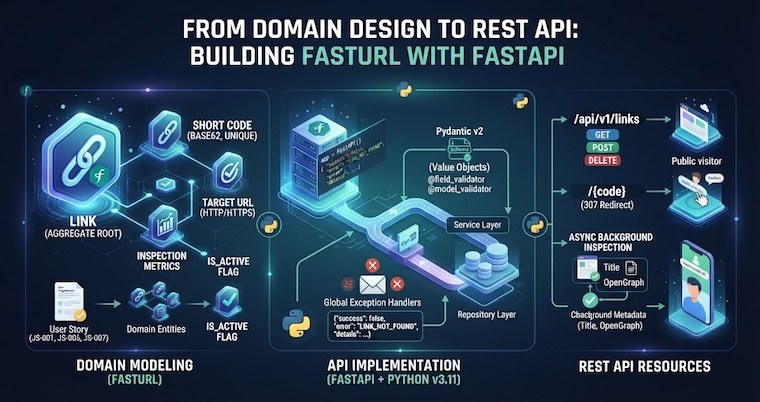
<p><img src="/assets/img/from-domain-design-to-rest-api-building-fasturl-with-fastapi-hero.png" alt="From Domain Design to REST API: Building FastURL with FastAPI" width="760" height="400" class="responsive_img" /></p>

<h2 id="introduction">Introduction</h2>

<p>In the <a href="/designing-rest-apis-in-practice-a-kubernetes-case-study/">previous article</a> we established the theory: requirements produce domain entities, domain entities become REST resources, and HTTP methods map to the lifecycle operations of those resources. Kubernetes was the illustration — large enough to make the pattern clear, but too complex to implement in a blog post.</p>

<p>This article moves from theory to practice. The project is <strong>FastURL</strong>, a URL shortener and link inspector built with <a href="https://fastapi.tiangolo.com/">FastAPI</a>. It is small enough to fit comfortably in a few articles, but real enough to demonstrate every concept that matters: domain modeling, Pydantic validation as a form of type-safe Value Objects, a standardized error envelope, and a resource hierarchy derived directly from the domain.</p>

<p>You should read this article if:</p>

<ul>
  <li>You have read the previous article and want to see the methodology applied to real code.</li>
  <li>You want to understand how Pydantic v2 validators enforce domain rules at the HTTP boundary.</li>
  <li>You want to see how a consistent error contract is designed and implemented from scratch.</li>
</ul>

<h2 id="what-fasturl-does">What FastURL Does</h2>

<p>FastURL is a REST API that shortens long URLs into compact 7-character codes and resolves them back via HTTP redirects. Beyond basic shortening, it runs an asynchronous background inspection on every newly created link: it fetches the target page, records the HTTP status code and latency, and extracts the HTML title and OpenGraph metadata.</p>

<p>Three actors interact with the system:</p>

<table>
  <thead>
    <tr>
      <th>Actor</th>
      <th>Description</th>
    </tr>
  </thead>
  <tbody>
    <tr>
      <td><strong>API Client</strong></td>
      <td>Creates, lists, retrieves, and deletes shortened links</td>
    </tr>
    <tr>
      <td><strong>Public Visitor</strong></td>
      <td>Navigates to a short URL and gets redirected to the target</td>
    </tr>
    <tr>
      <td><strong>Background Inspector</strong></td>
      <td>Asynchronously checks target URL health after creation</td>
    </tr>
  </tbody>
</table>

<p>This actor breakdown comes directly from the <a href="https://github.com/sasadangelo/fasturl/blob/main/docs/requirements.md">requirements document</a> — before any code was written. The nouns in the job stories (<code class="language-plaintext highlighter-rouge">Link</code>, <code class="language-plaintext highlighter-rouge">ShortCode</code>, <code class="language-plaintext highlighter-rouge">TargetUrl</code>, <code class="language-plaintext highlighter-rouge">Inspection</code>, <code class="language-plaintext highlighter-rouge">Metrics</code>) became the domain entities. The verbs (<code class="language-plaintext highlighter-rouge">shorten</code>, <code class="language-plaintext highlighter-rouge">resolve</code>, <code class="language-plaintext highlighter-rouge">inspect</code>, <code class="language-plaintext highlighter-rouge">delete</code>) became the operations.</p>

<h2 id="from-requirements-to-domain-entities">From Requirements to Domain Entities</h2>

<p>Every requirement in FastURL can be traced to one of eight job stories documented in the <a href="https://github.com/sasadangelo/fasturl/blob/main/docs/requirements.md">requirements document</a>. Three of them are worth looking at closely because they drive the entire domain design.</p>

<p><strong>JS-001</strong> — <em>When I provide a valid target URL, I want a unique shortened URL with a random alphanumeric code.</em> This story introduces two domain concepts: a <code class="language-plaintext highlighter-rouge">Link</code> (the association between a short code and a target URL) and a <code class="language-plaintext highlighter-rouge">ShortCode</code> (a validated 7-character Base62 string). The story also establishes a business rule: the code must be unique and collision-resistant.</p>

<p><strong>JS-006</strong> — <em>When I navigate to a short URL, I want to be redirected immediately.</em> This story adds two more rules: the link must be active (<code class="language-plaintext highlighter-rouge">is_active = true</code>) and must not have passed its expiration date (<code class="language-plaintext highlighter-rouge">expires_at</code>). If either condition fails, the redirect must not happen.</p>

<p><strong>JS-007</strong> — <em>When a new link is registered, I want a non-blocking background check on the target URL.</em> This story introduces the <code class="language-plaintext highlighter-rouge">LinkInspection</code> concept: a snapshot of target URL health, latency, and page metadata. Crucially, it must not block the creation response — the system acknowledges the creation immediately and inspects asynchronously. This is the <a href="/async-and-event-loop-in-python-asyncio-in-practice/">async I/O pattern</a> we covered earlier in the series.</p>

<p>These three stories alone define the core of the domain model.</p>

<h3 id="the-domain-model">The Domain Model</h3>

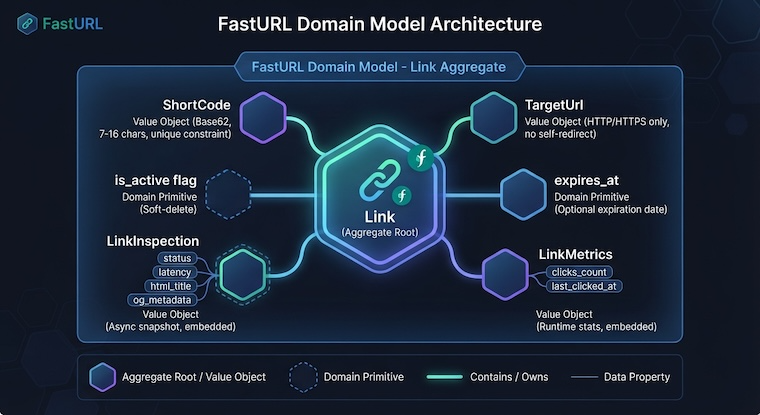
<p>FastURL has a single Aggregate Root: <code class="language-plaintext highlighter-rouge">Link</code>. It owns all the data and enforces all invariants. The Value Objects — <code class="language-plaintext highlighter-rouge">ShortCode</code>, <code class="language-plaintext highlighter-rouge">TargetUrl</code>, <code class="language-plaintext highlighter-rouge">LinkMetrics</code>, and <code class="language-plaintext highlighter-rouge">LinkInspection</code> — are part of the <code class="language-plaintext highlighter-rouge">Link</code> aggregate, not separate entities with their own identity.</p>

<p><img src="/assets/img/fasturl-domain-model.png" alt="FastURL Domain Model Architecture" width="760" height="400" class="responsive_img" /></p>

<div class="language-text highlighter-rouge"><div class="highlight"><pre class="highlight"><code>Link (Aggregate Root)
├── code          ← ShortCode (Base62, 7–16 chars, unique)
├── target_url    ← TargetUrl (HTTP/HTTPS only, no self-redirect)
├── is_active     ← soft-delete flag
├── expires_at    ← optional expiry
├── inspection    ← LinkInspection (status, latency, title, og:*)
└── metrics       ← LinkMetrics (clicks_count, last_clicked_at)
</code></pre></div></div>

<p>There are two bounded contexts: <strong>LinkManagement</strong> (CRUD and redirect resolution) and <strong>LinkInspection</strong> (async health check and metadata extraction). They communicate via a <code class="language-plaintext highlighter-rouge">LinkCreated</code> event that triggers the background task.</p>

<blockquote>
  <p>A single aggregate with Value Objects as members keeps the domain model flat and readable. <code class="language-plaintext highlighter-rouge">LinkInspection</code> and <code class="language-plaintext highlighter-rouge">LinkMetrics</code> have no identity of their own — they only make sense as part of a <code class="language-plaintext highlighter-rouge">Link</code>.</p>
</blockquote>

<h3 id="mapping-entities-to-resources">Mapping Entities to Resources</h3>

<p>The mapping from domain to REST is direct:</p>

<table>
  <thead>
    <tr>
      <th>Domain Entity</th>
      <th>REST Resource</th>
      <th>Methods</th>
    </tr>
  </thead>
  <tbody>
    <tr>
      <td><code class="language-plaintext highlighter-rouge">Link</code> collection</td>
      <td><code class="language-plaintext highlighter-rouge">/api/v1/links</code></td>
      <td><code class="language-plaintext highlighter-rouge">GET</code>, <code class="language-plaintext highlighter-rouge">POST</code></td>
    </tr>
    <tr>
      <td><code class="language-plaintext highlighter-rouge">Link</code> instance</td>
      <td><code class="language-plaintext highlighter-rouge">/api/v1/links/{code}</code></td>
      <td><code class="language-plaintext highlighter-rouge">GET</code>, <code class="language-plaintext highlighter-rouge">DELETE</code></td>
    </tr>
    <tr>
      <td><code class="language-plaintext highlighter-rouge">LinkInspection</code> action</td>
      <td><code class="language-plaintext highlighter-rouge">/api/v1/links/{code}/inspect</code></td>
      <td><code class="language-plaintext highlighter-rouge">POST</code></td>
    </tr>
    <tr>
      <td><em>(public redirect)</em></td>
      <td><code class="language-plaintext highlighter-rouge">/{code}</code></td>
      <td><code class="language-plaintext highlighter-rouge">GET</code></td>
    </tr>
  </tbody>
</table>

<p>Notice that <code class="language-plaintext highlighter-rouge">/{code}</code> carries no <code class="language-plaintext highlighter-rouge">/api/v1/</code> prefix. This is intentional: it is a consumer-facing URL that must be short and stable, not a versioned management endpoint.</p>

<p>The <code class="language-plaintext highlighter-rouge">POST /api/v1/links/{code}/inspect</code> endpoint does not map to a CRUD operation — it triggers an action. As discussed in the previous article, <code class="language-plaintext highlighter-rouge">POST</code> is the correct method for non-CRUD actions on a resource.</p>

<h2 id="pydantic-as-value-object-implementation">Pydantic as Value Object Implementation</h2>

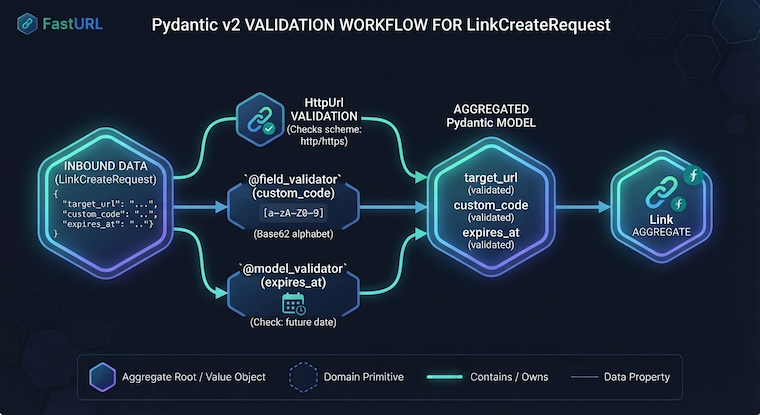
<p>In Domain-Driven Design, a Value Object encapsulates validation rules and equality semantics. In FastAPI, <a href="https://docs.pydantic.dev/latest/">Pydantic</a> models serve exactly this role at the HTTP boundary. The <code class="language-plaintext highlighter-rouge">LinkCreateRequest</code> schema enforces every business rule on inbound data before the service layer is ever called.</p>

<div class="language-python highlighter-rouge"><div class="highlight"><pre class="highlight"><code><span class="k">class</span> <span class="nc">LinkCreateRequest</span><span class="p">(</span><span class="n">BaseModel</span><span class="p">):</span>
    <span class="n">target_url</span><span class="p">:</span> <span class="n">HttpUrl</span> <span class="o">=</span> <span class="nc">Field</span><span class="p">(</span>
        <span class="n">description</span><span class="o">=</span><span class="sh">"</span><span class="s">Destination URL to shorten. Must be HTTP or HTTPS.</span><span class="sh">"</span><span class="p">,</span>
    <span class="p">)</span>
    <span class="n">custom_code</span><span class="p">:</span> <span class="nb">str</span> <span class="o">|</span> <span class="bp">None</span> <span class="o">=</span> <span class="nc">Field</span><span class="p">(</span>
        <span class="n">default</span><span class="o">=</span><span class="bp">None</span><span class="p">,</span>
        <span class="n">min_length</span><span class="o">=</span><span class="mi">7</span><span class="p">,</span>
        <span class="n">max_length</span><span class="o">=</span><span class="mi">16</span><span class="p">,</span>
    <span class="p">)</span>
    <span class="n">expires_at</span><span class="p">:</span> <span class="n">datetime</span> <span class="o">|</span> <span class="bp">None</span> <span class="o">=</span> <span class="nc">Field</span><span class="p">(</span><span class="n">default</span><span class="o">=</span><span class="bp">None</span><span class="p">)</span>

    <span class="nd">@field_validator</span><span class="p">(</span><span class="sh">"</span><span class="s">custom_code</span><span class="sh">"</span><span class="p">)</span>
    <span class="nd">@classmethod</span>
    <span class="k">def</span> <span class="nf">validate_custom_code</span><span class="p">(</span><span class="n">cls</span><span class="p">,</span> <span class="n">v</span><span class="p">:</span> <span class="nb">str</span> <span class="o">|</span> <span class="bp">None</span><span class="p">)</span> <span class="o">-&gt;</span> <span class="nb">str</span> <span class="o">|</span> <span class="bp">None</span><span class="p">:</span>
        <span class="k">if</span> <span class="n">v</span> <span class="ow">is</span> <span class="ow">not</span> <span class="bp">None</span> <span class="ow">and</span> <span class="ow">not</span> <span class="n">_BASE62_PATTERN</span><span class="p">.</span><span class="nf">match</span><span class="p">(</span><span class="n">v</span><span class="p">):</span>
            <span class="k">raise</span> <span class="nc">ValueError</span><span class="p">(</span><span class="sh">"</span><span class="s">custom_code must contain only alphanumeric characters [a-zA-Z0-9]</span><span class="sh">"</span><span class="p">)</span>
        <span class="k">return</span> <span class="n">v</span>

    <span class="nd">@model_validator</span><span class="p">(</span><span class="n">mode</span><span class="o">=</span><span class="sh">"</span><span class="s">after</span><span class="sh">"</span><span class="p">)</span>
    <span class="k">def</span> <span class="nf">validate_expires_at_future</span><span class="p">(</span><span class="n">self</span><span class="p">)</span> <span class="o">-&gt;</span> <span class="n">LinkCreateRequest</span><span class="p">:</span>
        <span class="k">if</span> <span class="n">self</span><span class="p">.</span><span class="n">expires_at</span> <span class="ow">is</span> <span class="ow">not</span> <span class="bp">None</span><span class="p">:</span>
            <span class="n">now</span> <span class="o">=</span> <span class="n">datetime</span><span class="p">.</span><span class="nf">now</span><span class="p">(</span><span class="n">UTC</span><span class="p">).</span><span class="nf">replace</span><span class="p">(</span><span class="n">tzinfo</span><span class="o">=</span><span class="bp">None</span><span class="p">)</span>
            <span class="n">expires</span> <span class="o">=</span> <span class="n">self</span><span class="p">.</span><span class="n">expires_at</span><span class="p">.</span><span class="nf">replace</span><span class="p">(</span><span class="n">tzinfo</span><span class="o">=</span><span class="bp">None</span><span class="p">)</span>
            <span class="k">if</span> <span class="n">expires</span> <span class="o">&lt;=</span> <span class="n">now</span><span class="p">:</span>
                <span class="k">raise</span> <span class="nc">ValueError</span><span class="p">(</span><span class="sh">"</span><span class="s">expires_at -&gt; Expiration date must be in the future</span><span class="sh">"</span><span class="p">)</span>
        <span class="k">return</span> <span class="n">self</span>
</code></pre></div></div>

<p>Breaking down what each element enforces:</p>

<ul>
  <li><strong><code class="language-plaintext highlighter-rouge">HttpUrl</code></strong> — Pydantic’s built-in type rejects any URL that is not HTTP or HTTPS. No custom validator needed for the scheme.</li>
  <li><strong><a href="https://docs.pydantic.dev/latest/concepts/validators/#field-validators"><code class="language-plaintext highlighter-rouge">@field_validator</code></a></strong> — Enforces the Base62 alphabet rule: only <code class="language-plaintext highlighter-rouge">[a-zA-Z0-9]</code>. This is the <code class="language-plaintext highlighter-rouge">ShortCode</code> Value Object’s constraint, expressed as a Pydantic field-level validator.</li>
  <li><strong><a href="https://docs.pydantic.dev/latest/concepts/validators/#model-validators"><code class="language-plaintext highlighter-rouge">@model_validator(mode="after")</code></a></strong> — Runs after all fields are validated, so it can access <code class="language-plaintext highlighter-rouge">self.expires_at</code>. It rejects expiration dates in the past. This is a cross-field invariant that requires the full model context.</li>
</ul>

<p><img src="/assets/img/fasturl-pydantic-validation.png" alt="Pydantic v2 Validation Workflow" width="760" height="400" class="responsive_img" /></p>

<p>The response schema mirrors the domain structure: <code class="language-plaintext highlighter-rouge">LinkResponse</code> embeds <code class="language-plaintext highlighter-rouge">InspectionResponse</code> and <code class="language-plaintext highlighter-rouge">MetricsResponse</code>, reflecting the <code class="language-plaintext highlighter-rouge">LinkInspection</code> and <code class="language-plaintext highlighter-rouge">LinkMetrics</code> Value Objects in the aggregate.</p>

<div class="language-python highlighter-rouge"><div class="highlight"><pre class="highlight"><code><span class="k">class</span> <span class="nc">LinkResponse</span><span class="p">(</span><span class="n">BaseModel</span><span class="p">):</span>
    <span class="n">code</span><span class="p">:</span> <span class="nb">str</span>
    <span class="n">short_url</span><span class="p">:</span> <span class="nb">str</span>
    <span class="n">target_url</span><span class="p">:</span> <span class="nb">str</span>
    <span class="n">is_active</span><span class="p">:</span> <span class="nb">bool</span>
    <span class="n">expires_at</span><span class="p">:</span> <span class="n">datetime</span> <span class="o">|</span> <span class="bp">None</span> <span class="o">=</span> <span class="bp">None</span>
    <span class="n">inspection</span><span class="p">:</span> <span class="n">InspectionResponse</span>
    <span class="n">metrics</span><span class="p">:</span> <span class="n">MetricsResponse</span>
    <span class="n">created_at</span><span class="p">:</span> <span class="n">datetime</span>
    <span class="n">updated_at</span><span class="p">:</span> <span class="n">datetime</span>
</code></pre></div></div>

<p>Note that <code class="language-plaintext highlighter-rouge">id</code> — the internal surrogate key — is absent from the response. The <code class="language-plaintext highlighter-rouge">code</code> is the sole public identifier. This is a deliberate design choice: a sequential integer PK is enumerable and guessable; a Base62 7-character code is not.</p>

<h2 id="the-error-envelope">The Error Envelope</h2>

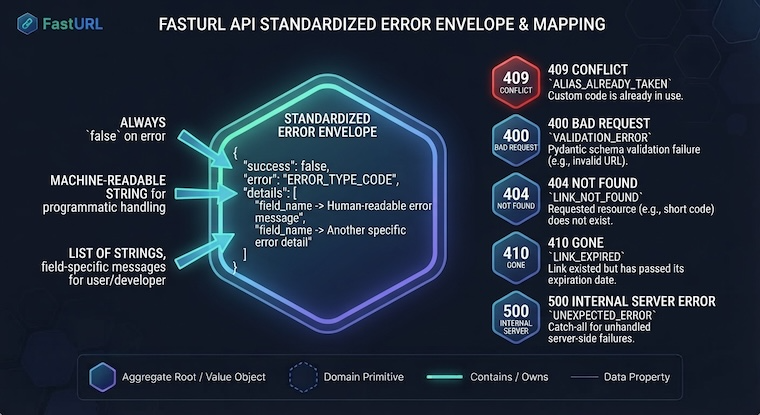
<p>One of the most important consistency decisions in any API is the error contract. FastURL uses a single envelope for every error response:</p>

<div class="language-json highlighter-rouge"><div class="highlight"><pre class="highlight"><code><span class="p">{</span><span class="w">
  </span><span class="nl">"success"</span><span class="p">:</span><span class="w"> </span><span class="kc">false</span><span class="p">,</span><span class="w">
  </span><span class="nl">"error"</span><span class="p">:</span><span class="w"> </span><span class="s2">"LINK_NOT_FOUND"</span><span class="p">,</span><span class="w">
  </span><span class="nl">"details"</span><span class="p">:</span><span class="w"> </span><span class="p">[</span><span class="w">
    </span><span class="s2">"code -&gt; No link found with code 'aB3x9zK'"</span><span class="w">
  </span><span class="p">]</span><span class="w">
</span><span class="p">}</span><span class="w">
</span></code></pre></div></div>

<p>The <code class="language-plaintext highlighter-rouge">error</code> field is a machine-readable short code. The <code class="language-plaintext highlighter-rouge">details</code> list contains human-readable, field-level explanations. This structure lets clients branch on <code class="language-plaintext highlighter-rouge">error</code> programmatically and display <code class="language-plaintext highlighter-rouge">details</code> to a developer or end user.</p>

<p><img src="/assets/img/fasturl-error-envelope.png" alt="FastAPI Standardized Error Envelope &amp; Mapping" width="760" height="400" class="responsive_img" /></p>

<h3 id="domain-exceptions">Domain Exceptions</h3>

<p>Domain exceptions are pure Python classes — no FastAPI imports, no HTTP knowledge. They carry only the data needed to build the error response.</p>

<div class="language-python highlighter-rouge"><div class="highlight"><pre class="highlight"><code><span class="k">class</span> <span class="nc">LinkNotFoundError</span><span class="p">(</span><span class="n">AppError</span><span class="p">):</span>
    <span class="k">def</span> <span class="nf">__init__</span><span class="p">(</span><span class="n">self</span><span class="p">,</span> <span class="n">code</span><span class="p">:</span> <span class="nb">str</span><span class="p">)</span> <span class="o">-&gt;</span> <span class="bp">None</span><span class="p">:</span>
        <span class="nf">super</span><span class="p">().</span><span class="nf">__init__</span><span class="p">(</span>
            <span class="n">message</span><span class="o">=</span><span class="sh">"</span><span class="s">LINK_NOT_FOUND</span><span class="sh">"</span><span class="p">,</span>
            <span class="n">status_code</span><span class="o">=</span><span class="mi">404</span><span class="p">,</span>
            <span class="n">details</span><span class="o">=</span><span class="p">[</span><span class="sa">f</span><span class="sh">"</span><span class="s">code -&gt; No link found with code </span><span class="sh">'</span><span class="si">{</span><span class="n">code</span><span class="si">}</span><span class="sh">'"</span><span class="p">],</span>
        <span class="p">)</span>

<span class="k">class</span> <span class="nc">AliasAlreadyTakenError</span><span class="p">(</span><span class="n">AppError</span><span class="p">):</span>
    <span class="k">def</span> <span class="nf">__init__</span><span class="p">(</span><span class="n">self</span><span class="p">,</span> <span class="n">alias</span><span class="p">:</span> <span class="nb">str</span><span class="p">)</span> <span class="o">-&gt;</span> <span class="bp">None</span><span class="p">:</span>
        <span class="nf">super</span><span class="p">().</span><span class="nf">__init__</span><span class="p">(</span>
            <span class="n">message</span><span class="o">=</span><span class="sh">"</span><span class="s">ALIAS_ALREADY_TAKEN</span><span class="sh">"</span><span class="p">,</span>
            <span class="n">status_code</span><span class="o">=</span><span class="mi">409</span><span class="p">,</span>
            <span class="n">details</span><span class="o">=</span><span class="p">[</span><span class="sa">f</span><span class="sh">"</span><span class="s">custom_code -&gt; The alias </span><span class="sh">'</span><span class="si">{</span><span class="n">alias</span><span class="si">}</span><span class="sh">'</span><span class="s"> is already in use</span><span class="sh">"</span><span class="p">],</span>
        <span class="p">)</span>

<span class="k">class</span> <span class="nc">LinkExpiredError</span><span class="p">(</span><span class="n">AppError</span><span class="p">):</span>
    <span class="k">def</span> <span class="nf">__init__</span><span class="p">(</span><span class="n">self</span><span class="p">,</span> <span class="n">code</span><span class="p">:</span> <span class="nb">str</span><span class="p">,</span> <span class="n">expired_at</span><span class="p">:</span> <span class="nb">str</span><span class="p">)</span> <span class="o">-&gt;</span> <span class="bp">None</span><span class="p">:</span>
        <span class="nf">super</span><span class="p">().</span><span class="nf">__init__</span><span class="p">(</span>
            <span class="n">message</span><span class="o">=</span><span class="sh">"</span><span class="s">LINK_EXPIRED</span><span class="sh">"</span><span class="p">,</span>
            <span class="n">status_code</span><span class="o">=</span><span class="mi">410</span><span class="p">,</span>
            <span class="n">details</span><span class="o">=</span><span class="p">[</span><span class="sa">f</span><span class="sh">"</span><span class="s">code -&gt; Link </span><span class="sh">'</span><span class="si">{</span><span class="n">code</span><span class="si">}</span><span class="sh">'</span><span class="s"> expired on </span><span class="si">{</span><span class="n">expired_at</span><span class="si">}</span><span class="sh">"</span><span class="p">],</span>
        <span class="p">)</span>
</code></pre></div></div>

<p>The <code class="language-plaintext highlighter-rouge">AppError</code> base class holds the <code class="language-plaintext highlighter-rouge">message</code>, <code class="language-plaintext highlighter-rouge">status_code</code>, and <code class="language-plaintext highlighter-rouge">details</code>. Subclasses just set the right values in <code class="language-plaintext highlighter-rouge">__init__</code>. The service layer raises these exceptions; the HTTP layer never needs to know how they are structured.</p>

<h3 id="global-exception-handlers">Global Exception Handlers</h3>

<p>Three handlers registered in <code class="language-plaintext highlighter-rouge">main.py</code> <a href="https://fastapi.tiangolo.com/tutorial/handling-errors/">cover every failure path</a>:</p>

<div class="language-python highlighter-rouge"><div class="highlight"><pre class="highlight"><code><span class="k">def</span> <span class="nf">register_exception_handlers</span><span class="p">(</span><span class="n">app</span><span class="p">:</span> <span class="n">FastAPI</span><span class="p">)</span> <span class="o">-&gt;</span> <span class="bp">None</span><span class="p">:</span>

    <span class="nd">@app.exception_handler</span><span class="p">(</span><span class="n">RequestValidationError</span><span class="p">)</span>
    <span class="k">async</span> <span class="k">def</span> <span class="nf">validation_exception_handler</span><span class="p">(</span><span class="n">request</span><span class="p">,</span> <span class="n">exc</span><span class="p">)</span> <span class="o">-&gt;</span> <span class="n">JSONResponse</span><span class="p">:</span>
        <span class="n">error_details</span> <span class="o">=</span> <span class="p">[]</span>
        <span class="k">for</span> <span class="n">e</span> <span class="ow">in</span> <span class="n">exc</span><span class="p">.</span><span class="nf">errors</span><span class="p">():</span>
            <span class="n">loc</span> <span class="o">=</span> <span class="sh">"</span><span class="s"> -&gt; </span><span class="sh">"</span><span class="p">.</span><span class="nf">join</span><span class="p">(</span><span class="nf">str</span><span class="p">(</span><span class="n">x</span><span class="p">)</span> <span class="k">for</span> <span class="n">x</span> <span class="ow">in</span> <span class="n">e</span><span class="p">[</span><span class="sh">"</span><span class="s">loc</span><span class="sh">"</span><span class="p">])</span>
            <span class="n">msg</span> <span class="o">=</span> <span class="n">e</span><span class="p">[</span><span class="sh">"</span><span class="s">msg</span><span class="sh">"</span><span class="p">]</span>
            <span class="n">error_details</span><span class="p">.</span><span class="nf">append</span><span class="p">(</span><span class="sa">f</span><span class="sh">"</span><span class="si">{</span><span class="n">loc</span><span class="si">}</span><span class="s">: </span><span class="si">{</span><span class="n">msg</span><span class="si">}</span><span class="sh">"</span><span class="p">)</span>
        <span class="k">return</span> <span class="nc">JSONResponse</span><span class="p">(</span>
            <span class="n">status_code</span><span class="o">=</span><span class="mi">400</span><span class="p">,</span>
            <span class="n">content</span><span class="o">=</span><span class="p">{</span><span class="sh">"</span><span class="s">success</span><span class="sh">"</span><span class="p">:</span> <span class="bp">False</span><span class="p">,</span> <span class="sh">"</span><span class="s">error</span><span class="sh">"</span><span class="p">:</span> <span class="sh">"</span><span class="s">VALIDATION_ERROR</span><span class="sh">"</span><span class="p">,</span> <span class="sh">"</span><span class="s">details</span><span class="sh">"</span><span class="p">:</span> <span class="n">error_details</span><span class="p">},</span>
        <span class="p">)</span>

    <span class="nd">@app.exception_handler</span><span class="p">(</span><span class="n">AppError</span><span class="p">)</span>
    <span class="k">async</span> <span class="k">def</span> <span class="nf">app_error_handler</span><span class="p">(</span><span class="n">request</span><span class="p">,</span> <span class="n">exc</span><span class="p">)</span> <span class="o">-&gt;</span> <span class="n">JSONResponse</span><span class="p">:</span>
        <span class="k">return</span> <span class="nc">JSONResponse</span><span class="p">(</span>
            <span class="n">status_code</span><span class="o">=</span><span class="n">exc</span><span class="p">.</span><span class="n">status_code</span><span class="p">,</span>
            <span class="n">content</span><span class="o">=</span><span class="p">{</span><span class="sh">"</span><span class="s">success</span><span class="sh">"</span><span class="p">:</span> <span class="bp">False</span><span class="p">,</span> <span class="sh">"</span><span class="s">error</span><span class="sh">"</span><span class="p">:</span> <span class="n">exc</span><span class="p">.</span><span class="n">message</span><span class="p">,</span> <span class="sh">"</span><span class="s">details</span><span class="sh">"</span><span class="p">:</span> <span class="n">exc</span><span class="p">.</span><span class="n">details</span><span class="p">},</span>
        <span class="p">)</span>

    <span class="nd">@app.exception_handler</span><span class="p">(</span><span class="nb">Exception</span><span class="p">)</span>
    <span class="k">async</span> <span class="k">def</span> <span class="nf">global_exception_handler</span><span class="p">(</span><span class="n">request</span><span class="p">,</span> <span class="n">exc</span><span class="p">)</span> <span class="o">-&gt;</span> <span class="n">JSONResponse</span><span class="p">:</span>
        <span class="c1"># Full traceback logged server-side; generic message returned to client
</span>        <span class="k">return</span> <span class="nc">JSONResponse</span><span class="p">(</span>
            <span class="n">status_code</span><span class="o">=</span><span class="mi">500</span><span class="p">,</span>
            <span class="n">content</span><span class="o">=</span><span class="p">{</span><span class="sh">"</span><span class="s">success</span><span class="sh">"</span><span class="p">:</span> <span class="bp">False</span><span class="p">,</span> <span class="sh">"</span><span class="s">error</span><span class="sh">"</span><span class="p">:</span> <span class="sh">"</span><span class="s">INTERNAL_SERVER_ERROR</span><span class="sh">"</span><span class="p">,</span>
                     <span class="sh">"</span><span class="s">details</span><span class="sh">"</span><span class="p">:</span> <span class="p">[</span><span class="sh">"</span><span class="s">An unexpected error occurred. Please contact support.</span><span class="sh">"</span><span class="p">]},</span>
        <span class="p">)</span>
</code></pre></div></div>

<p>The three handlers map precisely to the three failure categories:</p>

<table>
  <thead>
    <tr>
      <th>Handler</th>
      <th>Triggered by</th>
      <th>HTTP status</th>
    </tr>
  </thead>
  <tbody>
    <tr>
      <td><code class="language-plaintext highlighter-rouge">RequestValidationError</code></td>
      <td>Pydantic schema validation failure</td>
      <td>400</td>
    </tr>
    <tr>
      <td><code class="language-plaintext highlighter-rouge">AppError</code></td>
      <td>Domain rule violation (not found, conflict, expired)</td>
      <td>404 / 409 / 410</td>
    </tr>
    <tr>
      <td><code class="language-plaintext highlighter-rouge">Exception</code></td>
      <td>Any unhandled error</td>
      <td>500</td>
    </tr>
  </tbody>
</table>

<p>The third handler is the safety net. It logs the full traceback server-side but returns only a generic message to the client — no stack traces, no internal details, no information disclosure.</p>

<h2 id="the-full-endpoint-table">The Full Endpoint Table</h2>

<p>Bringing everything together, here is the complete API surface of FastURL:</p>

<table>
  <thead>
    <tr>
      <th>Endpoint</th>
      <th>Method</th>
      <th>Status codes</th>
      <th>Description</th>
    </tr>
  </thead>
  <tbody>
    <tr>
      <td><code class="language-plaintext highlighter-rouge">/api/v1/links</code></td>
      <td><code class="language-plaintext highlighter-rouge">POST</code></td>
      <td>201, 400, 409</td>
      <td>Create a shortened link</td>
    </tr>
    <tr>
      <td><code class="language-plaintext highlighter-rouge">/api/v1/links</code></td>
      <td><code class="language-plaintext highlighter-rouge">GET</code></td>
      <td>200, 400</td>
      <td>List links with optional filters</td>
    </tr>
    <tr>
      <td><code class="language-plaintext highlighter-rouge">/api/v1/links/{code}</code></td>
      <td><code class="language-plaintext highlighter-rouge">GET</code></td>
      <td>200, 404</td>
      <td>Retrieve a single link</td>
    </tr>
    <tr>
      <td><code class="language-plaintext highlighter-rouge">/api/v1/links/{code}</code></td>
      <td><code class="language-plaintext highlighter-rouge">DELETE</code></td>
      <td>204, 404</td>
      <td>Soft-delete a link</td>
    </tr>
    <tr>
      <td><code class="language-plaintext highlighter-rouge">/api/v1/links/{code}/inspect</code></td>
      <td><code class="language-plaintext highlighter-rouge">POST</code></td>
      <td>202, 404</td>
      <td>Trigger background re-inspection</td>
    </tr>
    <tr>
      <td><code class="language-plaintext highlighter-rouge">/{code}</code></td>
      <td><code class="language-plaintext highlighter-rouge">GET</code></td>
      <td>307, 404, 410</td>
      <td>Redirect to target URL</td>
    </tr>
  </tbody>
</table>

<p>A few design decisions worth noting:</p>

<ul>
  <li><code class="language-plaintext highlighter-rouge">DELETE</code> returns <code class="language-plaintext highlighter-rouge">204 No Content</code> — no body, because there is nothing meaningful to return after a deletion.</li>
  <li><code class="language-plaintext highlighter-rouge">POST /api/v1/links/{code}/inspect</code> returns <code class="language-plaintext highlighter-rouge">202 Accepted</code> — not <code class="language-plaintext highlighter-rouge">200 OK</code>. The inspection runs asynchronously; the client receives the current snapshot immediately and polls <code class="language-plaintext highlighter-rouge">GET /api/v1/links/{code}</code> for the result.</li>
  <li><code class="language-plaintext highlighter-rouge">GET /{code}</code> can return <code class="language-plaintext highlighter-rouge">410 Gone</code> for expired links. <code class="language-plaintext highlighter-rouge">410</code> is semantically different from <code class="language-plaintext highlighter-rouge">404</code>: it signals that the resource existed but is permanently unavailable, not that it was never found.</li>
</ul>

<h2 id="conclusion">Conclusion</h2>

<p>In this article we covered:</p>

<ul>
  <li><strong>From job stories to domain entities</strong>: how the nouns and verbs in requirements directly produce the <code class="language-plaintext highlighter-rouge">Link</code> aggregate, the <code class="language-plaintext highlighter-rouge">ShortCode</code> and <code class="language-plaintext highlighter-rouge">TargetUrl</code> Value Objects, and the <code class="language-plaintext highlighter-rouge">LinkInspection</code> and <code class="language-plaintext highlighter-rouge">LinkMetrics</code> embedded snapshots.</li>
  <li><strong>Pydantic as Value Object implementation</strong>: using <code class="language-plaintext highlighter-rouge">HttpUrl</code>, <code class="language-plaintext highlighter-rouge">@field_validator</code>, and <code class="language-plaintext highlighter-rouge">@model_validator</code> to enforce domain invariants at the HTTP boundary — before the service layer is called.</li>
  <li><strong>A consistent error envelope</strong>: a single <code class="language-plaintext highlighter-rouge">{success, error, details}</code> structure for every failure, backed by domain exceptions that carry no HTTP knowledge and three global handlers that translate them.</li>
  <li><strong>Resource hierarchy derived from the domain</strong>: five management endpoints plus a public redirect endpoint, each with a clear ownership and a precise set of status codes.</li>
</ul>

<p>The <a href="/layered-architecture-with-fastapi-routers-services-and-repositories/">next article</a> walks through the layered code structure that makes all of this work: how routers, services, repositories, and the dependency injection system are organized to keep each concern in its own place.</p>

<hr />

<p>If you enjoyed this article, don’t forget to <strong>give it a clap 👏</strong>, <strong>share it with your friends 🔗</strong>, and <strong>follow me for more tips and tutorials on software development 📘</strong>. Your support helps me create more content like this — thank you! 🙌</p>]]></content><author><name>sasadangelo</name></author><category term="Programming" /><summary type="html"><![CDATA[Learn how to turn requirements and a domain model into a clean REST API using FastAPI and Pydantic v2, using FastURL — a URL shortener — as a concrete case study.]]></summary><media:thumbnail xmlns:media="http://search.yahoo.com/mrss/" url="https://www.code4projects.org/assets/img/from-domain-design-to-rest-api-building-fasturl-with-fastapi-hero.png" /><media:content medium="image" url="https://www.code4projects.org/assets/img/from-domain-design-to-rest-api-building-fasturl-with-fastapi-hero.png" xmlns:media="http://search.yahoo.com/mrss/" /></entry><entry><title type="html">Designing REST APIs in Practice: A Kubernetes Case Study</title><link href="https://www.code4projects.org/designing-rest-apis-in-practice-a-kubernetes-case-study/" rel="alternate" type="text/html" title="Designing REST APIs in Practice: A Kubernetes Case Study" /><published>2026-09-16T00:00:00+00:00</published><updated>2026-09-16T00:00:00+00:00</updated><id>https://www.code4projects.org/designing-rest-apis-in-practice-a-kubernetes-case-study</id><content type="html" xml:base="https://www.code4projects.org/designing-rest-apis-in-practice-a-kubernetes-case-study/"><![CDATA[<h1 id="designing-rest-apis-in-practice-a-kubernetes-case-study">Designing REST APIs in Practice: A Kubernetes Case Study</h1>
<p><em>Posted on <strong>16 Sep 2026</strong></em></p>

<p><img src="/assets/img/designing-rest-apis-in-practice-a-kubernetes-case-study-hero.png" alt="Designing REST APIs in Practice: A Kubernetes Case Study" width="760" height="400" class="responsive_img" /></p>

<h2 id="introduction">Introduction</h2>

<p>In the previous installments of this series, we explored CLI application patterns with <a href="/building-a-python-cli-with-click-a-cleaner-approach-to-the-command-pattern/">Click</a> and <a href="/modern-approach-to-the-command-pattern/">Typer</a>. While CLI interfaces offer a convenient way for developers to interact with services locally, building distributed applications requires exposing services over the network via structured HTTP interfaces.</p>

<p>When designing a REST API, engineers often focus on choosing the “right” framework — FastAPI, Spring Boot, and so on. Tools matter, but they solve only the implementation detail. The real challenge is designing an API that reflects the business domain, exposes domain entities as resources, and uses HTTP semantics consistently, including errors and status codes.</p>

<p><strong>Think of an API as a contract between two systems</strong>. As the designer of this contract, you act like a <strong>notary</strong>, carefully drafting the terms of interaction. However, this contract must follow the <strong>rules of HTTP</strong>, ensuring it adheres to the standard conventions for communication.</p>

<p>The first step is to identify the <strong>entities</strong> involved in the contract. Once these entities are clear, the next step is to define the <strong>rules</strong>: what operations can be performed on each entity, and under what conditions, all while respecting the HTTP framework.</p>

<p>A good API should be intuitive, self-describing, and coherent with the domain. This requires identifying business entities, their lifecycle, and their relationships before thinking about technology. Once the domain model is clear, the API becomes almost a direct consequence of it.</p>

<p>To avoid remaining purely theoretical, we will use Kubernetes as a case study. It provides a concrete example where functional requirements naturally lead to entities and operations that are directly exposed through an HTTP interface.</p>

<p>You should read this article if:</p>

<ul>
  <li>You are designing or refactoring a REST API and want a rigorous, entity-driven methodology.</li>
  <li>You want to understand how domain concepts translate into REST resources, HTTP methods, and status codes.</li>
  <li>You want to see how Kubernetes models its complex architecture cleanly using standard REST conventions.</li>
</ul>

<h2 id="from-requirements-to-entities-the-logical-model-of-kubernetes">From requirements to entities: the logical model of Kubernetes</h2>

<p>In a <a href="https://www.amazon.it/-/en/Clean-Architecture-Craftsmans-Software-Structure/dp/0134494164">Clean Architecture</a> perspective, the design process begins from the inside: <strong>entities at the center</strong>, then <strong>use cases</strong>, then the <strong>external interfaces</strong>.</p>

<p><img src="/assets/img/designing-rest-apis-in-practice-a-kubernetes-case-study-clean-architecture.png" alt="Clean Architecture Main Concepts" width="760" height="400" class="responsive_img" />
<em>Clean Architecture Main Concepts</em></p>

<p>User stories play a fundamental role here. They describe what the system must accomplish from a business perspective, and in doing so they implicitly define the <strong>domain language</strong>: the nouns in the stories become the <strong>entities</strong> of the domain, while the verbs describe the operations and relationships between them.</p>

<p>Kubernetes is no exception. Its functional requirements — scheduling workloads, distributing containers, maintaining stable network access, scaling services, enforcing security boundaries — naturally give rise to a set of domain entities. These entities exist independently of any API design choice; the API merely exposes them.</p>

<p>In this section, I assume the requirements of Kubernetes are already known and focus directly on their consequences: the entities that form the system and the relationships between them.</p>

<h3 id="resource-entities">Resource entities</h3>

<p><img src="/assets/img/designing-rest-apis-in-practice-a-kubernetes-case-study-entities-relationships.png" alt="Kubernetes Entities with their Relationships" width="760" height="400" class="responsive_img" />
<em>Kubernetes Entities with their Relationships</em></p>

<p>In Kubernetes everything is a Resource. Conceptually, Kubernetes exposes two main categories of resources:</p>

<ul>
  <li><strong>Namespaced resources</strong> — exist within a specific namespace</li>
  <li><strong>Cluster-scoped resources</strong> — global across the entire cluster</li>
</ul>

<p>Although the “cluster” itself is not a first-class API object, we can treat it as the top-level element for reasoning about relationships.</p>

<ul>
  <li>A <strong>cluster</strong> consists of one or more <strong>nodes</strong> or <strong>workers</strong>.</li>
  <li>Each <strong>node</strong> runs one or more <em>*Pods</em>+.</li>
  <li>Each <strong>Pod</strong> contains one or more <strong>containers</strong>.</li>
</ul>

<p>Pods are ephemeral and their network identity is unstable. For this reason, Pods are typically exposed through a <strong>Service</strong> (namespaced resource). Services come in three main variants:</p>

<ul>
  <li><strong>ClusterIP</strong></li>
  <li><strong>NodePort</strong></li>
  <li><strong>LoadBalancer</strong></li>
</ul>

<p>Workloads are created and managed by Workload (this concept doesn’t explicitly exist in Kubernetes but it helps us to model the resources). The most common ones are:</p>

<ul>
  <li><strong>Deployments</strong>, used for stateless applications</li>
  <li><strong>StatefulSets</strong>, used for stateful applications</li>
  <li><strong>DaemonSets</strong>, used to run one Pod instance on every (or selected) node</li>
  <li><strong>Jobs</strong>, used for finite, one-off batch operations</li>
  <li><strong>CronJobs</strong>, used for scheduled batch workloads</li>
</ul>

<p>Pods may rely on persistent storage. They reference one or more <strong>PersistentVolumeClaims (PVCs)</strong>, each of which binds to a <strong>PersistentVolume (PV)</strong> in a one-to-one manner.</p>

<p>Finally, users are not represented by Kubernetes YAML objects but are defined in the Kubernetes configuration (commonly via the kubeconfig file). Users acquire permissions through <strong>Roles</strong> (namespaced) and <strong>ClusterRoles</strong> (cluster-scoped). Roles are connected to users through <strong>RoleBindings</strong> or <strong>ClusterRoleBindings</strong>, depending on the scope.</p>

<p>Once this entity model is clear, designing a RESTful API becomes almost mechanical. Each entity maps directly to a resource, operations correspond to the entity’s lifecycle, and access control follows from the relationships defined in the domain model.</p>

<h2 id="defining-the-rules-of-an-api">Defining the Rules of an API</h2>

<p>Once we have identified the entities in the system, the next step is to define the <strong>rules</strong> of interaction between these entities. These rules will dictate how resources can be accessed, manipulated, or deleted via the API. Each rule can be broken down into four main components:</p>

<p><img src="/assets/img/designing-rest-apis-in-practice-a-kubernetes-case-study-api-rules.png" alt="Defining the Rules of an API" width="760" height="400" class="responsive_img" />
<em>Defining the Rules of an API</em></p>

<h3 id="1-endpoint">1. Endpoint</h3>

<p>The <strong>endpoint</strong> is the URL pattern that maps to the entity and defines the resource’s location. It is the path that the client will use to access the resource or perform an action on it.</p>

<p>A few important principles:</p>

<p><strong>Use plural names for entities:</strong></p>

<p>Even when retrieving a single entity, the resource name in the endpoint should be plural to denote the collection.</p>

<p>Example:</p>

<div class="language-http highlighter-rouge"><div class="highlight"><pre class="highlight"><code><span class="err">/api/v1/namespaces/{namespace}/pods          # collection of pods
/api/v1/namespaces/{namespace}/pods/{pod_id}  # single pod
</span></code></pre></div></div>

<p>Using the plural form consistently improves readability, makes endpoints predictable, and clearly distinguishes between collections and individual entities.</p>

<p><strong>Limit relationship depth to two entities:</strong></p>

<p>When representing relationships between entities in the endpoint, it is recommended to limit the path to two entities (e.g., <code class="language-plaintext highlighter-rouge">/api/v1/customers/{customer_id}/employees</code>). Going beyond this introduces unnecessary complexity and can lead to performance issues, as deeper relationships make the endpoint more difficult to manage and can impact scalability. Keeping the representation simple ensures better performance and maintainability.</p>

<h3 id="2-operation">2. Operation</h3>

<p>The operation specifies the action to be performed on the resource. This is determined by the HTTP method used in the request. The most common HTTP methods include:</p>

<table>
  <thead>
    <tr>
      <th>Method</th>
      <th>Purpose</th>
      <th style="text-align: center">Idempotent by spec</th>
      <th style="text-align: center">Idempotent by design</th>
    </tr>
  </thead>
  <tbody>
    <tr>
      <td><code class="language-plaintext highlighter-rouge">GET</code></td>
      <td>Retrieve a resource or a collection</td>
      <td style="text-align: center">✅ Yes</td>
      <td style="text-align: center">—</td>
    </tr>
    <tr>
      <td><code class="language-plaintext highlighter-rouge">POST</code></td>
      <td>Create a new resource</td>
      <td style="text-align: center">❌ No</td>
      <td style="text-align: center">⚠️ Possible</td>
    </tr>
    <tr>
      <td><code class="language-plaintext highlighter-rouge">PUT</code></td>
      <td>Replace the entire resource representation</td>
      <td style="text-align: center">✅ Yes</td>
      <td style="text-align: center">—</td>
    </tr>
    <tr>
      <td><code class="language-plaintext highlighter-rouge">PATCH</code></td>
      <td>Apply partial updates</td>
      <td style="text-align: center">❌ No</td>
      <td style="text-align: center">⚠️ Possible</td>
    </tr>
    <tr>
      <td><code class="language-plaintext highlighter-rouge">DELETE</code></td>
      <td>Remove a resource</td>
      <td style="text-align: center">❌ No</td>
      <td style="text-align: center">⚠️ Possible</td>
    </tr>
  </tbody>
</table>

<p><strong>Idempotent by spec</strong> reflects what the HTTP specification (RFC 9110) mandates for the method.
<strong>Idempotent by design</strong> marks methods that are not idempotent by spec but can be made so through deliberate implementation choices:</p>

<ul>
  <li><strong>POST</strong> — A payment system must not charge a customer twice on retried requests. This is solved with an <code class="language-plaintext highlighter-rouge">Idempotency-Key</code> header: the server stores the result of the first call and returns it unchanged on subsequent calls with the same key.</li>
  <li><strong>PATCH</strong> — A partial update that sets an absolute value (e.g., <code class="language-plaintext highlighter-rouge">{"status": "active"}</code>) is idempotent; one that applies a relative delta (e.g., <code class="language-plaintext highlighter-rouge">{"counter": "+1"}</code>) is not.</li>
  <li><strong>DELETE</strong> — A soft delete (setting a <code class="language-plaintext highlighter-rouge">deleted_at</code> timestamp or a <code class="language-plaintext highlighter-rouge">status=deleted</code> flag) makes the operation idempotent: a second call finds the resource already marked as deleted and returns the same successful response.</li>
</ul>

<p>Some actions, like <strong>restarting a Pod</strong>, are not CRUD operations but can be modeled using <strong>POST</strong>, as they trigger an action on a resource without modifying it directly.</p>

<h3 id="3-parameters">3. Parameters</h3>

<p>Parameters define the information needed to execute the operation. There are three types of parameters that can be used:</p>

<ul>
  <li><strong>URL Parameters:</strong> These are part of the endpoint and are typically used to specify the resource’s identity, such as a specific resource ID (e.g., <code class="language-plaintext highlighter-rouge">/pods/{pod_id}</code>).</li>
  <li><strong>Query Parameters:</strong> These are appended to the URL to refine or filter the results. They can specify things like pagination, sorting, or specific filters (e.g., <code class="language-plaintext highlighter-rouge">?limit=10</code> or <code class="language-plaintext highlighter-rouge">?status=active</code>).</li>
  <li><strong>Body Parameters:</strong> These are included in the body of the request and are typically used with methods like POST, PUT, and PATCH. Body parameters allow you to send complex data structures like JSON or XML to define the resource’s state or request changes.</li>
</ul>

<h3 id="4-status-code">4. Status Code</h3>

<p>The status code is the HTTP response code that indicates the result of the operation. Common status codes include:</p>

<ul>
  <li><strong>200 OK:</strong> The request was successful (used for GET, PUT, DELETE).</li>
  <li><strong>201 Created:</strong> The resource was successfully created (used for POST).</li>
  <li><strong>400 Bad Request:</strong> The request was malformed or invalid.</li>
  <li><strong>404 Not Found:</strong> The resource was not found.</li>
  <li><strong>405 Method Not Allowed:</strong> The requested method (i.e. GET, POST, etc.) has not been implemented for the specified resource.</li>
  <li><strong>409 Conflict:</strong> Conflicting state or rate limit reached.</li>
  <li><strong>500 Internal Server Error:</strong> There was an error on the server side.</li>
  <li><strong>503 Bad Gateway / Service Unavailable:</strong> Usually when a 3rd party subsystem is unavailable.</li>
</ul>

<h3 id="5-response">5. Response</h3>

<p>The <strong>response</strong> is the data returned from the server after processing the request. This can include:</p>

<ul>
  <li>A <strong>representation of the resource</strong> (for GET requests).</li>
  <li>A <strong>confirmation message</strong> (for POST, PUT, or DELETE requests, indicating success or failure).</li>
  <li>A <strong>failure message</strong> (for errors, explaining what went wrong).</li>
</ul>

<p>The response should be formatted in a structured and predictable way (typically JSON or XML) so that the client can easily parse and understand the result.</p>

<p>These components — <strong>endpoint</strong>, <strong>operation</strong>, <strong>parameters</strong>, <strong>status code</strong>, and <strong>response</strong> — form the backbone of any API rule. By clearly defining these elements, you ensure that the API is intuitive, consistent, and easy to use for clients. These rules are the foundation that will guide how entities interact with each other in a system, ensuring that the API remains predictable, maintainable, and aligned with business needs.</p>

<h2 id="managing-a-pod-via-api">Managing a Pod via API</h2>

<p>Since it’s impossible in an article cover the API for all the above mentioned resources, let’s see how to define the API for the <strong>Pod</strong> resource.</p>

<p>In Kubernetes, these are the typical <a href="https://kubernetes.io/docs/reference/generated/kubernetes-api/v1.31/#podspec-v1-core">operations you can perform on a Pod</a>, including both <strong>CRUD operations</strong> and a <strong>non-CRUD action</strong> like restarting a Pod.</p>

<p><img src="/assets/img/designing-rest-apis-in-practice-a-kubernetes-case-study-managing-pod.png" alt="Managing Pod via API" width="760" height="400" class="responsive_img" />
<em>Managing Pod via API</em></p>

<h3 id="1-create-post">1. CREATE (POST)</h3>

<ul>
  <li><strong>Endpoint:</strong> <code class="language-plaintext highlighter-rouge">/api/v1/namespaces/{namespace}/pods</code></li>
  <li><strong>Operation:</strong> POST</li>
  <li><strong>Parameters:</strong> Body (JSON representation of the Pod specification, equivalent to what would be defined in a YAML file)</li>
  <li><strong>Description:</strong> Create a new Pod in the specified namespace. The JSON body contains the Pod definition, including metadata and specification (containers, images, etc.).</li>
  <li><strong>Status Code:</strong> 201 Created</li>
  <li><strong>Response:</strong> Details of the created Pod.</li>
</ul>

<h3 id="2-read-get">2. READ (GET)</h3>

<ul>
  <li><strong>Endpoint:</strong> <code class="language-plaintext highlighter-rouge">/api/v1/namespaces/{namespace}/pods</code> (to list all Pods in a namespace) or <code class="language-plaintext highlighter-rouge">/api/v1/namespaces/{namespace}/pods/{pod_id}</code> (to retrieve a specific Pod)</li>
  <li><strong>Operation:</strong> GET</li>
  <li><strong>Parameters:</strong> URL parameters (<code class="language-plaintext highlighter-rouge">namespace</code>, <code class="language-plaintext highlighter-rouge">pod_id</code>), Query parameters (e.g., <code class="language-plaintext highlighter-rouge">?status=running</code>)</li>
  <li><strong>Description:</strong> Retrieve information about a specific Pod or a list of Pods.</li>
  <li><strong>Status Code:</strong> 200 OK</li>
  <li><strong>Response:</strong> The Pod’s details (e.g., metadata, status, containers).</li>
</ul>

<h3 id="3-update-put">3. UPDATE (PUT)</h3>

<ul>
  <li><strong>Endpoint:</strong> <code class="language-plaintext highlighter-rouge">/api/v1/namespaces/{namespace}/pods/{pod_id}</code></li>
  <li><strong>Operation:</strong> PUT</li>
  <li><strong>Parameters:</strong> Body (Updated Pod specification in JSON)</li>
  <li><strong>Description:</strong> Replace an existing Pod’s specification with a new one (e.g., updating resources).</li>
  <li><strong>Status Code:</strong> 200 OK</li>
  <li><strong>Response:</strong> The updated Pod details.</li>
</ul>

<h3 id="4-partial-update-patch">4. PARTIAL UPDATE (PATCH)</h3>

<ul>
  <li><strong>Endpoint:</strong> <code class="language-plaintext highlighter-rouge">/api/v1/namespaces/{namespace}/pods/{pod_id}</code></li>
  <li><strong>Operation:</strong> PATCH</li>
  <li><strong>Parameters:</strong> Body (Partial update, e.g., only changing the labels or annotations).</li>
  <li><strong>Description:</strong> Apply partial updates to a Pod’s specification, such as modifying labels, annotations, or other attributes without replacing the entire Pod.</li>
  <li><strong>Status Code:</strong> 200 OK</li>
  <li><strong>Response:</strong> The updated Pod details.</li>
</ul>

<h3 id="5-delete-delete">5. DELETE (DELETE)</h3>

<ul>
  <li><strong>Endpoint:</strong> <code class="language-plaintext highlighter-rouge">/api/v1/namespaces/{namespace}/pods/{pod_id}</code></li>
  <li><strong>Operation:</strong> DELETE</li>
  <li><strong>Parameters:</strong> URL parameters (<code class="language-plaintext highlighter-rouge">namespace</code>, <code class="language-plaintext highlighter-rouge">pod_id</code>)</li>
  <li><strong>Description:</strong> Delete the specified Pod.</li>
  <li><strong>Status Code:</strong> 200 OK, 202 Accepted if the deletion is asynchronous, or 204 No Content if the operation is successfully but there is no content in the response.</li>
  <li><strong>Response:</strong> Confirmation of deletion.</li>
</ul>

<h2 id="authentication-and-authorization-in-apis-kubernetes-as-a-case-study">Authentication and Authorization in APIs (Kubernetes as a Case Study)</h2>

<p>In any API, <strong>authentication</strong> and <strong>authorization</strong> are critical to ensure that only legitimate users can perform allowed operations on the system’s resources. Conceptually, these principles apply to all APIs, not just Kubernetes.</p>

<p><img src="/assets/img/designing-rest-apis-in-practice-a-kubernetes-case-study-auth.png" alt="Authentication and Authorization" width="760" height="400" class="responsive_img" />
<em>Authentication and Authorization</em></p>

<h3 id="1-authentication">1. Authentication</h3>

<ul>
  <li><strong>Authentication</strong> verifies the identity of a user or client.</li>
  <li>Typically, a user presents a credential, such as a <strong>client ID and secret</strong>, a <strong>JWT token</strong>, or a certificate.</li>
  <li>The application validates the credential and extracts the user identity.</li>
</ul>

<blockquote>
  <p><strong>Principle:</strong> If the identity cannot be verified, the API must return <strong>HTTP 401 Unauthorized</strong>.</p>
</blockquote>

<h3 id="2-authorization">2. Authorization</h3>

<ul>
  <li><strong>Authorization</strong> determines what the authenticated user can do.</li>
  <li>Once a user is identified, the system maps the user to <strong>roles</strong>, and roles define permissions on resources.</li>
  <li>Each role can be scoped to a part of the system (i.e. in Kubernetes <strong>Namespaced resources</strong> or <strong>Cluster-scoped resources</strong>).</li>
</ul>

<blockquote>
  <p><strong>Principle:</strong> If the user is authenticated but lacks permission for an operation, the API must return <strong>HTTP 403 Forbidden</strong>.</p>
</blockquote>

<h3 id="3-role-mapping-and-bindings-case-study-kubernetes">3. Role Mapping and Bindings (Case Study: Kubernetes)</h3>

<p>When you design your application you need to:</p>

<ul>
  <li>Define a set of roles;</li>
  <li>Define a scope for each role;</li>
  <li>Define the operations the role can do in that scope.</li>
</ul>

<p>Kubernetes illustrates these concepts:</p>

<ul>
  <li>A <strong>Role</strong> defines operations allowed on namespaced resources (e.g., Pods, Services).</li>
  <li>A <strong>ClusterRole</strong> defines operations allowed on cluster-scoped resources (e.g., Nodes, PersistentVolumes).</li>
  <li>Users are associated to roles via:
    <ul>
      <li><strong>RoleBinding</strong> → links user to a Role in a namespace</li>
      <li><strong>ClusterRoleBinding</strong> → links user to a ClusterRole cluster-wide</li>
    </ul>
  </li>
</ul>

<p>This design allows a many-to-many mapping: users can have multiple roles, and roles can apply to multiple users.</p>

<h3 id="4-context-of-operation">4. Context of Operation</h3>

<p>When a user interacts with the API, the system maintains a context that encapsulates all relevant information:</p>

<ul>
  <li><strong>User identity</strong> — who is making the request</li>
  <li><strong>Roles</strong> — the permissions assigned to this user</li>
  <li><strong>Scope</strong> — the resource context (namespaced or cluster-scoped) where operations are allowed</li>
</ul>

<p>This context is used by the application to enforce authorization rules consistently for each request.</p>

<h3 id="5-key-takeaways-for-api-design">5. Key Takeaways for API Design</h3>

<ul>
  <li>Authentication and authorization should be <strong>explicit and predictable</strong>: unauthorized requests → 401, forbidden operations → 403.</li>
  <li>Roles should be mapped clearly to resources, respecting their scope.</li>
  <li>Maintaining a user context makes it easier to check permissions and enforce rules consistently.</li>
</ul>

<p>Kubernetes demonstrates this clean separation of identity (authentication), capability (authorization), and scope (context), providing a model that can be applied to any API design.</p>

<h2 id="error-handling-in-apis">Error Handling in APIs</h2>

<p>One of the key differences between a professional API and one created by inexperienced developers is how errors are handled. Proper error handling ensures that clients can reliably understand what went wrong and respond appropriately.</p>

<p>While frameworks like <strong>FastAPI</strong> (Python) or <strong>Spring Boot</strong> (Java) provide built-in mechanisms for error handling, the principles are framework-agnostic.</p>

<p><img src="/assets/img/designing-rest-apis-in-practice-a-kubernetes-case-study-error-handling.png" alt="API Error Handling" width="760" height="400" class="responsive_img" />
<em>API Error Handling</em></p>

<h3 id="1-resource-not-found-404">1. Resource Not Found (404)</h3>

<ul>
  <li>When performing operations like <strong>GET</strong>, <strong>PUT</strong>, <strong>PATCH</strong>, <strong>DELETE</strong> on a resource identified by an ID, if the resource does not exist, the API must return <strong>404 Not Found</strong>.</li>
  <li>Returning 200 OK with a message like “resource not found” is incorrect, because clients rely on the HTTP status code to handle errors programmatically.</li>
</ul>

<p>Example:</p>

<div class="language-http highlighter-rouge"><div class="highlight"><pre class="highlight"><code><span class="err">GET /api/v1/namespaces/default/pods/nonexistent
Response: 404 Not Found
</span></code></pre></div></div>

<h3 id="2-validation-errors-400-422">2. Validation Errors (400, 422)</h3>

<p>If the client sends invalid input, such as:</p>

<ul>
  <li>Missing required fields</li>
  <li>Incorrect data types</li>
  <li>Malformed JSON</li>
</ul>

<p>the API should return <strong>400 Bad Request</strong> or <strong>422 Unprocessable Entity</strong>.</p>

<p>Frameworks like FastAPI + Pydantic or Spring Boot with validation annotations make it easy to automatically validate input and return the appropriate status code.</p>

<h3 id="3-authentication-and-authorization-errors-401-403">3. Authentication and Authorization Errors (401, 403)</h3>

<ul>
  <li><strong>401 Unauthorized:</strong> The client’s identity could not be verified (e.g., missing or invalid token).</li>
  <li><strong>403 Forbidden:</strong> The client is authenticated but does not have permission to perform the requested operation.</li>
</ul>

<p>These errors were covered in the Authentication and Authorization section, but they are a crucial part of robust error handling.</p>

<h3 id="4-method-not-allowed-405">4. Method Not Allowed (405)</h3>

<p><strong>405 Method Not Allowed</strong> is returned when the client attempts to use an HTTP method that is not supported for a given resource.</p>

<p>Example:</p>

<div class="language-http highlighter-rouge"><div class="highlight"><pre class="highlight"><code><span class="err">POST /api/v1/customers/{id}
Response: 405 Method Not Allowed
</span></code></pre></div></div>

<p>This error is typically <strong>implemented automatically by the framework</strong> (e.g., FastAPI or Spring Boot), based on how routes and HTTP methods are defined. The application logic should not manually handle this case.</p>

<h3 id="5-rate-limiting-429">5. Rate Limiting (429)</h3>

<p><strong>429 Too Many Requests</strong> indicates that the client has exceeded the allowed request rate.</p>

<p>This error is:</p>

<ul>
  <li><strong>Typically enforced at the API gateway or infrastructure level</strong></li>
  <li><strong>Not implemented inside the application code</strong></li>
</ul>

<p>Common use cases include:</p>

<ul>
  <li>Abuse prevention</li>
  <li>Traffic control</li>
  <li>Fair usage policies</li>
</ul>

<p>The response often includes headers such as <code class="language-plaintext highlighter-rouge">Retry-After</code> to indicate when the client can retry.</p>

<h3 id="6-server-errors-500-503">6. Server Errors (500, 503)</h3>

<ul>
  <li><strong>500 Internal Server Error:</strong> Indicates unexpected failures, such as programming errors or unhandled exceptions.</li>
  <li><strong>503 Service Unavailable:</strong> Indicates that a dependency is temporarily unavailable, for example when the API cannot reach the database or an external service is down.</li>
</ul>

<p>These codes allow clients to distinguish between a system failure and a temporary unavailability.</p>

<h2 id="api-documentation">API Documentation</h2>

<p>APIs should be <strong>self-describing</strong>, meaning that each endpoint should be clear and understandable without requiring external documentation. However, tools like <strong>Swagger</strong> have greatly simplified the publication and management of API documentation. Frameworks such as <strong>FastAPI</strong> allow you to automatically generate Swagger documentation for every API, making it interactive and easily accessible.</p>

<p><img src="/assets/img/designing-rest-apis-in-practice-a-kubernetes-case-study-swagger-docs.png" alt="API Documentation with Swagger" width="760" height="400" class="responsive_img" />
<em>API Documentation with Swagger</em></p>

<p>When using Swagger, it’s a best practice to group APIs by the entities they belong to. In FastAPI, this can be achieved using <strong>tags</strong>. For example, all APIs related to a specific entity, such as Customer, can be grouped under the Customer tag. This approach helps to keep the documentation clear and well-structured, with each group of APIs representing the “rules” for that particular entity.</p>

<p>For every API, it’s essential to properly document the following details in the code:</p>

<ul>
  <li><strong>Summary:</strong> A brief description of what the API does, allowing users to quickly understand its purpose.</li>
  <li><strong>Description:</strong> A more detailed explanation of the API, providing additional context on its behavior.</li>
  <li><strong>Parameters:</strong> A list of all the parameters the API accepts, along with information about their type and whether they are required.</li>
  <li><strong>Error Codes:</strong> A list of possible error codes the API may return, along with brief explanations of what each code means.</li>
</ul>

<p>These details will automatically be included in the Swagger documentation, making it comprehensive and easy to navigate.</p>

<p>Moreover, Swagger also acts as a client, allowing developers to directly test the APIs from the documentation interface, which simplifies testing and debugging during development.</p>

<h2 id="conclusion">Conclusion</h2>

<p>In this article we covered:</p>

<ul>
  <li><strong>Entity modeling from requirements</strong>: How Clean Architecture principles and user stories identify domain entities and their boundaries prior to writing any API code.</li>
  <li><strong>Resource mappings and relationships</strong>: Structuring RESTful endpoints with plural naming conventions and shallow nesting hierarchies (maximum 2 entities).</li>
  <li><strong>HTTP semantics and operations</strong>: Mapping CRUD and action-based workflows to standard HTTP methods (<code class="language-plaintext highlighter-rouge">GET</code>, <code class="language-plaintext highlighter-rouge">POST</code>, <code class="language-plaintext highlighter-rouge">PUT</code>, <code class="language-plaintext highlighter-rouge">PATCH</code>, <code class="language-plaintext highlighter-rouge">DELETE</code>) with predictable status codes.</li>
  <li><strong>Authentication, authorization, and context</strong>: Enforcing access controls via roles, scopes, and execution contexts, using Kubernetes RBAC (<code class="language-plaintext highlighter-rouge">Role</code>, <code class="language-plaintext highlighter-rouge">ClusterRole</code>, <code class="language-plaintext highlighter-rouge">RoleBinding</code>) as an architectural blueprint.</li>
  <li><strong>Standardized error handling and Swagger documentation</strong>: Returning machine-readable status codes and using tags and OpenAPI metadata to generate self-documenting APIs.</li>
</ul>

<p>The next article will put these architectural principles into practice: building a production-ready asynchronous REST API using <strong>FastAPI</strong>, with thread pools for blocking operations and dependency injection patterns.</p>

<hr />

<p>If you enjoyed this article, don’t forget to <strong>give it a clap 👏</strong>, <strong>share it with your friends 🔗</strong>, and <strong>follow me for more tips and tutorials on software development 📘</strong>. Your support helps me create more content like this — thank you! 🙌</p>]]></content><author><name>sasadangelo</name></author><category term="Programming" /><summary type="html"><![CDATA[Learn how to design robust, domain-driven REST APIs using HTTP semantics and clean architecture principles, using Kubernetes as a practical case study.]]></summary><media:thumbnail xmlns:media="http://search.yahoo.com/mrss/" url="https://www.code4projects.org/assets/img/designing-rest-apis-in-practice-a-kubernetes-case-study-hero.png" /><media:content medium="image" url="https://www.code4projects.org/assets/img/designing-rest-apis-in-practice-a-kubernetes-case-study-hero.png" xmlns:media="http://search.yahoo.com/mrss/" /></entry><entry><title type="html">Async and the Event Loop in Python: asyncio in Practice</title><link href="https://www.code4projects.org/async-and-event-loop-in-python-asyncio-in-practice/" rel="alternate" type="text/html" title="Async and the Event Loop in Python: asyncio in Practice" /><published>2026-09-13T00:00:00+00:00</published><updated>2026-09-13T00:00:00+00:00</updated><id>https://www.code4projects.org/async-and-event-loop-in-python-asyncio-in-practice</id><content type="html" xml:base="https://www.code4projects.org/async-and-event-loop-in-python-asyncio-in-practice/"><![CDATA[<h1 id="async-and-the-event-loop-in-python-asyncio-in-practice">Async and the Event Loop in Python: asyncio in Practice</h1>
<p><em>Posted on <strong>13 Sep 2026</strong></em></p>

<p><img src="/assets/img/async-and-event-loop-in-python-asyncio-in-practice-hero.jpg" alt="Async and the Event Loop in Python: asyncio in Practice" width="760" height="400" class="responsive_img" /></p>

<h2 id="introduction">Introduction</h2>

<p>The <a href="/concurrency-in-python-threads-processes-and-the-event-loop/">previous article</a> covered the theory: the GIL, thread pools, process pools, and why the event loop beats them all for I/O-bound concurrency at scale. Theory is useful until you sit down to write something real.</p>

<p>This article builds a concrete project from scratch — an async news aggregator that fetches RSS feeds concurrently and formats a digest ready to send via WhatsApp. The code is the same used in the open-source <a href="https://github.com/sasadangelo/alfred">Alfred project</a>: it starts minimal and grows with one new pattern per section: <code class="language-plaintext highlighter-rouge">gather</code>, <code class="language-plaintext highlighter-rouge">TaskGroup</code>, <code class="language-plaintext highlighter-rouge">asyncio.timeout</code>, <code class="language-plaintext highlighter-rouge">Semaphore</code>, and <code class="language-plaintext highlighter-rouge">format_news</code>. By the end you have a working, production-grade async application and a clear mental model of when and why to reach for each tool.</p>

<p>You should read this article if:</p>

<ul>
  <li>You understand the theory of <code class="language-plaintext highlighter-rouge">asyncio</code> but have not yet built something real with it.</li>
  <li>You want to see <code class="language-plaintext highlighter-rouge">TaskGroup</code>, <code class="language-plaintext highlighter-rouge">Semaphore</code>, and <code class="language-plaintext highlighter-rouge">asyncio.timeout</code> used together in a single project rather than in isolation.</li>
  <li>You are comfortable with Python but new to <code class="language-plaintext highlighter-rouge">aiohttp</code> and concurrent I/O patterns.</li>
</ul>

<p>This article is part of the <a href="/how-to-set-up-your-next-python-project/">Modern Python Application</a> series.</p>

<h2 id="the-project-an-async-news-aggregator">The Project: An Async News Aggregator</h2>

<p>The aggregator in this article is based on the <code class="language-plaintext highlighter-rouge">news.py</code> module from the open-source <a href="https://github.com/sasadangelo/alfred/blob/main/src/alfred/news.py">Alfred project</a> — a personal assistant that fetches daily news and delivers it via WhatsApp. The article walks through the same patterns the real module uses, introducing them one step at a time. The final section points out where the production code goes further.</p>

<p>The aggregator fetches headlines from five RSS sources — the same default feeds configured in Alfred:</p>

<table>
  <thead>
    <tr>
      <th>Source</th>
      <th>Category</th>
      <th>URL</th>
    </tr>
  </thead>
  <tbody>
    <tr>
      <td><strong>BBC News</strong></td>
      <td>International</td>
      <td><code class="language-plaintext highlighter-rouge">https://feeds.bbci.co.uk/news/world/rss.xml</code></td>
    </tr>
    <tr>
      <td><strong>Repubblica</strong></td>
      <td>National</td>
      <td><code class="language-plaintext highlighter-rouge">https://www.repubblica.it/rss/homepage/rss2.0.xml</code></td>
    </tr>
    <tr>
      <td><strong>Wired</strong></td>
      <td>Technology</td>
      <td><code class="language-plaintext highlighter-rouge">https://www.wired.com/feed/rss</code></td>
    </tr>
    <tr>
      <td><strong>Sky Sport</strong></td>
      <td>Sport</td>
      <td><code class="language-plaintext highlighter-rouge">https://sport.sky.it/rss/sport.xml</code></td>
    </tr>
    <tr>
      <td><strong>Science Daily</strong></td>
      <td>Science</td>
      <td><code class="language-plaintext highlighter-rouge">https://www.sciencedaily.com/rss/top/science.xml</code></td>
    </tr>
  </tbody>
</table>

<p>The final output is a formatted text digest ready to be sent via WhatsApp, with each item showing title and a short summary stripped of HTML.</p>

<p>Install the dependencies first:</p>

<div class="language-shell highlighter-rouge"><div class="highlight"><pre class="highlight"><code>pip <span class="nb">install </span>aiohttp feedparser
</code></pre></div></div>

<ul>
  <li><code class="language-plaintext highlighter-rouge">aiohttp</code> — async HTTP client; see the <a href="https://docs.aiohttp.org/">aiohttp documentation</a> for the full API reference</li>
  <li><code class="language-plaintext highlighter-rouge">feedparser</code> — synchronous RSS/Atom/RDF parser; we feed it raw XML already in memory; see the <a href="https://feedparser.readthedocs.io/">feedparser documentation</a> for the full entry field reference</li>
</ul>

<h2 id="step-1--one-feed-one-coroutine">Step 1 — One Feed, One Coroutine</h2>

<p>Start with the simplest possible version: fetch a single RSS feed and parse it. The real Alfred module also strips HTML from each entry’s summary — let’s include that from the start, since it is a two-liner and avoids HTML noise in the output.</p>

<div class="language-python highlighter-rouge"><div class="highlight"><pre class="highlight"><code><span class="c1"># news.py
</span><span class="kn">import</span> <span class="n">asyncio</span>
<span class="kn">import</span> <span class="n">re</span>

<span class="kn">import</span> <span class="n">aiohttp</span>
<span class="kn">import</span> <span class="n">feedparser</span>

<span class="n">TIMEOUT</span> <span class="o">=</span> <span class="n">aiohttp</span><span class="p">.</span><span class="nc">ClientTimeout</span><span class="p">(</span><span class="n">total</span><span class="o">=</span><span class="mi">10</span><span class="p">)</span>
<span class="n">HEADERS</span> <span class="o">=</span> <span class="p">{</span><span class="sh">"</span><span class="s">User-Agent</span><span class="sh">"</span><span class="p">:</span> <span class="sh">"</span><span class="s">Mozilla/5.0 (compatible; AlfredBot/1.0)</span><span class="sh">"</span><span class="p">}</span>
<span class="n">MAX_SUMMARY</span> <span class="o">=</span> <span class="mi">150</span>


<span class="k">def</span> <span class="nf">_strip_html</span><span class="p">(</span><span class="n">text</span><span class="p">:</span> <span class="nb">str</span><span class="p">)</span> <span class="o">-&gt;</span> <span class="nb">str</span><span class="p">:</span>
    <span class="sh">"""</span><span class="s">Remove HTML tags, collapse whitespace, and truncate to MAX_SUMMARY chars.</span><span class="sh">"""</span>
    <span class="n">clean</span> <span class="o">=</span> <span class="n">re</span><span class="p">.</span><span class="nf">sub</span><span class="p">(</span><span class="sa">r</span><span class="sh">"</span><span class="s">\s+</span><span class="sh">"</span><span class="p">,</span> <span class="sh">"</span><span class="s"> </span><span class="sh">"</span><span class="p">,</span> <span class="n">re</span><span class="p">.</span><span class="nf">sub</span><span class="p">(</span><span class="sa">r</span><span class="sh">"</span><span class="s">&lt;[^&gt;]+&gt;</span><span class="sh">"</span><span class="p">,</span> <span class="sh">""</span><span class="p">,</span> <span class="n">text</span><span class="p">)).</span><span class="nf">strip</span><span class="p">()</span>
    <span class="k">return</span> <span class="n">clean</span><span class="p">[:</span><span class="n">MAX_SUMMARY</span><span class="p">]</span> <span class="o">+</span> <span class="sh">"</span><span class="s">…</span><span class="sh">"</span> <span class="k">if</span> <span class="nf">len</span><span class="p">(</span><span class="n">clean</span><span class="p">)</span> <span class="o">&gt;</span> <span class="n">MAX_SUMMARY</span> <span class="k">else</span> <span class="n">clean</span>


<span class="k">async</span> <span class="k">def</span> <span class="nf">fetch</span><span class="p">(</span><span class="n">session</span><span class="p">:</span> <span class="n">aiohttp</span><span class="p">.</span><span class="n">ClientSession</span><span class="p">,</span> <span class="n">url</span><span class="p">:</span> <span class="nb">str</span><span class="p">,</span> <span class="n">limit</span><span class="p">:</span> <span class="nb">int</span> <span class="o">=</span> <span class="mi">3</span><span class="p">)</span> <span class="o">-&gt;</span> <span class="nb">list</span><span class="p">[</span><span class="nb">dict</span><span class="p">]:</span>
    <span class="k">async</span> <span class="k">with</span> <span class="n">session</span><span class="p">.</span><span class="nf">get</span><span class="p">(</span><span class="n">url</span><span class="p">)</span> <span class="k">as</span> <span class="n">resp</span><span class="p">:</span>
        <span class="n">resp</span><span class="p">.</span><span class="nf">raise_for_status</span><span class="p">()</span>
        <span class="n">text</span> <span class="o">=</span> <span class="k">await</span> <span class="n">resp</span><span class="p">.</span><span class="nf">text</span><span class="p">()</span>
    <span class="n">feed</span> <span class="o">=</span> <span class="n">feedparser</span><span class="p">.</span><span class="nf">parse</span><span class="p">(</span><span class="n">text</span><span class="p">)</span>
    <span class="k">return</span> <span class="p">[</span>
        <span class="p">{</span>
            <span class="sh">"</span><span class="s">title</span><span class="sh">"</span><span class="p">:</span> <span class="n">e</span><span class="p">.</span><span class="nf">get</span><span class="p">(</span><span class="sh">"</span><span class="s">title</span><span class="sh">"</span><span class="p">,</span> <span class="sh">""</span><span class="p">).</span><span class="nf">strip</span><span class="p">(),</span>
            <span class="sh">"</span><span class="s">link</span><span class="sh">"</span><span class="p">:</span> <span class="n">e</span><span class="p">.</span><span class="nf">get</span><span class="p">(</span><span class="sh">"</span><span class="s">link</span><span class="sh">"</span><span class="p">,</span> <span class="sh">""</span><span class="p">),</span>
            <span class="sh">"</span><span class="s">summary</span><span class="sh">"</span><span class="p">:</span> <span class="nf">_strip_html</span><span class="p">(</span><span class="n">e</span><span class="p">.</span><span class="nf">get</span><span class="p">(</span><span class="sh">"</span><span class="s">summary</span><span class="sh">"</span><span class="p">,</span> <span class="sh">""</span><span class="p">)),</span>
        <span class="p">}</span>
        <span class="k">for</span> <span class="n">e</span> <span class="ow">in</span> <span class="n">feed</span><span class="p">.</span><span class="n">entries</span><span class="p">[:</span><span class="n">limit</span><span class="p">]</span>
    <span class="p">]</span>

<span class="k">async</span> <span class="k">def</span> <span class="nf">main</span><span class="p">()</span> <span class="o">-&gt;</span> <span class="bp">None</span><span class="p">:</span>
    <span class="k">async</span> <span class="k">with</span> <span class="n">aiohttp</span><span class="p">.</span><span class="nc">ClientSession</span><span class="p">(</span><span class="n">timeout</span><span class="o">=</span><span class="n">TIMEOUT</span><span class="p">,</span> <span class="n">headers</span><span class="o">=</span><span class="n">HEADERS</span><span class="p">)</span> <span class="k">as</span> <span class="n">session</span><span class="p">:</span>
        <span class="n">items</span> <span class="o">=</span> <span class="k">await</span> <span class="nf">fetch</span><span class="p">(</span><span class="n">session</span><span class="p">,</span> <span class="sh">"</span><span class="s">https://feeds.bbci.co.uk/news/world/rss.xml</span><span class="sh">"</span><span class="p">)</span>
    <span class="k">for</span> <span class="n">item</span> <span class="ow">in</span> <span class="n">items</span><span class="p">:</span>
        <span class="nf">print</span><span class="p">(</span><span class="n">item</span><span class="p">[</span><span class="sh">"</span><span class="s">title</span><span class="sh">"</span><span class="p">])</span>
        <span class="nf">print</span><span class="p">(</span><span class="n">item</span><span class="p">[</span><span class="sh">"</span><span class="s">summary</span><span class="sh">"</span><span class="p">])</span>

<span class="n">asyncio</span><span class="p">.</span><span class="nf">run</span><span class="p">(</span><span class="nf">main</span><span class="p">())</span>
</code></pre></div></div>

<p>A few things worth noting:</p>

<ul>
  <li><code class="language-plaintext highlighter-rouge">HEADERS</code> sets a <code class="language-plaintext highlighter-rouge">User-Agent</code> string. Many RSS servers silently return <code class="language-plaintext highlighter-rouge">403</code> for requests that look like bots without a recognisable user agent — this one-liner prevents that class of failure entirely.</li>
  <li><code class="language-plaintext highlighter-rouge">aiohttp.ClientSession</code> is created once and reused for all requests. Creating a session per request is the most common <code class="language-plaintext highlighter-rouge">aiohttp</code> mistake — it bypasses connection pooling entirely. One session per application is the rule.</li>
  <li><code class="language-plaintext highlighter-rouge">ClientTimeout(total=10)</code> sets a 10-second cap on the full operation. Without a timeout, a hanging feed hangs your entire program indefinitely.</li>
  <li><code class="language-plaintext highlighter-rouge">feedparser.parse(text)</code> is synchronous but runs in microseconds once the XML is already in memory — no need to offload it to a thread.</li>
  <li><code class="language-plaintext highlighter-rouge">resp.raise_for_status()</code> raises <code class="language-plaintext highlighter-rouge">aiohttp.ClientResponseError</code> for any 4xx or 5xx response immediately, rather than letting malformed data propagate silently.</li>
  <li><code class="language-plaintext highlighter-rouge">_strip_html()</code> removes HTML tags from the summary using two regex passes: first strips tags, then collapses whitespace. The truncation at <code class="language-plaintext highlighter-rouge">MAX_SUMMARY</code> chars keeps WhatsApp messages readable.</li>
</ul>

<blockquote>
  <p>A coroutine object does nothing until it is awaited. <code class="language-plaintext highlighter-rouge">fetch(session, url)</code> returns a coroutine — the HTTP request only fires when the event loop reaches <code class="language-plaintext highlighter-rouge">await</code>.</p>
</blockquote>

<h2 id="step-2--multiple-feeds-with-asynciogather">Step 2 — Multiple Feeds with <code class="language-plaintext highlighter-rouge">asyncio.gather</code></h2>

<p>Fetching feeds one by one defeats the purpose of async. <code class="language-plaintext highlighter-rouge">asyncio.gather</code> runs multiple coroutines concurrently — all five requests are in-flight simultaneously, and the total wall time equals the slowest single response, not the sum.</p>

<div class="language-python highlighter-rouge"><div class="highlight"><pre class="highlight"><code><span class="n">DEFAULT_FEEDS</span> <span class="o">=</span> <span class="p">{</span>
    <span class="sh">"</span><span class="s">BBC News</span><span class="sh">"</span><span class="p">:</span>      <span class="sh">"</span><span class="s">https://feeds.bbci.co.uk/news/world/rss.xml</span><span class="sh">"</span><span class="p">,</span>
    <span class="sh">"</span><span class="s">Repubblica</span><span class="sh">"</span><span class="p">:</span>    <span class="sh">"</span><span class="s">https://www.repubblica.it/rss/homepage/rss2.0.xml</span><span class="sh">"</span><span class="p">,</span>
    <span class="sh">"</span><span class="s">Wired</span><span class="sh">"</span><span class="p">:</span>         <span class="sh">"</span><span class="s">https://www.wired.com/feed/rss</span><span class="sh">"</span><span class="p">,</span>
    <span class="sh">"</span><span class="s">Sky Sport</span><span class="sh">"</span><span class="p">:</span>     <span class="sh">"</span><span class="s">https://sport.sky.it/rss/sport.xml</span><span class="sh">"</span><span class="p">,</span>
    <span class="sh">"</span><span class="s">Science Daily</span><span class="sh">"</span><span class="p">:</span> <span class="sh">"</span><span class="s">https://www.sciencedaily.com/rss/top/science.xml</span><span class="sh">"</span><span class="p">,</span>
<span class="p">}</span>

<span class="k">async</span> <span class="k">def</span> <span class="nf">main</span><span class="p">()</span> <span class="o">-&gt;</span> <span class="bp">None</span><span class="p">:</span>
    <span class="k">async</span> <span class="k">with</span> <span class="n">aiohttp</span><span class="p">.</span><span class="nc">ClientSession</span><span class="p">(</span><span class="n">timeout</span><span class="o">=</span><span class="n">TIMEOUT</span><span class="p">,</span> <span class="n">headers</span><span class="o">=</span><span class="n">HEADERS</span><span class="p">)</span> <span class="k">as</span> <span class="n">session</span><span class="p">:</span>
        <span class="n">results</span> <span class="o">=</span> <span class="k">await</span> <span class="n">asyncio</span><span class="p">.</span><span class="nf">gather</span><span class="p">(</span>
            <span class="o">*</span><span class="p">[</span><span class="nf">fetch</span><span class="p">(</span><span class="n">session</span><span class="p">,</span> <span class="n">url</span><span class="p">)</span> <span class="k">for</span> <span class="n">url</span> <span class="ow">in</span> <span class="n">DEFAULT_FEEDS</span><span class="p">.</span><span class="nf">values</span><span class="p">()],</span>
            <span class="n">return_exceptions</span><span class="o">=</span><span class="bp">True</span><span class="p">,</span>
        <span class="p">)</span>
    <span class="k">for</span> <span class="n">source</span><span class="p">,</span> <span class="n">result</span> <span class="ow">in</span> <span class="nf">zip</span><span class="p">(</span><span class="n">DEFAULT_FEEDS</span><span class="p">.</span><span class="nf">keys</span><span class="p">(),</span> <span class="n">results</span><span class="p">):</span>
        <span class="k">if</span> <span class="nf">isinstance</span><span class="p">(</span><span class="n">result</span><span class="p">,</span> <span class="nb">Exception</span><span class="p">):</span>
            <span class="nf">print</span><span class="p">(</span><span class="sa">f</span><span class="sh">"</span><span class="si">{</span><span class="n">source</span><span class="si">}</span><span class="s">: error — </span><span class="si">{</span><span class="n">result</span><span class="si">}</span><span class="sh">"</span><span class="p">)</span>
        <span class="k">else</span><span class="p">:</span>
            <span class="k">for</span> <span class="n">item</span> <span class="ow">in</span> <span class="n">result</span><span class="p">:</span>
                <span class="nf">print</span><span class="p">(</span><span class="sa">f</span><span class="sh">"</span><span class="s">[</span><span class="si">{</span><span class="n">source</span><span class="si">}</span><span class="s">] </span><span class="si">{</span><span class="n">item</span><span class="p">[</span><span class="sh">'</span><span class="s">title</span><span class="sh">'</span><span class="p">]</span><span class="si">}</span><span class="sh">"</span><span class="p">)</span>
</code></pre></div></div>

<p><code class="language-plaintext highlighter-rouge">return_exceptions=True</code> is the key choice here. Without it, the first failed feed raises immediately and you lose all results. With it, exceptions are returned as values alongside successful results — you check <code class="language-plaintext highlighter-rouge">isinstance(result, Exception)</code> and continue. This is the right default for an aggregator where partial results are genuinely useful.</p>

<p>The limitation: if one feed fails, the others keep running regardless. There is no automatic cancellation. That is sometimes what you want (independent sources) and sometimes not (a batch of dependent requests where partial data is useless). The next section shows the alternative.</p>

<h2 id="step-3--structured-concurrency-with-taskgroup">Step 3 — Structured Concurrency with <code class="language-plaintext highlighter-rouge">TaskGroup</code></h2>

<p><code class="language-plaintext highlighter-rouge">asyncio.TaskGroup</code> (Python 3.11+, see the <a href="https://docs.python.org/3/library/asyncio-task.html#asyncio.TaskGroup">official docs</a>) enforces a stricter contract: if any task raises an unhandled exception, all siblings are cancelled and an <code class="language-plaintext highlighter-rouge">ExceptionGroup</code> is raised at the <code class="language-plaintext highlighter-rouge">async with</code> exit. Think of it as <code class="language-plaintext highlighter-rouge">gather</code> with a safety net <em>(here, that safety net never triggers — <code class="language-plaintext highlighter-rouge">fetch_safe</code> absorbs every exception internally before <code class="language-plaintext highlighter-rouge">TaskGroup</code> can see it)</em>.</p>

<p><img src="/assets/img/async-and-event-loop-in-python-asyncio-in-practice-taskgroup-isolation.png" alt="fetch_safe() isolates each feed failure — only the failing feed goes to the failed dict, siblings continue" width="760" height="400" class="responsive_img" /></p>

<p>For the aggregator, feeds are independent sources — a failure in one should not kill the others. The right pattern here is to absorb errors inside <code class="language-plaintext highlighter-rouge">fetch_safe</code> and return them as a third tuple element, then let <code class="language-plaintext highlighter-rouge">TaskGroup</code> manage the concurrency cleanly:</p>

<div class="language-python highlighter-rouge"><div class="highlight"><pre class="highlight"><code><span class="k">async</span> <span class="k">def</span> <span class="nf">fetch_safe</span><span class="p">(</span>
    <span class="n">session</span><span class="p">:</span> <span class="n">aiohttp</span><span class="p">.</span><span class="n">ClientSession</span><span class="p">,</span>
    <span class="n">source</span><span class="p">:</span> <span class="nb">str</span><span class="p">,</span>
    <span class="n">url</span><span class="p">:</span> <span class="nb">str</span><span class="p">,</span>
    <span class="n">limit</span><span class="p">:</span> <span class="nb">int</span> <span class="o">=</span> <span class="mi">3</span><span class="p">,</span>
<span class="p">)</span> <span class="o">-&gt;</span> <span class="nb">tuple</span><span class="p">[</span><span class="nb">str</span><span class="p">,</span> <span class="nb">list</span><span class="p">[</span><span class="nb">dict</span><span class="p">],</span> <span class="nb">Exception</span> <span class="o">|</span> <span class="bp">None</span><span class="p">]:</span>
    <span class="k">try</span><span class="p">:</span>
        <span class="n">items</span> <span class="o">=</span> <span class="k">await</span> <span class="nf">fetch</span><span class="p">(</span><span class="n">session</span><span class="p">,</span> <span class="n">url</span><span class="p">,</span> <span class="n">limit</span><span class="o">=</span><span class="n">limit</span><span class="p">)</span>
        <span class="k">return</span> <span class="n">source</span><span class="p">,</span> <span class="n">items</span><span class="p">,</span> <span class="bp">None</span>
    <span class="k">except</span> <span class="nb">Exception</span> <span class="k">as</span> <span class="n">exc</span><span class="p">:</span>
        <span class="k">return</span> <span class="n">source</span><span class="p">,</span> <span class="p">[],</span> <span class="n">exc</span>

<span class="k">async</span> <span class="k">def</span> <span class="nf">main</span><span class="p">()</span> <span class="o">-&gt;</span> <span class="bp">None</span><span class="p">:</span>
    <span class="n">results</span><span class="p">:</span> <span class="nb">dict</span><span class="p">[</span><span class="nb">str</span><span class="p">,</span> <span class="nb">list</span><span class="p">[</span><span class="nb">dict</span><span class="p">]]</span> <span class="o">=</span> <span class="p">{}</span>
    <span class="n">failed</span><span class="p">:</span> <span class="nb">dict</span><span class="p">[</span><span class="nb">str</span><span class="p">,</span> <span class="nb">Exception</span><span class="p">]</span> <span class="o">=</span> <span class="p">{}</span>

    <span class="k">async</span> <span class="k">with</span> <span class="n">aiohttp</span><span class="p">.</span><span class="nc">ClientSession</span><span class="p">(</span><span class="n">timeout</span><span class="o">=</span><span class="n">TIMEOUT</span><span class="p">,</span> <span class="n">headers</span><span class="o">=</span><span class="n">HEADERS</span><span class="p">)</span> <span class="k">as</span> <span class="n">session</span><span class="p">:</span>
        <span class="k">async</span> <span class="k">with</span> <span class="n">asyncio</span><span class="p">.</span><span class="nc">TaskGroup</span><span class="p">()</span> <span class="k">as</span> <span class="n">tg</span><span class="p">:</span>
            <span class="n">tasks</span> <span class="o">=</span> <span class="p">{</span>
                <span class="n">source</span><span class="p">:</span> <span class="n">tg</span><span class="p">.</span><span class="nf">create_task</span><span class="p">(</span><span class="nf">fetch_safe</span><span class="p">(</span><span class="n">session</span><span class="p">,</span> <span class="n">source</span><span class="p">,</span> <span class="n">url</span><span class="p">))</span>
                <span class="k">for</span> <span class="n">source</span><span class="p">,</span> <span class="n">url</span> <span class="ow">in</span> <span class="n">DEFAULT_FEEDS</span><span class="p">.</span><span class="nf">items</span><span class="p">()</span>
            <span class="p">}</span>

    <span class="k">for</span> <span class="n">source</span><span class="p">,</span> <span class="n">task</span> <span class="ow">in</span> <span class="n">tasks</span><span class="p">.</span><span class="nf">items</span><span class="p">():</span>
        <span class="n">_</span><span class="p">,</span> <span class="n">items</span><span class="p">,</span> <span class="n">error</span> <span class="o">=</span> <span class="n">task</span><span class="p">.</span><span class="nf">result</span><span class="p">()</span>
        <span class="k">if</span> <span class="n">error</span> <span class="ow">is</span> <span class="ow">not</span> <span class="bp">None</span><span class="p">:</span>
            <span class="n">failed</span><span class="p">[</span><span class="n">source</span><span class="p">]</span> <span class="o">=</span> <span class="n">error</span>
        <span class="k">else</span><span class="p">:</span>
            <span class="n">results</span><span class="p">[</span><span class="n">source</span><span class="p">]</span> <span class="o">=</span> <span class="n">items</span>
</code></pre></div></div>

<p><code class="language-plaintext highlighter-rouge">tg.create_task()</code> schedules each coroutine as a <code class="language-plaintext highlighter-rouge">Task</code> immediately. The <code class="language-plaintext highlighter-rouge">async with</code> block does not exit until all tasks are complete — no manual <code class="language-plaintext highlighter-rouge">await</code> for each one. The tasks dictionary gives you named access to each result after the group closes.</p>

<p>Notice that <code class="language-plaintext highlighter-rouge">fetch_safe</code> now returns a 3-tuple <code class="language-plaintext highlighter-rouge">(source, items, error | None)</code> instead of mixing exceptions and data in a single list. The error travels alongside the result as a first-class field — the caller unpacks it cleanly with <code class="language-plaintext highlighter-rouge">_, items, error = task.result()</code> and routes failures to a separate <code class="language-plaintext highlighter-rouge">failed</code> dict without any <code class="language-plaintext highlighter-rouge">isinstance</code> check.</p>

<blockquote>
  <p>Use <code class="language-plaintext highlighter-rouge">TaskGroup</code> when you want structured lifetimes for a set of concurrent tasks. Use <code class="language-plaintext highlighter-rouge">gather(return_exceptions=True)</code> when you need to collect all results including errors as data.</p>
</blockquote>

<p>As <a href="https://hynek.me/articles/waiting-in-asyncio/">Hynek Schlawack notes</a>, <code class="language-plaintext highlighter-rouge">TaskGroup</code> is now the recommended default for scheduling a nested group of tasks — it has fewer sharp edges than <code class="language-plaintext highlighter-rouge">gather</code> and its cancellation semantics are unambiguous.</p>

<h2 id="step-4--per-request-timeouts-with-asynciotimeout">Step 4 — Per-Request Timeouts with <code class="language-plaintext highlighter-rouge">asyncio.timeout</code></h2>

<p>The global <code class="language-plaintext highlighter-rouge">ClientTimeout</code> covers the session default, but individual feeds can be slower or faster. <code class="language-plaintext highlighter-rouge">asyncio.timeout</code> (Python 3.11+) wraps any block of async code with a deadline — if the block takes longer than <code class="language-plaintext highlighter-rouge">n</code> seconds, it raises <code class="language-plaintext highlighter-rouge">TimeoutError</code> and cancels the inner task cleanly.</p>

<div class="language-python highlighter-rouge"><div class="highlight"><pre class="highlight"><code><span class="k">async</span> <span class="k">def</span> <span class="nf">fetch_safe</span><span class="p">(</span>
    <span class="n">session</span><span class="p">:</span> <span class="n">aiohttp</span><span class="p">.</span><span class="n">ClientSession</span><span class="p">,</span>
    <span class="n">source</span><span class="p">:</span> <span class="nb">str</span><span class="p">,</span>
    <span class="n">url</span><span class="p">:</span> <span class="nb">str</span><span class="p">,</span>
    <span class="n">timeout</span><span class="p">:</span> <span class="nb">float</span> <span class="o">=</span> <span class="mf">8.0</span><span class="p">,</span>
    <span class="n">limit</span><span class="p">:</span> <span class="nb">int</span> <span class="o">=</span> <span class="mi">3</span><span class="p">,</span>
<span class="p">)</span> <span class="o">-&gt;</span> <span class="nb">tuple</span><span class="p">[</span><span class="nb">str</span><span class="p">,</span> <span class="nb">list</span><span class="p">[</span><span class="nb">dict</span><span class="p">],</span> <span class="nb">Exception</span> <span class="o">|</span> <span class="bp">None</span><span class="p">]:</span>
    <span class="k">try</span><span class="p">:</span>
        <span class="k">async</span> <span class="k">with</span> <span class="n">asyncio</span><span class="p">.</span><span class="nf">timeout</span><span class="p">(</span><span class="n">timeout</span><span class="p">):</span>
            <span class="n">items</span> <span class="o">=</span> <span class="k">await</span> <span class="nf">fetch</span><span class="p">(</span><span class="n">session</span><span class="p">,</span> <span class="n">url</span><span class="p">,</span> <span class="n">limit</span><span class="o">=</span><span class="n">limit</span><span class="p">)</span>
        <span class="k">return</span> <span class="n">source</span><span class="p">,</span> <span class="n">items</span><span class="p">,</span> <span class="bp">None</span>
    <span class="k">except</span> <span class="nb">TimeoutError</span> <span class="k">as</span> <span class="n">exc</span><span class="p">:</span>
        <span class="k">return</span> <span class="n">source</span><span class="p">,</span> <span class="p">[],</span> <span class="n">exc</span>
    <span class="k">except</span> <span class="nb">Exception</span> <span class="k">as</span> <span class="n">exc</span><span class="p">:</span>
        <span class="k">return</span> <span class="n">source</span><span class="p">,</span> <span class="p">[],</span> <span class="n">exc</span>
</code></pre></div></div>

<p><code class="language-plaintext highlighter-rouge">asyncio.timeout</code> is more composable than <code class="language-plaintext highlighter-rouge">asyncio.wait_for</code> — it is an async context manager that wraps a block rather than a single coroutine call. This means you can cover multiple <code class="language-plaintext highlighter-rouge">await</code> expressions with a single deadline, which is useful when a feed requires a follow-up request to resolve redirects.</p>

<p>One important rule: <code class="language-plaintext highlighter-rouge">TimeoutError</code> must be caught <em>outside</em> the <code class="language-plaintext highlighter-rouge">async with asyncio.timeout(...)</code> block, not inside it. The context manager converts the internal <code class="language-plaintext highlighter-rouge">CancelledError</code> into <code class="language-plaintext highlighter-rouge">TimeoutError</code> at its exit — catching it inside would swallow it before the conversion.</p>

<h2 id="step-5--rate-limiting-with-asynciosemaphore">Step 5 — Rate Limiting with <code class="language-plaintext highlighter-rouge">asyncio.Semaphore</code></h2>

<p>Five feeds is manageable, but extend this to 50 sources and you risk triggering rate limits or overwhelming slow servers with a burst of simultaneous connections. <code class="language-plaintext highlighter-rouge">asyncio.Semaphore</code> is a counter that limits how many coroutines can be inside a critical section at the same time.</p>

<p><img src="/assets/img/async-and-event-loop-in-python-asyncio-in-practice-semaphore-rate-limit.png" alt="asyncio.Semaphore(3) — rate-limiting concurrent requests to BBC News, Repubblica, Wired, Sky Sport, Science Daily" width="760" height="400" class="responsive_img" /></p>

<div class="language-python highlighter-rouge"><div class="highlight"><pre class="highlight"><code><span class="k">async</span> <span class="k">def</span> <span class="nf">fetch_safe</span><span class="p">(</span>
    <span class="n">session</span><span class="p">:</span> <span class="n">aiohttp</span><span class="p">.</span><span class="n">ClientSession</span><span class="p">,</span>
    <span class="n">source</span><span class="p">:</span> <span class="nb">str</span><span class="p">,</span>
    <span class="n">url</span><span class="p">:</span> <span class="nb">str</span><span class="p">,</span>
    <span class="n">semaphore</span><span class="p">:</span> <span class="n">asyncio</span><span class="p">.</span><span class="n">Semaphore</span><span class="p">,</span>
    <span class="n">timeout</span><span class="p">:</span> <span class="nb">float</span> <span class="o">=</span> <span class="mf">8.0</span><span class="p">,</span>
    <span class="n">limit</span><span class="p">:</span> <span class="nb">int</span> <span class="o">=</span> <span class="mi">3</span><span class="p">,</span>
<span class="p">)</span> <span class="o">-&gt;</span> <span class="nb">tuple</span><span class="p">[</span><span class="nb">str</span><span class="p">,</span> <span class="nb">list</span><span class="p">[</span><span class="nb">dict</span><span class="p">],</span> <span class="nb">Exception</span> <span class="o">|</span> <span class="bp">None</span><span class="p">]:</span>
    <span class="k">async</span> <span class="k">with</span> <span class="n">semaphore</span><span class="p">:</span>  <span class="c1"># acquire slot; blocks if all slots are taken
</span>        <span class="k">try</span><span class="p">:</span>
            <span class="k">async</span> <span class="k">with</span> <span class="n">asyncio</span><span class="p">.</span><span class="nf">timeout</span><span class="p">(</span><span class="n">timeout</span><span class="p">):</span>
                <span class="n">items</span> <span class="o">=</span> <span class="k">await</span> <span class="nf">fetch</span><span class="p">(</span><span class="n">session</span><span class="p">,</span> <span class="n">url</span><span class="p">,</span> <span class="n">limit</span><span class="o">=</span><span class="n">limit</span><span class="p">)</span>
            <span class="k">return</span> <span class="n">source</span><span class="p">,</span> <span class="n">items</span><span class="p">,</span> <span class="bp">None</span>
        <span class="k">except</span> <span class="nb">TimeoutError</span> <span class="k">as</span> <span class="n">exc</span><span class="p">:</span>
            <span class="k">return</span> <span class="n">source</span><span class="p">,</span> <span class="p">[],</span> <span class="n">exc</span>
        <span class="k">except</span> <span class="nb">Exception</span> <span class="k">as</span> <span class="n">exc</span><span class="p">:</span>
            <span class="k">return</span> <span class="n">source</span><span class="p">,</span> <span class="p">[],</span> <span class="n">exc</span>


<span class="k">async</span> <span class="k">def</span> <span class="nf">_fetch_all</span><span class="p">(</span>
    <span class="n">feeds</span><span class="p">:</span> <span class="nb">dict</span><span class="p">[</span><span class="nb">str</span><span class="p">,</span> <span class="nb">str</span><span class="p">],</span> <span class="n">limit</span><span class="p">:</span> <span class="nb">int</span> <span class="o">=</span> <span class="mi">3</span>
<span class="p">)</span> <span class="o">-&gt;</span> <span class="nb">tuple</span><span class="p">[</span><span class="nb">dict</span><span class="p">[</span><span class="nb">str</span><span class="p">,</span> <span class="nb">list</span><span class="p">[</span><span class="nb">dict</span><span class="p">]],</span> <span class="nb">dict</span><span class="p">[</span><span class="nb">str</span><span class="p">,</span> <span class="nb">Exception</span><span class="p">]]:</span>
    <span class="n">semaphore</span> <span class="o">=</span> <span class="n">asyncio</span><span class="p">.</span><span class="nc">Semaphore</span><span class="p">(</span><span class="mi">3</span><span class="p">)</span>
    <span class="n">results</span><span class="p">:</span> <span class="nb">dict</span><span class="p">[</span><span class="nb">str</span><span class="p">,</span> <span class="nb">list</span><span class="p">[</span><span class="nb">dict</span><span class="p">]]</span> <span class="o">=</span> <span class="p">{}</span>
    <span class="n">failed</span><span class="p">:</span> <span class="nb">dict</span><span class="p">[</span><span class="nb">str</span><span class="p">,</span> <span class="nb">Exception</span><span class="p">]</span> <span class="o">=</span> <span class="p">{}</span>

    <span class="k">async</span> <span class="nf">with </span><span class="p">(</span>
        <span class="n">aiohttp</span><span class="p">.</span><span class="nc">ClientSession</span><span class="p">(</span><span class="n">timeout</span><span class="o">=</span><span class="n">TIMEOUT</span><span class="p">,</span> <span class="n">headers</span><span class="o">=</span><span class="n">HEADERS</span><span class="p">)</span> <span class="k">as</span> <span class="n">session</span><span class="p">,</span>
        <span class="n">asyncio</span><span class="p">.</span><span class="nc">TaskGroup</span><span class="p">()</span> <span class="k">as</span> <span class="n">tg</span><span class="p">,</span>
    <span class="p">):</span>
        <span class="n">tasks</span> <span class="o">=</span> <span class="p">{</span>
            <span class="n">source</span><span class="p">:</span> <span class="n">tg</span><span class="p">.</span><span class="nf">create_task</span><span class="p">(</span><span class="nf">fetch_safe</span><span class="p">(</span><span class="n">session</span><span class="p">,</span> <span class="n">source</span><span class="p">,</span> <span class="n">url</span><span class="p">,</span> <span class="n">semaphore</span><span class="p">,</span> <span class="n">limit</span><span class="o">=</span><span class="n">limit</span><span class="p">))</span>
            <span class="k">for</span> <span class="n">source</span><span class="p">,</span> <span class="n">url</span> <span class="ow">in</span> <span class="n">feeds</span><span class="p">.</span><span class="nf">items</span><span class="p">()</span>
        <span class="p">}</span>

    <span class="k">for</span> <span class="n">source</span><span class="p">,</span> <span class="n">task</span> <span class="ow">in</span> <span class="n">tasks</span><span class="p">.</span><span class="nf">items</span><span class="p">():</span>
        <span class="n">_</span><span class="p">,</span> <span class="n">items</span><span class="p">,</span> <span class="n">error</span> <span class="o">=</span> <span class="n">task</span><span class="p">.</span><span class="nf">result</span><span class="p">()</span>
        <span class="k">if</span> <span class="n">error</span> <span class="ow">is</span> <span class="ow">not</span> <span class="bp">None</span><span class="p">:</span>
            <span class="n">failed</span><span class="p">[</span><span class="n">source</span><span class="p">]</span> <span class="o">=</span> <span class="n">error</span>
        <span class="k">else</span><span class="p">:</span>
            <span class="n">results</span><span class="p">[</span><span class="n">source</span><span class="p">]</span> <span class="o">=</span> <span class="n">items</span>

    <span class="k">return</span> <span class="n">results</span><span class="p">,</span> <span class="n">failed</span>
</code></pre></div></div>

<p>The semaphore wraps the entire request block including the timeout. When three tasks are already inside, the fourth <code class="language-plaintext highlighter-rouge">async with semaphore:</code> suspends at <code class="language-plaintext highlighter-rouge">acquire()</code> — the event loop runs other work while it waits. As soon as one of the active tasks exits the block, the semaphore releases a slot and the waiting task resumes.</p>

<p>The <code class="language-plaintext highlighter-rouge">_fetch_all</code> helper wraps everything: it creates the semaphore, opens the session and the <code class="language-plaintext highlighter-rouge">TaskGroup</code> together using a parenthesised <code class="language-plaintext highlighter-rouge">async with</code> block (Python 3.10+), spawns one task per feed, then collects results into <code class="language-plaintext highlighter-rouge">results</code> and <code class="language-plaintext highlighter-rouge">failed</code> dicts. Returning both separately is cleaner than mixing exceptions and data in a single list — the caller sees clean items and can act on errors independently.</p>

<blockquote>
  <p><code class="language-plaintext highlighter-rouge">asyncio.Semaphore</code> is not thread-safe. Use it only inside a single event loop — never across threads.</p>
</blockquote>

<h2 id="step-6--formatting-the-digest-with-format_news">Step 6 — Formatting the Digest with <code class="language-plaintext highlighter-rouge">format_news</code></h2>

<p>All the data is now in <code class="language-plaintext highlighter-rouge">results</code>. The last step before delivery is turning it into a human-readable string — one that WhatsApp can render with bold headers and bullet points using its own Markdown-like syntax.</p>

<div class="language-python highlighter-rouge"><div class="highlight"><pre class="highlight"><code><span class="k">def</span> <span class="nf">format_news</span><span class="p">(</span><span class="n">results</span><span class="p">:</span> <span class="nb">dict</span><span class="p">[</span><span class="nb">str</span><span class="p">,</span> <span class="nb">list</span><span class="p">[</span><span class="nb">dict</span><span class="p">]])</span> <span class="o">-&gt;</span> <span class="nb">str</span><span class="p">:</span>
    <span class="n">blocks</span><span class="p">:</span> <span class="nb">list</span><span class="p">[</span><span class="nb">str</span><span class="p">]</span> <span class="o">=</span> <span class="p">[]</span>
    <span class="k">for</span> <span class="n">source</span><span class="p">,</span> <span class="n">items</span> <span class="ow">in</span> <span class="n">results</span><span class="p">.</span><span class="nf">items</span><span class="p">():</span>
        <span class="k">if</span> <span class="ow">not</span> <span class="n">items</span><span class="p">:</span>
            <span class="k">continue</span>
        <span class="n">lines</span><span class="p">:</span> <span class="nb">list</span><span class="p">[</span><span class="nb">str</span><span class="p">]</span> <span class="o">=</span> <span class="p">[</span><span class="sa">f</span><span class="sh">"</span><span class="s">*</span><span class="si">{</span><span class="n">source</span><span class="si">}</span><span class="s">*</span><span class="sh">"</span><span class="p">]</span>
        <span class="k">for</span> <span class="n">item</span> <span class="ow">in</span> <span class="n">items</span><span class="p">:</span>
            <span class="n">lines</span><span class="p">.</span><span class="nf">append</span><span class="p">(</span><span class="sa">f</span><span class="sh">"</span><span class="s">• </span><span class="si">{</span><span class="n">item</span><span class="p">[</span><span class="sh">'</span><span class="s">title</span><span class="sh">'</span><span class="p">]</span><span class="si">}</span><span class="sh">"</span><span class="p">)</span>
            <span class="k">if</span> <span class="n">item</span><span class="p">.</span><span class="nf">get</span><span class="p">(</span><span class="sh">"</span><span class="s">summary</span><span class="sh">"</span><span class="p">):</span>
                <span class="n">lines</span><span class="p">.</span><span class="nf">append</span><span class="p">(</span><span class="sa">f</span><span class="sh">"</span><span class="s">  </span><span class="si">{</span><span class="n">item</span><span class="p">[</span><span class="sh">'</span><span class="s">summary</span><span class="sh">'</span><span class="p">]</span><span class="si">}</span><span class="sh">"</span><span class="p">)</span>
        <span class="n">blocks</span><span class="p">.</span><span class="nf">append</span><span class="p">(</span><span class="sh">"</span><span class="se">\n</span><span class="sh">"</span><span class="p">.</span><span class="nf">join</span><span class="p">(</span><span class="n">lines</span><span class="p">))</span>
    <span class="k">if</span> <span class="ow">not</span> <span class="n">blocks</span><span class="p">:</span>
        <span class="k">return</span> <span class="sh">""</span>
    <span class="k">return</span> <span class="sh">"</span><span class="s">📰 *Ultime Notizie*</span><span class="se">\n\n</span><span class="sh">"</span> <span class="o">+</span> <span class="sh">"</span><span class="se">\n\n</span><span class="sh">"</span><span class="p">.</span><span class="nf">join</span><span class="p">(</span><span class="n">blocks</span><span class="p">)</span>
</code></pre></div></div>

<p><code class="language-plaintext highlighter-rouge">format_news</code> is a plain synchronous function — no <code class="language-plaintext highlighter-rouge">async</code>, no <code class="language-plaintext highlighter-rouge">await</code>. By the time it runs, all the I/O is done and <code class="language-plaintext highlighter-rouge">results</code> is already in memory. This is the right pattern: keep async code to the network and disk boundary, and let everything else be normal Python.</p>

<ul>
  <li><code class="language-plaintext highlighter-rouge">*source*</code> produces bold text in WhatsApp.</li>
  <li><code class="language-plaintext highlighter-rouge">• item['title']</code> is a bullet item.</li>
  <li>The summary line is indented with two spaces and shown only when non-empty.</li>
  <li>Sources with zero items are skipped entirely.</li>
</ul>

<h2 id="the-complete-aggregator">The Complete Aggregator</h2>

<p>Putting all the pieces together — this is the full <a href="https://github.com/sasadangelo/alfred/blob/main/src/alfred/news.py"><code class="language-plaintext highlighter-rouge">news.py</code></a> module from Alfred, with <code class="language-plaintext highlighter-rouge">DEFAULT_FEEDS</code> hardcoded for readability:</p>

<div class="language-python highlighter-rouge"><div class="highlight"><pre class="highlight"><code><span class="c1"># news.py
</span><span class="kn">import</span> <span class="n">asyncio</span>
<span class="kn">import</span> <span class="n">re</span>

<span class="kn">import</span> <span class="n">aiohttp</span>
<span class="kn">import</span> <span class="n">feedparser</span>

<span class="n">TIMEOUT</span> <span class="o">=</span> <span class="n">aiohttp</span><span class="p">.</span><span class="nc">ClientTimeout</span><span class="p">(</span><span class="n">total</span><span class="o">=</span><span class="mi">10</span><span class="p">)</span>
<span class="n">HEADERS</span> <span class="o">=</span> <span class="p">{</span><span class="sh">"</span><span class="s">User-Agent</span><span class="sh">"</span><span class="p">:</span> <span class="sh">"</span><span class="s">Mozilla/5.0 (compatible; AlfredBot/1.0)</span><span class="sh">"</span><span class="p">}</span>
<span class="n">MAX_SUMMARY</span> <span class="o">=</span> <span class="mi">150</span>

<span class="n">DEFAULT_FEEDS</span> <span class="o">=</span> <span class="p">{</span>
    <span class="sh">"</span><span class="s">BBC News</span><span class="sh">"</span><span class="p">:</span>      <span class="sh">"</span><span class="s">https://feeds.bbci.co.uk/news/world/rss.xml</span><span class="sh">"</span><span class="p">,</span>
    <span class="sh">"</span><span class="s">Repubblica</span><span class="sh">"</span><span class="p">:</span>    <span class="sh">"</span><span class="s">https://www.repubblica.it/rss/homepage/rss2.0.xml</span><span class="sh">"</span><span class="p">,</span>
    <span class="sh">"</span><span class="s">Wired</span><span class="sh">"</span><span class="p">:</span>         <span class="sh">"</span><span class="s">https://www.wired.com/feed/rss</span><span class="sh">"</span><span class="p">,</span>
    <span class="sh">"</span><span class="s">Sky Sport</span><span class="sh">"</span><span class="p">:</span>     <span class="sh">"</span><span class="s">https://sport.sky.it/rss/sport.xml</span><span class="sh">"</span><span class="p">,</span>
    <span class="sh">"</span><span class="s">Science Daily</span><span class="sh">"</span><span class="p">:</span> <span class="sh">"</span><span class="s">https://www.sciencedaily.com/rss/top/science.xml</span><span class="sh">"</span><span class="p">,</span>
<span class="p">}</span>


<span class="k">def</span> <span class="nf">_strip_html</span><span class="p">(</span><span class="n">text</span><span class="p">:</span> <span class="nb">str</span><span class="p">)</span> <span class="o">-&gt;</span> <span class="nb">str</span><span class="p">:</span>
    <span class="n">clean</span> <span class="o">=</span> <span class="n">re</span><span class="p">.</span><span class="nf">sub</span><span class="p">(</span><span class="sa">r</span><span class="sh">"</span><span class="s">\s+</span><span class="sh">"</span><span class="p">,</span> <span class="sh">"</span><span class="s"> </span><span class="sh">"</span><span class="p">,</span> <span class="n">re</span><span class="p">.</span><span class="nf">sub</span><span class="p">(</span><span class="sa">r</span><span class="sh">"</span><span class="s">&lt;[^&gt;]+&gt;</span><span class="sh">"</span><span class="p">,</span> <span class="sh">""</span><span class="p">,</span> <span class="n">text</span><span class="p">)).</span><span class="nf">strip</span><span class="p">()</span>
    <span class="k">return</span> <span class="n">clean</span><span class="p">[:</span><span class="n">MAX_SUMMARY</span><span class="p">]</span> <span class="o">+</span> <span class="sh">"</span><span class="s">…</span><span class="sh">"</span> <span class="k">if</span> <span class="nf">len</span><span class="p">(</span><span class="n">clean</span><span class="p">)</span> <span class="o">&gt;</span> <span class="n">MAX_SUMMARY</span> <span class="k">else</span> <span class="n">clean</span>


<span class="k">async</span> <span class="k">def</span> <span class="nf">fetch</span><span class="p">(</span><span class="n">session</span><span class="p">:</span> <span class="n">aiohttp</span><span class="p">.</span><span class="n">ClientSession</span><span class="p">,</span> <span class="n">url</span><span class="p">:</span> <span class="nb">str</span><span class="p">,</span> <span class="n">limit</span><span class="p">:</span> <span class="nb">int</span> <span class="o">=</span> <span class="mi">3</span><span class="p">)</span> <span class="o">-&gt;</span> <span class="nb">list</span><span class="p">[</span><span class="nb">dict</span><span class="p">]:</span>
    <span class="k">async</span> <span class="k">with</span> <span class="n">session</span><span class="p">.</span><span class="nf">get</span><span class="p">(</span><span class="n">url</span><span class="p">)</span> <span class="k">as</span> <span class="n">resp</span><span class="p">:</span>
        <span class="n">resp</span><span class="p">.</span><span class="nf">raise_for_status</span><span class="p">()</span>
        <span class="n">text</span> <span class="o">=</span> <span class="k">await</span> <span class="n">resp</span><span class="p">.</span><span class="nf">text</span><span class="p">()</span>
    <span class="n">feed</span> <span class="o">=</span> <span class="n">feedparser</span><span class="p">.</span><span class="nf">parse</span><span class="p">(</span><span class="n">text</span><span class="p">)</span>
    <span class="k">return</span> <span class="p">[</span>
        <span class="p">{</span>
            <span class="sh">"</span><span class="s">title</span><span class="sh">"</span><span class="p">:</span> <span class="n">e</span><span class="p">.</span><span class="nf">get</span><span class="p">(</span><span class="sh">"</span><span class="s">title</span><span class="sh">"</span><span class="p">,</span> <span class="sh">""</span><span class="p">).</span><span class="nf">strip</span><span class="p">(),</span>
            <span class="sh">"</span><span class="s">link</span><span class="sh">"</span><span class="p">:</span> <span class="n">e</span><span class="p">.</span><span class="nf">get</span><span class="p">(</span><span class="sh">"</span><span class="s">link</span><span class="sh">"</span><span class="p">,</span> <span class="sh">""</span><span class="p">),</span>
            <span class="sh">"</span><span class="s">summary</span><span class="sh">"</span><span class="p">:</span> <span class="nf">_strip_html</span><span class="p">(</span><span class="n">e</span><span class="p">.</span><span class="nf">get</span><span class="p">(</span><span class="sh">"</span><span class="s">summary</span><span class="sh">"</span><span class="p">,</span> <span class="sh">""</span><span class="p">)),</span>
        <span class="p">}</span>
        <span class="k">for</span> <span class="n">e</span> <span class="ow">in</span> <span class="n">feed</span><span class="p">.</span><span class="n">entries</span><span class="p">[:</span><span class="n">limit</span><span class="p">]</span>
    <span class="p">]</span>


<span class="k">async</span> <span class="k">def</span> <span class="nf">fetch_safe</span><span class="p">(</span>
    <span class="n">session</span><span class="p">:</span> <span class="n">aiohttp</span><span class="p">.</span><span class="n">ClientSession</span><span class="p">,</span>
    <span class="n">source</span><span class="p">:</span> <span class="nb">str</span><span class="p">,</span>
    <span class="n">url</span><span class="p">:</span> <span class="nb">str</span><span class="p">,</span>
    <span class="n">semaphore</span><span class="p">:</span> <span class="n">asyncio</span><span class="p">.</span><span class="n">Semaphore</span><span class="p">,</span>
    <span class="n">timeout</span><span class="p">:</span> <span class="nb">float</span> <span class="o">=</span> <span class="mf">8.0</span><span class="p">,</span>
    <span class="n">limit</span><span class="p">:</span> <span class="nb">int</span> <span class="o">=</span> <span class="mi">3</span><span class="p">,</span>
<span class="p">)</span> <span class="o">-&gt;</span> <span class="nb">tuple</span><span class="p">[</span><span class="nb">str</span><span class="p">,</span> <span class="nb">list</span><span class="p">[</span><span class="nb">dict</span><span class="p">],</span> <span class="nb">Exception</span> <span class="o">|</span> <span class="bp">None</span><span class="p">]:</span>
    <span class="k">async</span> <span class="k">with</span> <span class="n">semaphore</span><span class="p">:</span>
        <span class="k">try</span><span class="p">:</span>
            <span class="k">async</span> <span class="k">with</span> <span class="n">asyncio</span><span class="p">.</span><span class="nf">timeout</span><span class="p">(</span><span class="n">timeout</span><span class="p">):</span>
                <span class="n">items</span> <span class="o">=</span> <span class="k">await</span> <span class="nf">fetch</span><span class="p">(</span><span class="n">session</span><span class="p">,</span> <span class="n">url</span><span class="p">,</span> <span class="n">limit</span><span class="o">=</span><span class="n">limit</span><span class="p">)</span>
            <span class="k">return</span> <span class="n">source</span><span class="p">,</span> <span class="n">items</span><span class="p">,</span> <span class="bp">None</span>
        <span class="k">except</span> <span class="nb">TimeoutError</span> <span class="k">as</span> <span class="n">exc</span><span class="p">:</span>
            <span class="k">return</span> <span class="n">source</span><span class="p">,</span> <span class="p">[],</span> <span class="n">exc</span>
        <span class="k">except</span> <span class="nb">Exception</span> <span class="k">as</span> <span class="n">exc</span><span class="p">:</span>
            <span class="k">return</span> <span class="n">source</span><span class="p">,</span> <span class="p">[],</span> <span class="n">exc</span>


<span class="k">async</span> <span class="k">def</span> <span class="nf">_fetch_all</span><span class="p">(</span>
    <span class="n">feeds</span><span class="p">:</span> <span class="nb">dict</span><span class="p">[</span><span class="nb">str</span><span class="p">,</span> <span class="nb">str</span><span class="p">],</span> <span class="n">limit</span><span class="p">:</span> <span class="nb">int</span> <span class="o">=</span> <span class="mi">3</span>
<span class="p">)</span> <span class="o">-&gt;</span> <span class="nb">tuple</span><span class="p">[</span><span class="nb">dict</span><span class="p">[</span><span class="nb">str</span><span class="p">,</span> <span class="nb">list</span><span class="p">[</span><span class="nb">dict</span><span class="p">]],</span> <span class="nb">dict</span><span class="p">[</span><span class="nb">str</span><span class="p">,</span> <span class="nb">Exception</span><span class="p">]]:</span>
    <span class="n">semaphore</span> <span class="o">=</span> <span class="n">asyncio</span><span class="p">.</span><span class="nc">Semaphore</span><span class="p">(</span><span class="mi">3</span><span class="p">)</span>
    <span class="n">results</span><span class="p">:</span> <span class="nb">dict</span><span class="p">[</span><span class="nb">str</span><span class="p">,</span> <span class="nb">list</span><span class="p">[</span><span class="nb">dict</span><span class="p">]]</span> <span class="o">=</span> <span class="p">{}</span>
    <span class="n">failed</span><span class="p">:</span> <span class="nb">dict</span><span class="p">[</span><span class="nb">str</span><span class="p">,</span> <span class="nb">Exception</span><span class="p">]</span> <span class="o">=</span> <span class="p">{}</span>

    <span class="k">async</span> <span class="nf">with </span><span class="p">(</span>
        <span class="n">aiohttp</span><span class="p">.</span><span class="nc">ClientSession</span><span class="p">(</span><span class="n">timeout</span><span class="o">=</span><span class="n">TIMEOUT</span><span class="p">,</span> <span class="n">headers</span><span class="o">=</span><span class="n">HEADERS</span><span class="p">)</span> <span class="k">as</span> <span class="n">session</span><span class="p">,</span>
        <span class="n">asyncio</span><span class="p">.</span><span class="nc">TaskGroup</span><span class="p">()</span> <span class="k">as</span> <span class="n">tg</span><span class="p">,</span>
    <span class="p">):</span>
        <span class="n">tasks</span> <span class="o">=</span> <span class="p">{</span>
            <span class="n">source</span><span class="p">:</span> <span class="n">tg</span><span class="p">.</span><span class="nf">create_task</span><span class="p">(</span><span class="nf">fetch_safe</span><span class="p">(</span><span class="n">session</span><span class="p">,</span> <span class="n">source</span><span class="p">,</span> <span class="n">url</span><span class="p">,</span> <span class="n">semaphore</span><span class="p">,</span> <span class="n">limit</span><span class="o">=</span><span class="n">limit</span><span class="p">))</span>
            <span class="k">for</span> <span class="n">source</span><span class="p">,</span> <span class="n">url</span> <span class="ow">in</span> <span class="n">feeds</span><span class="p">.</span><span class="nf">items</span><span class="p">()</span>
        <span class="p">}</span>

    <span class="k">for</span> <span class="n">source</span><span class="p">,</span> <span class="n">task</span> <span class="ow">in</span> <span class="n">tasks</span><span class="p">.</span><span class="nf">items</span><span class="p">():</span>
        <span class="n">_</span><span class="p">,</span> <span class="n">items</span><span class="p">,</span> <span class="n">error</span> <span class="o">=</span> <span class="n">task</span><span class="p">.</span><span class="nf">result</span><span class="p">()</span>
        <span class="k">if</span> <span class="n">error</span> <span class="ow">is</span> <span class="ow">not</span> <span class="bp">None</span><span class="p">:</span>
            <span class="n">failed</span><span class="p">[</span><span class="n">source</span><span class="p">]</span> <span class="o">=</span> <span class="n">error</span>
        <span class="k">else</span><span class="p">:</span>
            <span class="n">results</span><span class="p">[</span><span class="n">source</span><span class="p">]</span> <span class="o">=</span> <span class="n">items</span>

    <span class="k">return</span> <span class="n">results</span><span class="p">,</span> <span class="n">failed</span>


<span class="k">def</span> <span class="nf">format_news</span><span class="p">(</span><span class="n">results</span><span class="p">:</span> <span class="nb">dict</span><span class="p">[</span><span class="nb">str</span><span class="p">,</span> <span class="nb">list</span><span class="p">[</span><span class="nb">dict</span><span class="p">]])</span> <span class="o">-&gt;</span> <span class="nb">str</span><span class="p">:</span>
    <span class="n">blocks</span><span class="p">:</span> <span class="nb">list</span><span class="p">[</span><span class="nb">str</span><span class="p">]</span> <span class="o">=</span> <span class="p">[]</span>
    <span class="k">for</span> <span class="n">source</span><span class="p">,</span> <span class="n">items</span> <span class="ow">in</span> <span class="n">results</span><span class="p">.</span><span class="nf">items</span><span class="p">():</span>
        <span class="k">if</span> <span class="ow">not</span> <span class="n">items</span><span class="p">:</span>
            <span class="k">continue</span>
        <span class="n">lines</span><span class="p">:</span> <span class="nb">list</span><span class="p">[</span><span class="nb">str</span><span class="p">]</span> <span class="o">=</span> <span class="p">[</span><span class="sa">f</span><span class="sh">"</span><span class="s">*</span><span class="si">{</span><span class="n">source</span><span class="si">}</span><span class="s">*</span><span class="sh">"</span><span class="p">]</span>
        <span class="k">for</span> <span class="n">item</span> <span class="ow">in</span> <span class="n">items</span><span class="p">:</span>
            <span class="n">lines</span><span class="p">.</span><span class="nf">append</span><span class="p">(</span><span class="sa">f</span><span class="sh">"</span><span class="s">• </span><span class="si">{</span><span class="n">item</span><span class="p">[</span><span class="sh">'</span><span class="s">title</span><span class="sh">'</span><span class="p">]</span><span class="si">}</span><span class="sh">"</span><span class="p">)</span>
            <span class="k">if</span> <span class="n">item</span><span class="p">.</span><span class="nf">get</span><span class="p">(</span><span class="sh">"</span><span class="s">summary</span><span class="sh">"</span><span class="p">):</span>
                <span class="n">lines</span><span class="p">.</span><span class="nf">append</span><span class="p">(</span><span class="sa">f</span><span class="sh">"</span><span class="s">  </span><span class="si">{</span><span class="n">item</span><span class="p">[</span><span class="sh">'</span><span class="s">summary</span><span class="sh">'</span><span class="p">]</span><span class="si">}</span><span class="sh">"</span><span class="p">)</span>
        <span class="n">blocks</span><span class="p">.</span><span class="nf">append</span><span class="p">(</span><span class="sh">"</span><span class="se">\n</span><span class="sh">"</span><span class="p">.</span><span class="nf">join</span><span class="p">(</span><span class="n">lines</span><span class="p">))</span>
    <span class="k">if</span> <span class="ow">not</span> <span class="n">blocks</span><span class="p">:</span>
        <span class="k">return</span> <span class="sh">""</span>
    <span class="k">return</span> <span class="sh">"</span><span class="s">📰 *Ultime Notizie*</span><span class="se">\n\n</span><span class="sh">"</span> <span class="o">+</span> <span class="sh">"</span><span class="se">\n\n</span><span class="sh">"</span><span class="p">.</span><span class="nf">join</span><span class="p">(</span><span class="n">blocks</span><span class="p">)</span>


<span class="k">async</span> <span class="k">def</span> <span class="nf">main</span><span class="p">()</span> <span class="o">-&gt;</span> <span class="bp">None</span><span class="p">:</span>
    <span class="n">results</span><span class="p">,</span> <span class="n">failed</span> <span class="o">=</span> <span class="k">await</span> <span class="nf">_fetch_all</span><span class="p">(</span><span class="n">DEFAULT_FEEDS</span><span class="p">)</span>

    <span class="nf">print</span><span class="p">(</span><span class="nf">format_news</span><span class="p">(</span><span class="n">results</span><span class="p">))</span>

    <span class="k">if</span> <span class="n">failed</span><span class="p">:</span>
        <span class="nf">print</span><span class="p">(</span><span class="sh">"</span><span class="s">--- Failed feeds ---</span><span class="sh">"</span><span class="p">)</span>
        <span class="k">for</span> <span class="n">source</span><span class="p">,</span> <span class="n">error</span> <span class="ow">in</span> <span class="n">failed</span><span class="p">.</span><span class="nf">items</span><span class="p">():</span>
            <span class="nf">print</span><span class="p">(</span><span class="sa">f</span><span class="sh">"</span><span class="si">{</span><span class="n">source</span><span class="si">}</span><span class="s">: </span><span class="si">{</span><span class="n">error</span><span class="si">}</span><span class="sh">"</span><span class="p">)</span>


<span class="k">if</span> <span class="n">__name__</span> <span class="o">==</span> <span class="sh">"</span><span class="s">__main__</span><span class="sh">"</span><span class="p">:</span>
    <span class="n">asyncio</span><span class="p">.</span><span class="nf">run</span><span class="p">(</span><span class="nf">main</span><span class="p">())</span>
</code></pre></div></div>

<p>Run it:</p>

<div class="language-shell highlighter-rouge"><div class="highlight"><pre class="highlight"><code>python news.py
</code></pre></div></div>

<p>The expected output looks like:</p>

<div class="language-text highlighter-rouge"><div class="highlight"><pre class="highlight"><code>📰 *Ultime Notizie*

*BBC News*
• Article title one
  Short summary of the article…
• Article title two
  Short summary of the article…

*Repubblica*
• ...
</code></pre></div></div>

<h2 id="how-the-event-loop-sees-this">How the Event Loop Sees This</h2>

<p>Every <code class="language-plaintext highlighter-rouge">await</code> in the code above is a yield point — the moment a coroutine suspends and hands control back to the event loop. The diagram below shows what happens with five concurrent <code class="language-plaintext highlighter-rouge">fetch(url)</code> calls: the event loop runs all five as tasks of the same coroutine function, each suspended at its own <code class="language-plaintext highlighter-rouge">await</code>, each holding a different URL.</p>

<p><img src="/assets/img/async-and-event-loop-in-python-asyncio-in-practice-event-loop-wheel.png" alt="The event loop running five concurrent fetch(url) coroutines — BBC News, Repubblica, Wired, Sky Sport, Science Daily" width="760" height="400" class="responsive_img" /></p>

<p>None of the feeds block each other. While <code class="language-plaintext highlighter-rouge">fetch(url)</code> for BBC News is waiting for bytes from the BBC server, the event loop resumes <code class="language-plaintext highlighter-rouge">fetch(url)</code> for Repubblica, and so on. The total wall time collapses to the latency of the single slowest feed — not the sum of all five.</p>

<blockquote>
  <p>The event loop does not make individual requests faster. It makes the waiting invisible by running other work while one request is in flight.</p>
</blockquote>

<h2 id="patterns-compared">Patterns Compared</h2>

<table>
  <thead>
    <tr>
      <th>Pattern</th>
      <th>API</th>
      <th>Best for</th>
      <th>Cancels siblings on failure?</th>
    </tr>
  </thead>
  <tbody>
    <tr>
      <td><strong>Sequential</strong></td>
      <td><code class="language-plaintext highlighter-rouge">await</code></td>
      <td>Dependent steps, no concurrency needed</td>
      <td>N/A</td>
    </tr>
    <tr>
      <td><strong>Concurrent, collect all</strong></td>
      <td><code class="language-plaintext highlighter-rouge">asyncio.gather(return_exceptions=True)</code></td>
      <td>Independent tasks, partial results useful</td>
      <td>No</td>
    </tr>
    <tr>
      <td><strong>Structured concurrency</strong></td>
      <td><code class="language-plaintext highlighter-rouge">asyncio.TaskGroup</code></td>
      <td>Independent tasks, clean lifetimes</td>
      <td>Yes</td>
    </tr>
    <tr>
      <td><strong>Deadline</strong></td>
      <td><code class="language-plaintext highlighter-rouge">asyncio.timeout</code></td>
      <td>Any block that must not hang</td>
      <td>Yes (inner task)</td>
    </tr>
    <tr>
      <td><strong>Rate limit</strong></td>
      <td><code class="language-plaintext highlighter-rouge">asyncio.Semaphore</code></td>
      <td>Limiting concurrent access to a resource</td>
      <td>No</td>
    </tr>
    <tr>
      <td><strong>Sync formatting</strong></td>
      <td>plain <code class="language-plaintext highlighter-rouge">def</code></td>
      <td>Post-I/O data shaping, no blocking concerns</td>
      <td>N/A</td>
    </tr>
  </tbody>
</table>

<h2 id="conclusion">Conclusion</h2>

<p>In this article we covered:</p>

<ul>
  <li>Starting with a single <code class="language-plaintext highlighter-rouge">async def fetch()</code> coroutine, a shared <code class="language-plaintext highlighter-rouge">aiohttp.ClientSession</code>, and a <code class="language-plaintext highlighter-rouge">_strip_html()</code> helper to produce clean summaries from the first line.</li>
  <li>Adding a <code class="language-plaintext highlighter-rouge">User-Agent</code> header to avoid silent <code class="language-plaintext highlighter-rouge">403</code> rejections from RSS servers that block unrecognised clients.</li>
  <li>Fetching multiple feeds concurrently with <code class="language-plaintext highlighter-rouge">asyncio.gather(return_exceptions=True)</code> to collect partial results when some sources fail.</li>
  <li>Replacing <code class="language-plaintext highlighter-rouge">gather</code> with <code class="language-plaintext highlighter-rouge">asyncio.TaskGroup</code> for structured concurrency with clean task lifetimes, and switching <code class="language-plaintext highlighter-rouge">fetch_safe</code> to a 3-tuple return so errors travel as data rather than exceptions.</li>
  <li>Wrapping individual requests with <code class="language-plaintext highlighter-rouge">asyncio.timeout</code> to enforce per-source deadlines without blocking the event loop.</li>
  <li>Using <code class="language-plaintext highlighter-rouge">asyncio.Semaphore(3)</code> and a <code class="language-plaintext highlighter-rouge">_fetch_all</code> helper with a parenthesised <code class="language-plaintext highlighter-rouge">async with</code> block to cap concurrent connections and keep the call site clean.</li>
  <li>Converting the results dict to a WhatsApp-ready string with a plain synchronous <code class="language-plaintext highlighter-rouge">format_news</code> function — keeping async code at the I/O boundary and normal Python everywhere else.</li>
</ul>

<p>The <a href="/building-a-python-cli-with-the-command-pattern/">next article</a> starts a three-part mini-series on Python CLI development — building the same Task Manager CLI first with <code class="language-plaintext highlighter-rouge">argparse</code> and the Command Pattern, then with Click, then with Typer.</p>

<hr />

<p>If you enjoyed this article, don’t forget to <strong>give it a clap 👏</strong>, <strong>share it with your friends 🔗</strong>, and <strong>follow me for more tips and tutorials on software development 📘</strong>. Your support helps me create more content like this — thank you! 🙌</p>]]></content><author><name>sasadangelo</name></author><category term="Programming" /><summary type="html"><![CDATA[Build a real async news aggregator step by step — fetching RSS feeds concurrently with aiohttp, the same code used in the Alfred open-source project. Each section adds one asyncio pattern: gather, TaskGroup, timeout, Semaphore, and format_news.]]></summary><media:thumbnail xmlns:media="http://search.yahoo.com/mrss/" url="https://www.code4projects.org/assets/img/async-and-event-loop-in-python-asyncio-in-practice-hero.jpg" /><media:content medium="image" url="https://www.code4projects.org/assets/img/async-and-event-loop-in-python-asyncio-in-practice-hero.jpg" xmlns:media="http://search.yahoo.com/mrss/" /></entry><entry><title type="html">Concurrency in Python: Threads, Processes, and the Event Loop</title><link href="https://www.code4projects.org/concurrency-in-python-threads-processes-and-the-event-loop/" rel="alternate" type="text/html" title="Concurrency in Python: Threads, Processes, and the Event Loop" /><published>2026-09-06T00:00:00+00:00</published><updated>2026-09-06T00:00:00+00:00</updated><id>https://www.code4projects.org/concurrency-in-python-threads-processes-and-the-event-loop</id><content type="html" xml:base="https://www.code4projects.org/concurrency-in-python-threads-processes-and-the-event-loop/"><![CDATA[<h1 id="concurrency-in-python-threads-processes-and-the-event-loop">Concurrency in Python: Threads, Processes, and the Event Loop</h1>
<p><em>Posted on <strong>06 Sep 2026</strong></em></p>

<p><img src="/assets/img/concurrency-in-python-threads-processes-and-the-event-loop-hero.webp" alt="Concurrency in Python: Threads, Processes, and the Event Loop" width="760" height="400" class="responsive_img" /></p>

<h2 id="introduction">Introduction</h2>

<p>Your Python application works fine until the moment it has to do more than one thing at a time. A web server blocking on every database query, a scraper waiting for each HTTP response before firing the next — the code is correct, it just does not scale. Python offers three concurrency models to fix this: <strong>threads</strong>, <strong>processes</strong>, and <strong>the event loop</strong>. Each solves a different problem, and choosing the wrong one costs you performance or correctness.</p>

<p>This article is part of the <a href="/how-to-set-up-your-next-python-project/">Modern Python Application</a> series.</p>

<p>You should read this article if:</p>

<ul>
  <li>You have hit a performance wall with sequential Python code and want to understand your options.</li>
  <li>You are confused about when threads help and when the GIL gets in the way.</li>
  <li>You want to understand why <code class="language-plaintext highlighter-rouge">asyncio</code> became the standard for high-concurrency services.</li>
</ul>

<h2 id="the-restaurant-metaphor">The Restaurant Metaphor</h2>

<p>Think of your Python program as a restaurant.</p>

<p><strong>Sequential model</strong> — one waiter takes an order, walks to the kitchen, and stands there until the dish is ready before returning. The cook (I/O, a DB query, a network call) does all the work while the waiter stands idle.</p>

<p><strong>Thread pool model</strong> — a dispatcher assigns each order to a pool waiter who walks to the kitchen and waits. Multiple orders are in-flight simultaneously. The catch: every waiter occupies memory even while idle, and coordinating handoffs costs time — the equivalent of context switching between threads. The more waiters, the higher the overhead. This model worked well for enterprise web apps when concurrency stayed in the hundreds.</p>

<p><strong>Event loop model</strong> — one efficient waiter drops an order at the kitchen pass and immediately moves to the next table. She never waits. Periodically she checks which dishes are ready and delivers them. If the restaurant can afford multiple waiters of this kind — one per CPU core — throughput scales proportionally, each running her own independent event loop. Node.js popularised this model in 2010; Python’s <code class="language-plaintext highlighter-rouge">asyncio</code> followed in 2014 and today underpins FastAPI, aiohttp, and every high-throughput Python service.</p>

<blockquote>
  <p>The event loop does not make individual operations faster — it makes the <em>waiting</em> disappear.</p>
</blockquote>

<h2 id="parallelism-vs-concurrency">Parallelism vs Concurrency</h2>

<p>Two terms that are often used interchangeably but mean different things.</p>

<p><strong>Parallelism</strong> — multiple tasks execute <em>at the same instant</em> on multiple CPU cores. Wall-clock time is divided by the number of cores.</p>

<p><strong>Concurrency</strong> — multiple tasks are <em>in progress</em> at the same time, but not necessarily executing simultaneously. A single core interleaves them: work on A, pause, switch to B, pause, switch to C. No two tasks run at the exact same instant, but all make progress.</p>

<p><img src="/assets/img/concurrency-in-python-parallelism-vs-concurrency.svg" alt="Parallelism vs Concurrency" width="760" height="400" class="responsive_img" /></p>

<blockquote>
  <p>Concurrency is about <em>dealing with</em> many things at once. Parallelism is about <em>doing</em> many things at once.</p>
</blockquote>

<p>The trade-off: concurrency hides <em>waiting</em> (I/O), parallelism reduces <em>computation</em> time. This maps directly onto Python’s three models:</p>

<ul>
  <li><strong><code class="language-plaintext highlighter-rouge">asyncio</code></strong> — concurrency on a single thread. Hides I/O waiting. Does not reduce computation time.</li>
  <li><strong><code class="language-plaintext highlighter-rouge">ThreadPoolExecutor</code></strong> — concurrency across threads. Hides I/O waiting. Does not reduce computation time (GIL).</li>
  <li><strong><code class="language-plaintext highlighter-rouge">ProcessPoolExecutor</code></strong> — true parallelism. Reduces computation time for CPU-bound work.</li>
</ul>

<h2 id="threads-vs-processes">Threads vs Processes</h2>

<p>A thread and a process are both units of execution, but they differ in one fundamental way: <strong>what they share</strong>.</p>

<p>A <strong>thread</strong> lives inside a process. All threads in the same process share the same memory — the same heap, the same global variables, the same open file handles. Communication between threads is fast and free: one thread writes to a variable, another reads it. The downside is that this sharing requires coordination, and in CPython it means sharing the GIL.</p>

<p>A <strong>process</strong> is a fully isolated execution environment. It has its own memory space, its own Python interpreter, and its own GIL. Processes do not share memory — to pass data between them, objects must be serialised (pickled) and sent through a pipe or queue. The upside: with no shared GIL, multiple processes run Python bytecode in true parallel on separate cores.</p>

<p><img src="/assets/img/concurrency-in-python-threads-vs-processes.svg" alt="Threads vs Processes" width="760" height="400" class="responsive_img" /></p>

<p>The diagram shows why this matters for Python concurrency. Threads inside Process A share one GIL — only one runs at a time. Process B and Process C each have their own GIL and run simultaneously on separate cores. This is exactly why <code class="language-plaintext highlighter-rouge">ProcessPoolExecutor</code> bypasses the GIL while <code class="language-plaintext highlighter-rouge">ThreadPoolExecutor</code> does not.</p>

<table>
  <thead>
    <tr>
      <th> </th>
      <th><strong>Threads</strong></th>
      <th><strong>Processes</strong></th>
    </tr>
  </thead>
  <tbody>
    <tr>
      <td><strong>Memory</strong></td>
      <td>Shared — no copy needed</td>
      <td>Isolated — data must be serialised</td>
    </tr>
    <tr>
      <td><strong>GIL</strong></td>
      <td>Shared — one at a time</td>
      <td>Independent — true parallelism</td>
    </tr>
    <tr>
      <td><strong>Startup cost</strong></td>
      <td>Low</td>
      <td>High (spawn a new interpreter)</td>
    </tr>
    <tr>
      <td><strong>Communication</strong></td>
      <td>Direct (shared variables)</td>
      <td>Via queues or pipes (pickling required)</td>
    </tr>
    <tr>
      <td><strong>Best for</strong></td>
      <td>I/O-bound concurrency</td>
      <td>CPU-bound parallelism</td>
    </tr>
  </tbody>
</table>

<h2 id="the-gil-why-threads-are-not-what-you-think">The GIL: Why Threads Are Not What You Think</h2>

<p>Python’s <code class="language-plaintext highlighter-rouge">threading</code> module exists and works, but there is a catch: the <strong>Global Interpreter Lock</strong> (GIL). The GIL is a mutex inside CPython that allows only one thread to execute Python bytecode at a time, regardless of how many CPU cores your machine has.</p>

<p>This is fundamentally different from Java or C#, where the JVM and CLR manage memory with a garbage collector that does not need reference counting — so there is no GIL. In those languages, four threads on a four-core machine execute bytecode in true parallel. If you have fewer cores than threads, you get concurrency (threads take turns); if you have as many cores as threads, you get genuine parallelism.</p>

<p>In CPython the picture is different.</p>

<p><img src="/assets/img/concurrency-in-python-java-vs-cpython-threads.svg" alt="Java vs CPython threading model" width="760" height="400" class="responsive_img" /></p>

<p>In Java, four threads run simultaneously on four cores — wall time equals t. In CPython, the same four threads run one at a time on a single core — wall time is 4t, with cores 2–4 sitting idle waiting for the GIL.</p>

<p>This has two practical consequences.</p>

<h3 id="when-the-gil-is-released">When the GIL Is Released</h3>

<p>The GIL is not held permanently. CPython releases it in two situations: during I/O waits (network, disk, database) and inside C extensions that explicitly drop it (NumPy, PyCryptodome, lxml). In both cases, other threads can run while one is waiting or computing in C.</p>

<ul>
  <li><strong>I/O-bound tasks</strong>: threads work well. When a thread waits for a network response, a file read, or a database query, CPython releases the GIL for the duration of that wait. Another thread picks it up and runs. You get real concurrency — just not on the CPU calculation itself, but on the waiting.</li>
  <li><strong>CPU-bound tasks</strong>: threads give you nothing. All threads fight over the single GIL. A CPU-heavy calculation running in four threads on a four-core machine runs no faster than on one core — and slightly slower due to context switching overhead. In contrast, a Java developer using a thread pool for CPU work gets genuine parallelism; the same pattern in CPython gives worse results than a single thread.</li>
</ul>

<div class="language-python highlighter-rouge"><div class="highlight"><pre class="highlight"><code><span class="kn">import</span> <span class="n">threading</span>
<span class="kn">import</span> <span class="n">time</span>
<span class="kn">import</span> <span class="n">urllib.request</span>

<span class="k">def</span> <span class="nf">fetch</span><span class="p">(</span><span class="n">url</span><span class="p">):</span>
    <span class="k">with</span> <span class="n">urllib</span><span class="p">.</span><span class="n">request</span><span class="p">.</span><span class="nf">urlopen</span><span class="p">(</span><span class="n">url</span><span class="p">)</span> <span class="k">as</span> <span class="n">response</span><span class="p">:</span>
        <span class="k">return</span> <span class="n">response</span><span class="p">.</span><span class="nf">read</span><span class="p">()</span>

<span class="n">urls</span> <span class="o">=</span> <span class="p">[</span>
    <span class="sh">"</span><span class="s">https://httpbin.org/delay/1</span><span class="sh">"</span><span class="p">,</span>
    <span class="sh">"</span><span class="s">https://httpbin.org/delay/1</span><span class="sh">"</span><span class="p">,</span>
    <span class="sh">"</span><span class="s">https://httpbin.org/delay/1</span><span class="sh">"</span><span class="p">,</span>
<span class="p">]</span>

<span class="n">start</span> <span class="o">=</span> <span class="n">time</span><span class="p">.</span><span class="nf">time</span><span class="p">()</span>
<span class="n">threads</span> <span class="o">=</span> <span class="p">[</span><span class="n">threading</span><span class="p">.</span><span class="nc">Thread</span><span class="p">(</span><span class="n">target</span><span class="o">=</span><span class="n">fetch</span><span class="p">,</span> <span class="n">args</span><span class="o">=</span><span class="p">(</span><span class="n">url</span><span class="p">,))</span> <span class="k">for</span> <span class="n">url</span> <span class="ow">in</span> <span class="n">urls</span><span class="p">]</span>
<span class="k">for</span> <span class="n">t</span> <span class="ow">in</span> <span class="n">threads</span><span class="p">:</span>
    <span class="n">t</span><span class="p">.</span><span class="nf">start</span><span class="p">()</span>
<span class="k">for</span> <span class="n">t</span> <span class="ow">in</span> <span class="n">threads</span><span class="p">:</span>
    <span class="n">t</span><span class="p">.</span><span class="nf">join</span><span class="p">()</span>
<span class="nf">print</span><span class="p">(</span><span class="sa">f</span><span class="sh">"</span><span class="s">Elapsed: </span><span class="si">{</span><span class="n">time</span><span class="p">.</span><span class="nf">time</span><span class="p">()</span> <span class="o">-</span> <span class="n">start</span><span class="si">:</span><span class="p">.</span><span class="mi">1</span><span class="n">f</span><span class="si">}</span><span class="s">s</span><span class="sh">"</span><span class="p">)</span>  <span class="c1"># ~1s, not 3s
</span></code></pre></div></div>

<p>Three one-second HTTP requests finish in roughly one second because all three threads wait concurrently while the GIL sits idle during the actual network I/O.</p>

<p>This is exactly the I/O-bound case: the GIL is released during the network wait, so the threads are genuinely concurrent. If instead of making an HTTP request each thread ran a CPU-heavy calculation, the result would be ~3 seconds — or worse, due to the extra context switching overhead on top of serial execution.</p>

<p>The following example replaces the HTTP call with a CPU-bound task — summing a large range of numbers, which keeps the GIL held the entire time:</p>

<div class="language-python highlighter-rouge"><div class="highlight"><pre class="highlight"><code><span class="kn">import</span> <span class="n">threading</span>
<span class="kn">import</span> <span class="n">time</span>

<span class="k">def</span> <span class="nf">cpu_task</span><span class="p">():</span>
    <span class="c1"># time.monotonic() returns a monotonically increasing clock (never goes
</span>    <span class="c1"># backwards, unaffected by system clock adjustments) — reliable for
</span>    <span class="c1"># measuring durations. We busy-loop for exactly 1s on any machine.
</span>    <span class="n">deadline</span> <span class="o">=</span> <span class="n">time</span><span class="p">.</span><span class="nf">monotonic</span><span class="p">()</span> <span class="o">+</span> <span class="mf">1.0</span>
    <span class="k">while</span> <span class="n">time</span><span class="p">.</span><span class="nf">monotonic</span><span class="p">()</span> <span class="o">&lt;</span> <span class="n">deadline</span><span class="p">:</span>
        <span class="k">pass</span>  <span class="c1"># pure Python busy loop — GIL never released
</span>
<span class="n">start</span> <span class="o">=</span> <span class="n">time</span><span class="p">.</span><span class="nf">time</span><span class="p">()</span>
<span class="n">threads</span> <span class="o">=</span> <span class="p">[</span><span class="n">threading</span><span class="p">.</span><span class="nc">Thread</span><span class="p">(</span><span class="n">target</span><span class="o">=</span><span class="n">cpu_task</span><span class="p">)</span> <span class="k">for</span> <span class="n">_</span> <span class="ow">in</span> <span class="nf">range</span><span class="p">(</span><span class="mi">3</span><span class="p">)]</span>
<span class="k">for</span> <span class="n">t</span> <span class="ow">in</span> <span class="n">threads</span><span class="p">:</span>
    <span class="n">t</span><span class="p">.</span><span class="nf">start</span><span class="p">()</span>
<span class="k">for</span> <span class="n">t</span> <span class="ow">in</span> <span class="n">threads</span><span class="p">:</span>
    <span class="n">t</span><span class="p">.</span><span class="nf">join</span><span class="p">()</span>
<span class="nf">print</span><span class="p">(</span><span class="sa">f</span><span class="sh">"</span><span class="s">Elapsed: </span><span class="si">{</span><span class="n">time</span><span class="p">.</span><span class="nf">time</span><span class="p">()</span> <span class="o">-</span> <span class="n">start</span><span class="si">:</span><span class="p">.</span><span class="mi">1</span><span class="n">f</span><span class="si">}</span><span class="s">s</span><span class="sh">"</span><span class="p">)</span>  <span class="c1"># ~3s, not 1s
</span></code></pre></div></div>

<p>All three threads fight over the GIL. Only one runs at a time — the others wait. Total time is roughly three times the time of a single task, with no benefit over running them sequentially.</p>

<h3 id="free-threaded-python-313">Free-Threaded Python (3.13+)</h3>

<p><a href="https://peps.python.org/pep-0703/">PEP 703</a>, accepted in October 2023, introduced an experimental <code class="language-plaintext highlighter-rouge">--disable-gil</code> build flag in CPython 3.13, made more stable in 3.14. With the nogil build, threads can execute Python bytecode in parallel on multiple cores — real CPU-bound parallelism without <code class="language-plaintext highlighter-rouge">multiprocessing</code>.</p>

<div class="language-python highlighter-rouge"><div class="highlight"><pre class="highlight"><code><span class="kn">import</span> <span class="n">sys</span>
<span class="nf">print</span><span class="p">(</span><span class="n">sys</span><span class="p">.</span><span class="nf">_is_gil_enabled</span><span class="p">())</span>  <span class="c1"># False in a nogil build
</span></code></pre></div></div>

<p>The single-threaded performance penalty is approximately 5–10% (<a href="https://peps.python.org/pep-0703/#performance">PEP 703</a>). As of 2026, the nogil build is production-ready for many workloads and represents the most significant change to CPython’s concurrency model in the language’s history.</p>

<h2 id="threads-the-right-tool-for-io-bound-work">Threads: The Right Tool for I/O-Bound Work</h2>

<p>For I/O-bound concurrency where you need dozens — not thousands — of concurrent operations, <a href="https://docs.python.org/3/library/concurrent.futures.html#concurrent.futures.ThreadPoolExecutor"><code class="language-plaintext highlighter-rouge">ThreadPoolExecutor</code></a> from <a href="https://docs.python.org/3/library/concurrent.futures.html"><code class="language-plaintext highlighter-rouge">concurrent.futures</code></a> is the idiomatic choice. The <a href="https://docs.python.org/3/library/threading.html"><code class="language-plaintext highlighter-rouge">threading</code></a> module gives you lower-level control, but <code class="language-plaintext highlighter-rouge">ThreadPoolExecutor</code> handles pool management, exception propagation, and cleanup automatically.</p>

<div class="language-python highlighter-rouge"><div class="highlight"><pre class="highlight"><code><span class="kn">from</span> <span class="n">concurrent.futures</span> <span class="kn">import</span> <span class="n">ThreadPoolExecutor</span><span class="p">,</span> <span class="n">as_completed</span>
<span class="kn">import</span> <span class="n">urllib.request</span>

<span class="k">def</span> <span class="nf">fetch</span><span class="p">(</span><span class="n">url</span><span class="p">):</span>
    <span class="k">with</span> <span class="n">urllib</span><span class="p">.</span><span class="n">request</span><span class="p">.</span><span class="nf">urlopen</span><span class="p">(</span><span class="n">url</span><span class="p">,</span> <span class="n">timeout</span><span class="o">=</span><span class="mi">10</span><span class="p">)</span> <span class="k">as</span> <span class="n">r</span><span class="p">:</span>
        <span class="k">return</span> <span class="n">url</span><span class="p">,</span> <span class="nf">len</span><span class="p">(</span><span class="n">r</span><span class="p">.</span><span class="nf">read</span><span class="p">())</span>

<span class="n">urls</span> <span class="o">=</span> <span class="p">[</span>
    <span class="sh">"</span><span class="s">https://httpbin.org/bytes/1024</span><span class="sh">"</span><span class="p">,</span>
    <span class="sh">"</span><span class="s">https://httpbin.org/bytes/2048</span><span class="sh">"</span><span class="p">,</span>
    <span class="sh">"</span><span class="s">https://httpbin.org/bytes/512</span><span class="sh">"</span><span class="p">,</span>
<span class="p">]</span>

<span class="k">with</span> <span class="nc">ThreadPoolExecutor</span><span class="p">(</span><span class="n">max_workers</span><span class="o">=</span><span class="mi">10</span><span class="p">)</span> <span class="k">as</span> <span class="n">executor</span><span class="p">:</span>
    <span class="n">futures</span> <span class="o">=</span> <span class="p">{</span><span class="n">executor</span><span class="p">.</span><span class="nf">submit</span><span class="p">(</span><span class="n">fetch</span><span class="p">,</span> <span class="n">url</span><span class="p">):</span> <span class="n">url</span> <span class="k">for</span> <span class="n">url</span> <span class="ow">in</span> <span class="n">urls</span><span class="p">}</span>
    <span class="k">for</span> <span class="n">future</span> <span class="ow">in</span> <span class="nf">as_completed</span><span class="p">(</span><span class="n">futures</span><span class="p">):</span>
        <span class="n">url</span><span class="p">,</span> <span class="n">size</span> <span class="o">=</span> <span class="n">future</span><span class="p">.</span><span class="nf">result</span><span class="p">()</span>
        <span class="nf">print</span><span class="p">(</span><span class="sa">f</span><span class="sh">"</span><span class="si">{</span><span class="n">url</span><span class="si">}</span><span class="s"> → </span><span class="si">{</span><span class="n">size</span><span class="si">}</span><span class="s"> bytes</span><span class="sh">"</span><span class="p">)</span>
</code></pre></div></div>

<p>Breaking down the key choices:</p>

<ul>
  <li><code class="language-plaintext highlighter-rouge">max_workers=10</code> — caps the pool size. The default in Python 3.13+ is <code class="language-plaintext highlighter-rouge">min(32, cpu_count + 4)</code>, which preserves at least 5 workers for I/O overlap.</li>
  <li><code class="language-plaintext highlighter-rouge">as_completed()</code> — yields futures as they finish, not in submission order. Use this when tasks have different durations and you want to process results as they arrive.</li>
  <li>Context manager (<code class="language-plaintext highlighter-rouge">with</code>) — guarantees the pool shuts down cleanly and all threads complete before the block exits.</li>
</ul>

<blockquote>
  <p>Use <code class="language-plaintext highlighter-rouge">ThreadPoolExecutor</code> for I/O-bound work that needs straightforward parallel execution without handling thousands of concurrent connections.</p>
</blockquote>

<h2 id="processes-the-right-tool-for-cpu-bound-work">Processes: The Right Tool for CPU-Bound Work</h2>

<p>When you need real parallelism for CPU-heavy work — image processing, numerical computation, data transformation — use <a href="https://docs.python.org/3/library/concurrent.futures.html#concurrent.futures.ProcessPoolExecutor"><code class="language-plaintext highlighter-rouge">ProcessPoolExecutor</code></a>. Each worker runs in a separate Python interpreter with its own GIL, so all cores are genuinely available.</p>

<div class="language-python highlighter-rouge"><div class="highlight"><pre class="highlight"><code><span class="kn">from</span> <span class="n">concurrent.futures</span> <span class="kn">import</span> <span class="n">ProcessPoolExecutor</span>
<span class="kn">import</span> <span class="n">math</span>

<span class="k">def</span> <span class="nf">is_prime</span><span class="p">(</span><span class="n">n</span><span class="p">):</span>
    <span class="k">if</span> <span class="n">n</span> <span class="o">&lt;</span> <span class="mi">2</span><span class="p">:</span>
        <span class="k">return</span> <span class="bp">False</span>
    <span class="k">for</span> <span class="n">i</span> <span class="ow">in</span> <span class="nf">range</span><span class="p">(</span><span class="mi">2</span><span class="p">,</span> <span class="nf">int</span><span class="p">(</span><span class="n">math</span><span class="p">.</span><span class="nf">sqrt</span><span class="p">(</span><span class="n">n</span><span class="p">))</span> <span class="o">+</span> <span class="mi">1</span><span class="p">):</span>
        <span class="k">if</span> <span class="n">n</span> <span class="o">%</span> <span class="n">i</span> <span class="o">==</span> <span class="mi">0</span><span class="p">:</span>
            <span class="k">return</span> <span class="bp">False</span>
    <span class="k">return</span> <span class="bp">True</span>

<span class="k">if</span> <span class="n">__name__</span> <span class="o">==</span> <span class="sh">"</span><span class="s">__main__</span><span class="sh">"</span><span class="p">:</span>
    <span class="n">candidates</span> <span class="o">=</span> <span class="nf">range</span><span class="p">(</span><span class="mi">10_000_000</span><span class="p">,</span> <span class="mi">10_000_100</span><span class="p">)</span>
    <span class="k">with</span> <span class="nc">ProcessPoolExecutor</span><span class="p">()</span> <span class="k">as</span> <span class="n">executor</span><span class="p">:</span>
        <span class="n">results</span> <span class="o">=</span> <span class="nf">list</span><span class="p">(</span><span class="n">executor</span><span class="p">.</span><span class="nf">map</span><span class="p">(</span><span class="n">is_prime</span><span class="p">,</span> <span class="n">candidates</span><span class="p">))</span>
    <span class="n">primes</span> <span class="o">=</span> <span class="p">[</span><span class="n">n</span> <span class="k">for</span> <span class="n">n</span><span class="p">,</span> <span class="n">p</span> <span class="ow">in</span> <span class="nf">zip</span><span class="p">(</span><span class="n">candidates</span><span class="p">,</span> <span class="n">results</span><span class="p">)</span> <span class="k">if</span> <span class="n">p</span><span class="p">]</span>
    <span class="nf">print</span><span class="p">(</span><span class="sa">f</span><span class="sh">"</span><span class="s">Found </span><span class="si">{</span><span class="nf">len</span><span class="p">(</span><span class="n">primes</span><span class="p">)</span><span class="si">}</span><span class="s"> primes</span><span class="sh">"</span><span class="p">)</span>
</code></pre></div></div>

<p>Two rules that catch beginners:</p>

<ul>
  <li><strong><code class="language-plaintext highlighter-rouge">if __name__ == "__main__":</code></strong> is mandatory on macOS and Windows. The <code class="language-plaintext highlighter-rouge">spawn</code> start method (default since Python 3.14 for <code class="language-plaintext highlighter-rouge">ProcessPoolExecutor</code>) imports the module in each worker. Without this guard, the import triggers new worker spawns, causing an infinite loop.</li>
  <li><strong>Only picklable objects</strong> can be passed to and returned from workers. Lambda functions, file handles, and database connections are not picklable.</li>
</ul>

<p>The default worker count is <code class="language-plaintext highlighter-rouge">os.process_cpu_count()</code> — one worker per physical core. Spawning processes is expensive; use the context manager to amortize startup cost across many tasks. For project setup and dependency management best practices, see <a href="/how-to-set-up-your-next-python-project/">How to Set Up Your Next Python Project</a>.</p>

<h3 id="interpreterpoolexecutor-python-314">InterpreterPoolExecutor (Python 3.14+)</h3>

<p>Python 3.14 introduced <code class="language-plaintext highlighter-rouge">InterpreterPoolExecutor</code>, a new executor that gives each thread its own sub-interpreter with its own GIL. It achieves true multi-core parallelism without the process spawn cost.</p>

<div class="language-python highlighter-rouge"><div class="highlight"><pre class="highlight"><code><span class="kn">from</span> <span class="n">concurrent.futures</span> <span class="kn">import</span> <span class="n">InterpreterPoolExecutor</span>

<span class="k">def</span> <span class="nf">cpu_task</span><span class="p">(</span><span class="n">n</span><span class="p">):</span>
    <span class="k">return</span> <span class="nf">sum</span><span class="p">(</span><span class="n">i</span> <span class="o">*</span> <span class="n">i</span> <span class="k">for</span> <span class="n">i</span> <span class="ow">in</span> <span class="nf">range</span><span class="p">(</span><span class="n">n</span><span class="p">))</span>

<span class="k">with</span> <span class="nc">InterpreterPoolExecutor</span><span class="p">(</span><span class="n">max_workers</span><span class="o">=</span><span class="mi">4</span><span class="p">)</span> <span class="k">as</span> <span class="n">executor</span><span class="p">:</span>
    <span class="n">results</span> <span class="o">=</span> <span class="nf">list</span><span class="p">(</span><span class="n">executor</span><span class="p">.</span><span class="nf">map</span><span class="p">(</span><span class="n">cpu_task</span><span class="p">,</span> <span class="p">[</span><span class="mi">1_000_000</span><span class="p">]</span> <span class="o">*</span> <span class="mi">4</span><span class="p">))</span>

<span class="nf">print</span><span class="p">(</span><span class="n">results</span><span class="p">)</span>
<span class="c1"># [333332833333500000, 333332833333500000,
#  333332833333500000, 333332833333500000]
# Four tasks completed in parallel — wall time ≈ 1× single task duration
</span></code></pre></div></div>

<p>Each interpreter is fully isolated — no shared mutable state. Data must still be picklable. This is the direct answer to the GIL problem for many CPU-bound workloads that previously required <code class="language-plaintext highlighter-rouge">multiprocessing</code>.</p>

<h2 id="the-three-models-compared">The Three Models Compared</h2>

<table>
  <thead>
    <tr>
      <th> </th>
      <th><strong>Threads</strong></th>
      <th><strong>Processes</strong></th>
      <th><strong>Coroutines (asyncio)</strong></th>
    </tr>
  </thead>
  <tbody>
    <tr>
      <td><strong>GIL impact</strong></td>
      <td>Shared GIL, limits CPU parallelism</td>
      <td>Each process has its own GIL</td>
      <td>Single thread, no GIL concern</td>
    </tr>
    <tr>
      <td><strong>Memory</strong></td>
      <td>Shared memory space</td>
      <td>Separate memory per process</td>
      <td>Single thread, minimal overhead</td>
    </tr>
    <tr>
      <td><strong>Startup cost</strong></td>
      <td>Low</td>
      <td>High (spawn)</td>
      <td>Near-zero</td>
    </tr>
    <tr>
      <td><strong>Best for</strong></td>
      <td>I/O-bound, moderate concurrency</td>
      <td>CPU-bound workloads</td>
      <td>I/O-bound, high concurrency</td>
    </tr>
    <tr>
      <td><strong>stdlib class</strong></td>
      <td><code class="language-plaintext highlighter-rouge">ThreadPoolExecutor</code></td>
      <td><code class="language-plaintext highlighter-rouge">ProcessPoolExecutor</code></td>
      <td><code class="language-plaintext highlighter-rouge">asyncio.Task</code></td>
    </tr>
    <tr>
      <td><strong>Max practical concurrency</strong></td>
      <td>Hundreds</td>
      <td>Tens (CPU count)</td>
      <td>Tens of thousands</td>
    </tr>
  </tbody>
</table>

<h2 id="the-event-loop-asyncio-for-high-concurrency-io">The Event Loop: asyncio for High-Concurrency I/O</h2>

<p>When concurrent connections number in the thousands — API gateways, WebSocket servers, real-time data feeds — thread pools hit a wall. Each thread consumes a non-trivial amount of memory for its stack, and context switching between hundreds of threads adds measurable overhead.</p>

<p>The event loop solves this with <strong>cooperative concurrency</strong>: a single thread runs many coroutines, each of which voluntarily suspends at <code class="language-plaintext highlighter-rouge">await</code> points to let others run. No threads, no context switching overhead, no GIL juggling. This is the same model that powers <a href="https://fastapi.tiangolo.com/">FastAPI</a> and that we will use in the next article when building a REST API.</p>

<div class="language-python highlighter-rouge"><div class="highlight"><pre class="highlight"><code><span class="kn">import</span> <span class="n">asyncio</span>
<span class="kn">import</span> <span class="n">aiohttp</span>

<span class="k">async</span> <span class="k">def</span> <span class="nf">fetch</span><span class="p">(</span><span class="n">session</span><span class="p">,</span> <span class="n">url</span><span class="p">):</span>
    <span class="k">async</span> <span class="k">with</span> <span class="n">session</span><span class="p">.</span><span class="nf">get</span><span class="p">(</span><span class="n">url</span><span class="p">)</span> <span class="k">as</span> <span class="n">response</span><span class="p">:</span>
        <span class="k">return</span> <span class="k">await</span> <span class="n">response</span><span class="p">.</span><span class="nf">text</span><span class="p">()</span>

<span class="k">async</span> <span class="k">def</span> <span class="nf">main</span><span class="p">():</span>
    <span class="n">urls</span> <span class="o">=</span> <span class="p">[</span><span class="sh">"</span><span class="s">https://httpbin.org/delay/1</span><span class="sh">"</span> <span class="k">for</span> <span class="n">_</span> <span class="ow">in</span> <span class="nf">range</span><span class="p">(</span><span class="mi">10</span><span class="p">)]</span>
    <span class="k">async</span> <span class="k">with</span> <span class="n">aiohttp</span><span class="p">.</span><span class="nc">ClientSession</span><span class="p">()</span> <span class="k">as</span> <span class="n">session</span><span class="p">:</span>
        <span class="n">tasks</span> <span class="o">=</span> <span class="p">[</span><span class="nf">fetch</span><span class="p">(</span><span class="n">session</span><span class="p">,</span> <span class="n">url</span><span class="p">)</span> <span class="k">for</span> <span class="n">url</span> <span class="ow">in</span> <span class="n">urls</span><span class="p">]</span>
        <span class="n">results</span> <span class="o">=</span> <span class="k">await</span> <span class="n">asyncio</span><span class="p">.</span><span class="nf">gather</span><span class="p">(</span><span class="o">*</span><span class="n">tasks</span><span class="p">)</span>
    <span class="nf">print</span><span class="p">(</span><span class="sa">f</span><span class="sh">"</span><span class="s">Fetched </span><span class="si">{</span><span class="nf">len</span><span class="p">(</span><span class="n">results</span><span class="p">)</span><span class="si">}</span><span class="s"> responses</span><span class="sh">"</span><span class="p">)</span>

<span class="n">asyncio</span><span class="p">.</span><span class="nf">run</span><span class="p">(</span><span class="nf">main</span><span class="p">())</span>
</code></pre></div></div>

<p>Ten requests that each take one second complete in roughly one second — all ten coroutines are suspended at <code class="language-plaintext highlighter-rouge">await response.text()</code> simultaneously, and the event loop resumes each one as its response arrives.</p>

<h3 id="taskgroup-structured-concurrency-python-311">TaskGroup: Structured Concurrency (Python 3.11+)</h3>

<p><code class="language-plaintext highlighter-rouge">asyncio.gather()</code> has a subtle flaw: if one task raises an exception, the remaining tasks are <strong>not cancelled</strong> — they continue running as orphans. Python 3.11 introduced <code class="language-plaintext highlighter-rouge">TaskGroup</code>, which cancels all sibling tasks when any one fails.</p>

<div class="language-python highlighter-rouge"><div class="highlight"><pre class="highlight"><code><span class="kn">import</span> <span class="n">asyncio</span>
<span class="kn">import</span> <span class="n">aiohttp</span>

<span class="k">async</span> <span class="k">def</span> <span class="nf">fetch</span><span class="p">(</span><span class="n">session</span><span class="p">,</span> <span class="n">url</span><span class="p">):</span>
    <span class="k">async</span> <span class="k">with</span> <span class="n">session</span><span class="p">.</span><span class="nf">get</span><span class="p">(</span><span class="n">url</span><span class="p">)</span> <span class="k">as</span> <span class="n">response</span><span class="p">:</span>
        <span class="n">response</span><span class="p">.</span><span class="nf">raise_for_status</span><span class="p">()</span>
        <span class="k">return</span> <span class="k">await</span> <span class="n">response</span><span class="p">.</span><span class="nf">text</span><span class="p">()</span>

<span class="k">async</span> <span class="k">def</span> <span class="nf">main</span><span class="p">():</span>
    <span class="n">urls</span> <span class="o">=</span> <span class="p">[</span>
        <span class="sh">"</span><span class="s">https://httpbin.org/get</span><span class="sh">"</span><span class="p">,</span>
        <span class="sh">"</span><span class="s">https://httpbin.org/status/500</span><span class="sh">"</span><span class="p">,</span>  <span class="c1"># this will fail
</span>        <span class="sh">"</span><span class="s">https://httpbin.org/get</span><span class="sh">"</span><span class="p">,</span>
    <span class="p">]</span>
    <span class="k">async</span> <span class="k">with</span> <span class="n">aiohttp</span><span class="p">.</span><span class="nc">ClientSession</span><span class="p">()</span> <span class="k">as</span> <span class="n">session</span><span class="p">:</span>
        <span class="k">async</span> <span class="k">with</span> <span class="n">asyncio</span><span class="p">.</span><span class="nc">TaskGroup</span><span class="p">()</span> <span class="k">as</span> <span class="n">tg</span><span class="p">:</span>
            <span class="n">tasks</span> <span class="o">=</span> <span class="p">[</span><span class="n">tg</span><span class="p">.</span><span class="nf">create_task</span><span class="p">(</span><span class="nf">fetch</span><span class="p">(</span><span class="n">session</span><span class="p">,</span> <span class="n">url</span><span class="p">))</span> <span class="k">for</span> <span class="n">url</span> <span class="ow">in</span> <span class="n">urls</span><span class="p">]</span>
    <span class="c1"># If any task raises, all others are cancelled automatically
</span></code></pre></div></div>

<blockquote>
  <p>Use <code class="language-plaintext highlighter-rouge">TaskGroup</code> when a failure in one task should cancel all the others — e.g. a batch of dependent requests where partial results are useless. Use <code class="language-plaintext highlighter-rouge">gather()</code> when tasks are independent and you want all results even if some fail, passing <code class="language-plaintext highlighter-rouge">return_exceptions=True</code> to collect errors instead of raising them.</p>
</blockquote>

<h3 id="mixing-sync-and-async-asyncioto_thread">Mixing Sync and Async: asyncio.to_thread()</h3>

<p>Most existing Python libraries — <code class="language-plaintext highlighter-rouge">requests</code>, <code class="language-plaintext highlighter-rouge">psycopg2</code>, <code class="language-plaintext highlighter-rouge">boto3</code> — are synchronous. Calling them directly inside an <code class="language-plaintext highlighter-rouge">async def</code> blocks the entire event loop. <a href="https://docs.python.org/3/library/asyncio-task.html#asyncio.to_thread"><code class="language-plaintext highlighter-rouge">asyncio.to_thread()</code></a> (Python 3.9+) runs a blocking function in a thread pool without blocking the loop. This is the same pattern we used in the <a href="/how-to-create-cron-jobs-in-python/">cron jobs article</a> when mixing sync schedulers with async application code.</p>

<div class="language-python highlighter-rouge"><div class="highlight"><pre class="highlight"><code><span class="kn">import</span> <span class="n">asyncio</span>
<span class="kn">import</span> <span class="n">requests</span>  <span class="c1"># synchronous library
</span>
<span class="k">def</span> <span class="nf">blocking_fetch</span><span class="p">(</span><span class="n">url</span><span class="p">):</span>
    <span class="k">return</span> <span class="n">requests</span><span class="p">.</span><span class="nf">get</span><span class="p">(</span><span class="n">url</span><span class="p">).</span><span class="n">text</span>

<span class="k">async</span> <span class="k">def</span> <span class="nf">main</span><span class="p">():</span>
    <span class="c1"># Runs blocking_fetch in a thread; event loop continues while it waits
</span>    <span class="n">result</span> <span class="o">=</span> <span class="k">await</span> <span class="n">asyncio</span><span class="p">.</span><span class="nf">to_thread</span><span class="p">(</span><span class="n">blocking_fetch</span><span class="p">,</span> <span class="sh">"</span><span class="s">https://httpbin.org/get</span><span class="sh">"</span><span class="p">)</span>
    <span class="nf">print</span><span class="p">(</span><span class="n">result</span><span class="p">[:</span><span class="mi">100</span><span class="p">])</span>

<span class="n">asyncio</span><span class="p">.</span><span class="nf">run</span><span class="p">(</span><span class="nf">main</span><span class="p">())</span>
</code></pre></div></div>

<p>This replaces the older <code class="language-plaintext highlighter-rouge">loop.run_in_executor(None, func)</code> pattern and is the idiomatic bridge between sync libraries and async application code.</p>

<h2 id="which-model-should-i-use">Which Model Should I Use?</h2>

<p><img src="/assets/img/concurrency-in-python-decision-flowchart.svg" alt="Which Python concurrency model should I use?" width="760" height="400" class="responsive_img" /></p>

<p>Four questions get you to the right answer:</p>

<ol>
  <li><strong>Is the task I/O-bound?</strong> If yes, go to question 2. If no (CPU-bound), use <code class="language-plaintext highlighter-rouge">ProcessPoolExecutor</code> — or <code class="language-plaintext highlighter-rouge">InterpreterPoolExecutor</code> on Python 3.14+ to avoid process spawn cost.</li>
  <li><strong>Do you need thousands of concurrent connections?</strong> If yes, use <code class="language-plaintext highlighter-rouge">asyncio</code>. If no, continue.</li>
  <li><strong>Do you need to call synchronous libraries inside async code?</strong> Use <code class="language-plaintext highlighter-rouge">asyncio.to_thread()</code> as the bridge.</li>
  <li><strong>Moderate I/O concurrency with straightforward code?</strong> Use <code class="language-plaintext highlighter-rouge">ThreadPoolExecutor</code>.</li>
</ol>

<h3 id="scaling-to-production-gunicorn-with-uvicorn-workers">Scaling to Production: Gunicorn with Uvicorn Workers</h3>

<p>The event loop model scales further when combined with multiple worker processes. Gunicorn with Uvicorn workers runs one event loop per CPU core — back to the restaurant metaphor: multiple efficient waiters, one per kitchen station.</p>

<div class="language-shell highlighter-rouge"><div class="highlight"><pre class="highlight"><code>gunicorn app:app <span class="nt">-w</span> 4 <span class="nt">-k</span> uvicorn.workers.UvicornWorker
</code></pre></div></div>

<p>Breaking down the options:</p>

<ul>
  <li><code class="language-plaintext highlighter-rouge">-w 4</code> — four worker processes, one per CPU core. Each runs its own independent event loop.</li>
  <li><code class="language-plaintext highlighter-rouge">-k uvicorn.workers.UvicornWorker</code> — each worker uses Uvicorn’s ASGI event loop instead of a synchronous WSGI worker.</li>
</ul>

<p>This is the standard production deployment for FastAPI and Starlette applications.</p>

<h2 id="conclusion">Conclusion</h2>

<p>In this article we covered:</p>

<ul>
  <li>Why the GIL limits thread-based CPU parallelism in standard CPython, and how free-threaded Python 3.13+ changes that.</li>
  <li><code class="language-plaintext highlighter-rouge">ThreadPoolExecutor</code> for I/O-bound work with moderate concurrency.</li>
  <li><code class="language-plaintext highlighter-rouge">ProcessPoolExecutor</code> for CPU-bound workloads requiring real multi-core parallelism.</li>
  <li><code class="language-plaintext highlighter-rouge">InterpreterPoolExecutor</code> (Python 3.14+) as a process-free alternative for CPU-bound tasks.</li>
  <li>The event loop model and why it outperforms thread pools at high concurrency.</li>
  <li><code class="language-plaintext highlighter-rouge">asyncio.TaskGroup</code> for structured concurrency and safer error propagation.</li>
  <li><code class="language-plaintext highlighter-rouge">asyncio.to_thread()</code> as the bridge between synchronous libraries and async applications.</li>
  <li>Gunicorn + Uvicorn workers for scaling the event loop across all CPU cores in production.</li>
</ul>

<p>The <a href="/async-and-event-loop-in-python-asyncio-in-practice/">next article</a> puts the event loop theory into practice — building a real async news aggregator with <code class="language-plaintext highlighter-rouge">aiohttp</code>, <code class="language-plaintext highlighter-rouge">TaskGroup</code>, <code class="language-plaintext highlighter-rouge">Semaphore</code>, and <code class="language-plaintext highlighter-rouge">asyncio.timeout</code> in a single working module.</p>

<hr />

<p>If you enjoyed this article, don’t forget to <strong>give it a clap 👏</strong>, <strong>share it with your friends 🔗</strong>, and <strong>follow me for more tips and tutorials on software development 📘</strong>. Your support helps me create more content like this — thank you! 🙌</p>]]></content><author><name>sasadangelo</name></author><category term="Programming" /><summary type="html"><![CDATA[Master Python concurrency: understand when to use threads, processes, or asyncio — and why the event loop became the backbone of modern high-throughput applications.]]></summary><media:thumbnail xmlns:media="http://search.yahoo.com/mrss/" url="https://www.code4projects.org/assets/img/concurrency-in-python-threads-processes-and-the-event-loop-hero.webp" /><media:content medium="image" url="https://www.code4projects.org/assets/img/concurrency-in-python-threads-processes-and-the-event-loop-hero.webp" xmlns:media="http://search.yahoo.com/mrss/" /></entry><entry><title type="html">Building a Database Layer in Python with SQLAlchemy ORM</title><link href="https://www.code4projects.org/database-layer-with-sqlalchemy-in-a-layered-python-architecture/" rel="alternate" type="text/html" title="Building a Database Layer in Python with SQLAlchemy ORM" /><published>2026-08-24T00:00:00+00:00</published><updated>2026-08-24T00:00:00+00:00</updated><id>https://www.code4projects.org/database-layer-with-sqlalchemy-in-a-layered-python-architecture</id><content type="html" xml:base="https://www.code4projects.org/database-layer-with-sqlalchemy-in-a-layered-python-architecture/"><![CDATA[<h1 id="building-a-database-layer-in-python-with-sqlalchemy-orm">Building a Database Layer in Python with SQLAlchemy ORM</h1>
<p><em>Posted on <strong>24 Aug 2026</strong></em></p>

<p><img src="/assets/img/database-layer-with-sqlalchemy-python.jpg" alt="Building a Database Layer in Python with SQLAlchemy ORM" width="760" height="400" class="responsive_img" /></p>

<h2 id="introduction">Introduction</h2>

<p>Most Python tutorials show you how to write a <code class="language-plaintext highlighter-rouge">SELECT</code> statement. They rarely show you what to do when you have ten services, each opening connections and sprinkling <code class="language-plaintext highlighter-rouge">session.commit()</code> everywhere — until one forgotten rollback corrupts your data at 2 AM.</p>

<p>This article builds the database layer of a layered Python application. It covers the <code class="language-plaintext highlighter-rouge">DatabaseSessionManager</code>, which centralises session lifecycle and transaction management, the DAO models that map your tables to Python objects, the <code class="language-plaintext highlighter-rouge">DatabaseInitializer</code> service that creates your schema at startup, and the DAO vs DTO boundary that keeps your architecture honest.</p>

<p>All the code shown here is extracted from <a href="https://github.com/sasadangelo/runalyze">runalyze</a>, a personal project I built to analyse my Garmin running workouts. You can browse the full <a href="https://github.com/sasadangelo/runalyze/tree/main/src/runanalyze">source layout</a> on GitHub.</p>

<p>This post is Part 5 of the <a href="/how-to-set-up-your-next-python-project/">How to Write Modern Python Applications</a> series. The previous article covered <a href="/how-to-create-cron-jobs-in-python/">How to Create Cron Jobs in Python for Your Applications</a>.</p>

<p>You should read this article if:</p>

<ul>
  <li>you want a reusable, transactional database layer for any Python application (batch job, API, web app)</li>
  <li>you want SQLAlchemy’s ORM to handle SQL for you, without writing raw queries</li>
  <li>you want session lifecycle — commit, rollback, close — managed in one place so services never have to think about it</li>
</ul>

<h2 id="project-layout">Project Layout</h2>

<p>Think of the database layer as a set of concentric rings. At the centre is the raw connection (<code class="language-plaintext highlighter-rouge">database.py</code>). Wrapping it are the table mappings (<code class="language-plaintext highlighter-rouge">models/</code>). Around those are the services that do the actual work. Controllers and routes sit on the outermost ring — they call services, and nothing more.</p>

<div class="language-text highlighter-rouge"><div class="highlight"><pre class="highlight"><code>src/runanalyze/
│
├── core/
│   ├── config.py              # Pydantic Settings (Part 3 of this series)
│   └── database/
│       └── database.py        # DatabaseSessionManager
│
├── models/
│   ├── base.py                # SQLAlchemy declarative Base
│   ├── activity.py            # ActivityDAO
│   └── activity_sample.py     # ActivitySampleDAO
│
├── services/
│   ├── db_initializer.py      # Creates tables at startup
│   └── garmin_sync.py         # Business logic (Garmin data fetch &amp; sync)
│
├── controllers/               # Call services, never DAOs directly
└── routes/                    # Flask/FastAPI routes
</code></pre></div></div>

<blockquote>
  <p>The <code class="language-plaintext highlighter-rouge">models/</code> folder holds <strong>Data Access Objects (DAOs)</strong> — pure table-to-class mappings. Business logic lives exclusively in <code class="language-plaintext highlighter-rouge">services/</code>. Controllers and routes never touch a DAO directly.</p>
</blockquote>

<h2 id="the-declarative-base">The Declarative Base</h2>

<p>Before you can define any table, SQLAlchemy needs a registry to collect all model metadata. One line creates it, in <a href="https://github.com/sasadangelo/runalyze/blob/main/src/runanalyze/models/base.py"><code class="language-plaintext highlighter-rouge">models/base.py</code></a>:</p>

<div class="language-python highlighter-rouge"><div class="highlight"><pre class="highlight"><code><span class="kn">from</span> <span class="n">sqlalchemy.orm</span> <span class="kn">import</span> <span class="n">declarative_base</span>

<span class="n">Base</span> <span class="o">=</span> <span class="nf">declarative_base</span><span class="p">()</span>
</code></pre></div></div>

<p>Every DAO you write inherits from this <code class="language-plaintext highlighter-rouge">Base</code>. When you later call <code class="language-plaintext highlighter-rouge">Base.metadata.create_all(engine)</code>, SQLAlchemy uses this registry to create every table it knows about in a single pass.</p>

<h2 id="configuration">Configuration</h2>

<p>The session manager reads its database URL from the <code class="language-plaintext highlighter-rouge">Settings</code> object. The full explanation of how Pydantic Settings works is in the <a href="/managing-application-configuration-in-python-with-pydantic-settings/">previous article</a>. Here is the relevant section of <a href="https://github.com/sasadangelo/runalyze/blob/main/src/config.yaml"><code class="language-plaintext highlighter-rouge">config.yaml</code></a>:</p>

<div class="language-yaml highlighter-rouge"><div class="highlight"><pre class="highlight"><code><span class="na">database</span><span class="pi">:</span>
  <span class="na">sqlite</span><span class="pi">:</span>
    <span class="na">path</span><span class="pi">:</span> <span class="s2">"</span><span class="s">data/garmin.db"</span>
    <span class="na">echo</span><span class="pi">:</span> <span class="kc">false</span>
    <span class="na">pool_pre_ping</span><span class="pi">:</span> <span class="kc">true</span>

<span class="na">log</span><span class="pi">:</span>
  <span class="na">level</span><span class="pi">:</span> <span class="s2">"</span><span class="s">INFO"</span>
  <span class="na">console</span><span class="pi">:</span> <span class="kc">true</span>
  <span class="na">file</span><span class="pi">:</span> <span class="s2">"</span><span class="s">logs/runanalyze.log"</span>
  <span class="na">rotation</span><span class="pi">:</span> <span class="s2">"</span><span class="s">10</span><span class="nv"> </span><span class="s">MB"</span>
  <span class="na">retention</span><span class="pi">:</span> <span class="s2">"</span><span class="s">7</span><span class="nv"> </span><span class="s">days"</span>
  <span class="na">compression</span><span class="pi">:</span> <span class="s2">"</span><span class="s">zip"</span>
</code></pre></div></div>

<p>The <code class="language-plaintext highlighter-rouge">database.sqlite</code> section maps to a <code class="language-plaintext highlighter-rouge">SQLiteSettings</code> Pydantic model, which exposes computed properties like <code class="language-plaintext highlighter-rouge">absolute_path</code> and <code class="language-plaintext highlighter-rouge">database_url</code> used by the session manager. For a PostgreSQL backend, replace the <code class="language-plaintext highlighter-rouge">sqlite</code> block with <code class="language-plaintext highlighter-rouge">host</code>, <code class="language-plaintext highlighter-rouge">port</code>, <code class="language-plaintext highlighter-rouge">user</code>, and <code class="language-plaintext highlighter-rouge">dbname</code>, and inject the password via an environment variable.</p>

<h2 id="dao-vs-dto">DAO vs DTO</h2>

<p>Before diving into the code, one conceptual boundary deserves its own section — because getting it wrong quietly corrupts the architecture.</p>

<p>A <strong>DAO (Data Access Object)</strong> is a Python class that mirrors a database table. It is a SQLAlchemy ORM model. Its job is to represent a row in memory and participate in transactions. It lives in the <code class="language-plaintext highlighter-rouge">models/</code> layer.</p>

<p>A <strong>DTO (Data Transfer Object)</strong> is a plain data class — a <code class="language-plaintext highlighter-rouge">dataclass</code>, a Pydantic model, a <code class="language-plaintext highlighter-rouge">TypedDict</code> — that carries data between layers. No SQLAlchemy, no session, no database awareness whatsoever.</p>

<p>The critical rule is this:</p>

<blockquote>
  <p><strong>A DAO must never cross a service boundary.</strong> Controllers, routes, and any caller outside the service layer must only ever see DTOs.</p>
</blockquote>

<p>Why does this matter? If a controller receives an <code class="language-plaintext highlighter-rouge">ActivityDAO</code> instance directly, it is holding a live SQLAlchemy object bound to a session. The session may be closed. Accessing a lazy-loaded relationship raises a <code class="language-plaintext highlighter-rouge">DetachedInstanceError</code>. Serialising it to JSON is not straightforward. Testing the controller requires a real database.</p>

<p>The clean version:</p>

<ol>
  <li>The service queries the database, gets back <code class="language-plaintext highlighter-rouge">ActivityDAO</code> objects.</li>
  <li>The service maps them to <code class="language-plaintext highlighter-rouge">ActivityDTO</code> (a plain Pydantic model or dataclass).</li>
  <li>The service returns the DTO.</li>
  <li>The controller receives the DTO and does whatever it wants with it — serialize it, pass it further, log it.</li>
</ol>

<p>In the <code class="language-plaintext highlighter-rouge">runalyze</code> project, the batch sync service does not have a controller above it, so no DTOs are used today. But the boundary is still respected: the DAOs never leave the service. The moment a controller or API route is added, DTOs become mandatory.</p>

<h2 id="the-databasesessionmanager">The DatabaseSessionManager</h2>

<p>The <a href="https://github.com/sasadangelo/runalyze/blob/main/src/runanalyze/core/database/database.py"><code class="language-plaintext highlighter-rouge">DatabaseSessionManager</code></a> is the single object responsible for creating the engine, building sessions, and managing transactions. Services never call <code class="language-plaintext highlighter-rouge">session.commit()</code> or <code class="language-plaintext highlighter-rouge">session.rollback()</code> directly — the context manager does it for them.</p>

<div class="language-python highlighter-rouge"><div class="highlight"><pre class="highlight"><code><span class="c1"># core/database/database.py
</span><span class="kn">from</span> <span class="n">collections.abc</span> <span class="kn">import</span> <span class="n">Generator</span>
<span class="kn">from</span> <span class="n">contextlib</span> <span class="kn">import</span> <span class="n">contextmanager</span>
<span class="kn">from</span> <span class="n">pathlib</span> <span class="kn">import</span> <span class="n">Path</span>

<span class="kn">from</span> <span class="n">sqlalchemy</span> <span class="kn">import</span> <span class="n">create_engine</span><span class="p">,</span> <span class="n">event</span>
<span class="kn">from</span> <span class="n">sqlalchemy.exc</span> <span class="kn">import</span> <span class="n">SQLAlchemyError</span>
<span class="kn">from</span> <span class="n">sqlalchemy.orm</span> <span class="kn">import</span> <span class="n">Session</span><span class="p">,</span> <span class="n">sessionmaker</span>

<span class="kn">from</span> <span class="n">runanalyze.core.config</span> <span class="kn">import</span> <span class="n">SQLiteSettings</span><span class="p">,</span> <span class="n">config</span>


<span class="k">class</span> <span class="nc">DatabaseSessionManager</span><span class="p">:</span>
    <span class="k">def</span> <span class="nf">__init__</span><span class="p">(</span><span class="n">self</span><span class="p">)</span> <span class="o">-&gt;</span> <span class="bp">None</span><span class="p">:</span>
        <span class="n">sqlite_settings</span><span class="p">:</span> <span class="n">SQLiteSettings</span> <span class="o">=</span> <span class="n">config</span><span class="p">.</span><span class="n">database</span><span class="p">.</span><span class="n">sqlite</span>

        <span class="c1"># Ensure the target directory exists
</span>        <span class="n">db_file_path</span><span class="p">:</span> <span class="n">Path</span> <span class="o">=</span> <span class="n">sqlite_settings</span><span class="p">.</span><span class="n">absolute_path</span>
        <span class="n">db_file_path</span><span class="p">.</span><span class="n">parent</span><span class="p">.</span><span class="nf">mkdir</span><span class="p">(</span><span class="n">parents</span><span class="o">=</span><span class="bp">True</span><span class="p">,</span> <span class="n">exist_ok</span><span class="o">=</span><span class="bp">True</span><span class="p">)</span>

        <span class="n">self</span><span class="p">.</span><span class="n">database_url</span> <span class="o">=</span> <span class="n">sqlite_settings</span><span class="p">.</span><span class="n">database_url</span>

        <span class="n">self</span><span class="p">.</span><span class="n">engine</span> <span class="o">=</span> <span class="nf">create_engine</span><span class="p">(</span>
            <span class="n">self</span><span class="p">.</span><span class="n">database_url</span><span class="p">,</span>
            <span class="n">echo</span><span class="o">=</span><span class="n">sqlite_settings</span><span class="p">.</span><span class="n">echo</span><span class="p">,</span>
            <span class="n">pool_pre_ping</span><span class="o">=</span><span class="n">sqlite_settings</span><span class="p">.</span><span class="n">pool_pre_ping</span><span class="p">,</span>
            <span class="n">connect_args</span><span class="o">=</span><span class="p">{</span><span class="sh">"</span><span class="s">check_same_thread</span><span class="sh">"</span><span class="p">:</span> <span class="bp">False</span><span class="p">}</span>
            <span class="k">if</span> <span class="n">self</span><span class="p">.</span><span class="n">database_url</span><span class="p">.</span><span class="nf">startswith</span><span class="p">(</span><span class="sh">"</span><span class="s">sqlite</span><span class="sh">"</span><span class="p">)</span>
            <span class="k">else</span> <span class="p">{},</span>
        <span class="p">)</span>

        <span class="c1"># SQLite only: enforce foreign-key constraints
</span>        <span class="nd">@event.listens_for</span><span class="p">(</span><span class="n">self</span><span class="p">.</span><span class="n">engine</span><span class="p">,</span> <span class="sh">"</span><span class="s">connect</span><span class="sh">"</span><span class="p">)</span>
        <span class="k">def</span> <span class="nf">set_sqlite_pragma</span><span class="p">(</span><span class="n">dbapi_connection</span><span class="p">,</span> <span class="n">connection_record</span><span class="p">):</span>
            <span class="n">cursor</span> <span class="o">=</span> <span class="n">dbapi_connection</span><span class="p">.</span><span class="nf">cursor</span><span class="p">()</span>
            <span class="n">cursor</span><span class="p">.</span><span class="nf">execute</span><span class="p">(</span><span class="sh">"</span><span class="s">PRAGMA foreign_keys=ON</span><span class="sh">"</span><span class="p">)</span>
            <span class="n">cursor</span><span class="p">.</span><span class="nf">close</span><span class="p">()</span>

        <span class="n">self</span><span class="p">.</span><span class="n">SessionFactory</span> <span class="o">=</span> <span class="nf">sessionmaker</span><span class="p">(</span>
            <span class="n">bind</span><span class="o">=</span><span class="n">self</span><span class="p">.</span><span class="n">engine</span><span class="p">,</span> <span class="n">autocommit</span><span class="o">=</span><span class="bp">False</span><span class="p">,</span> <span class="n">autoflush</span><span class="o">=</span><span class="bp">False</span>
        <span class="p">)</span>

    <span class="nd">@contextmanager</span>
    <span class="k">def</span> <span class="nf">get_session</span><span class="p">(</span><span class="n">self</span><span class="p">)</span> <span class="o">-&gt;</span> <span class="n">Generator</span><span class="p">[</span><span class="n">Session</span><span class="p">,</span> <span class="bp">None</span><span class="p">,</span> <span class="bp">None</span><span class="p">]:</span>
        <span class="sh">"""</span><span class="s">Yields a transactional session. Commits on success, rolls back on error.</span><span class="sh">"""</span>
        <span class="n">session</span> <span class="o">=</span> <span class="n">self</span><span class="p">.</span><span class="nc">SessionFactory</span><span class="p">()</span>
        <span class="k">try</span><span class="p">:</span>
            <span class="k">yield</span> <span class="n">session</span>
            <span class="n">session</span><span class="p">.</span><span class="nf">commit</span><span class="p">()</span>
        <span class="k">except</span> <span class="n">SQLAlchemyError</span> <span class="k">as</span> <span class="n">e</span><span class="p">:</span>
            <span class="n">session</span><span class="p">.</span><span class="nf">rollback</span><span class="p">()</span>
            <span class="k">raise</span> <span class="n">e</span>
        <span class="k">except</span> <span class="nb">Exception</span> <span class="k">as</span> <span class="n">e</span><span class="p">:</span>
            <span class="n">session</span><span class="p">.</span><span class="nf">rollback</span><span class="p">()</span>
            <span class="k">raise</span> <span class="n">e</span>
        <span class="k">finally</span><span class="p">:</span>
            <span class="n">session</span><span class="p">.</span><span class="nf">close</span><span class="p">()</span>


<span class="c1"># Global instance — import this in every service
</span><span class="n">db_manager</span><span class="p">:</span> <span class="n">DatabaseSessionManager</span> <span class="o">=</span> <span class="nc">DatabaseSessionManager</span><span class="p">()</span>
</code></pre></div></div>

<p>A few design decisions are worth understanding:</p>

<ul>
  <li><strong><code class="language-plaintext highlighter-rouge">yield</code> inside <code class="language-plaintext highlighter-rouge">@contextmanager</code></strong> — control returns to the caller (<code class="language-plaintext highlighter-rouge">with</code> block) at the <code class="language-plaintext highlighter-rouge">yield</code> line. When the block exits, execution resumes in the <code class="language-plaintext highlighter-rouge">try/except/finally</code>. The caller never manages the transaction.</li>
  <li><strong><code class="language-plaintext highlighter-rouge">pool_pre_ping=True</code></strong> — before lending a connection from the pool, SQLAlchemy sends a lightweight <code class="language-plaintext highlighter-rouge">SELECT 1</code>. Stale connections dropped by the server after idle timeout are discarded and replaced transparently.</li>
  <li><strong><code class="language-plaintext highlighter-rouge">check_same_thread=False</code></strong> — SQLite rejects connections used from a thread other than the one that created them. SQLAlchemy’s session isolation makes multi-thread use safe, so this restriction is lifted explicitly.</li>
  <li><strong><code class="language-plaintext highlighter-rouge">PRAGMA foreign_keys=ON</code></strong> — SQLite does not enforce foreign-key constraints by default. This listener fires on every new connection and switches enforcement on, so <code class="language-plaintext highlighter-rouge">ON DELETE CASCADE</code> works as expected.</li>
</ul>

<blockquote>
  <p>If a service method raises after <code class="language-plaintext highlighter-rouge">yield</code>, the <code class="language-plaintext highlighter-rouge">except</code> block executes rollback. If it exits cleanly, <code class="language-plaintext highlighter-rouge">commit</code> fires. The service never decides which one to call.</p>
</blockquote>

<h2 id="dao-models">DAO Models</h2>

<p>A DAO is a Python class that mirrors a database table. SQLAlchemy translates between instances of that class and rows in the table.</p>

<h3 id="activitydao">ActivityDAO</h3>

<p>The <a href="https://github.com/sasadangelo/runalyze/blob/main/src/runanalyze/models/activity.py"><code class="language-plaintext highlighter-rouge">ActivityDAO</code></a> maps the <code class="language-plaintext highlighter-rouge">activities</code> table, which holds one row per Garmin workout:</p>

<div class="language-python highlighter-rouge"><div class="highlight"><pre class="highlight"><code><span class="c1"># models/activity.py
</span><span class="kn">from</span> <span class="n">sqlalchemy</span> <span class="kn">import</span> <span class="n">BigInteger</span><span class="p">,</span> <span class="n">Column</span><span class="p">,</span> <span class="n">Float</span><span class="p">,</span> <span class="n">String</span>
<span class="kn">from</span> <span class="n">sqlalchemy.orm</span> <span class="kn">import</span> <span class="n">relationship</span>

<span class="kn">from</span> <span class="n">.base</span> <span class="kn">import</span> <span class="n">Base</span>


<span class="k">class</span> <span class="nc">ActivityDAO</span><span class="p">(</span><span class="n">Base</span><span class="p">):</span>
    <span class="n">__tablename__</span> <span class="o">=</span> <span class="sh">"</span><span class="s">activities</span><span class="sh">"</span>

    <span class="nb">id</span> <span class="o">=</span> <span class="nc">Column</span><span class="p">(</span><span class="n">BigInteger</span><span class="p">,</span> <span class="n">primary_key</span><span class="o">=</span><span class="bp">True</span><span class="p">)</span>  <span class="c1"># Garmin Connect activity ID
</span>    <span class="n">name</span> <span class="o">=</span> <span class="nc">Column</span><span class="p">(</span><span class="nc">String</span><span class="p">(</span><span class="n">length</span><span class="o">=</span><span class="mi">120</span><span class="p">),</span> <span class="n">nullable</span><span class="o">=</span><span class="bp">False</span><span class="p">)</span>
    <span class="n">activity_type</span> <span class="o">=</span> <span class="nc">Column</span><span class="p">(</span><span class="nc">String</span><span class="p">(</span><span class="n">length</span><span class="o">=</span><span class="mi">50</span><span class="p">),</span> <span class="n">nullable</span><span class="o">=</span><span class="bp">True</span><span class="p">)</span>
    <span class="n">start_time</span> <span class="o">=</span> <span class="nc">Column</span><span class="p">(</span><span class="nc">String</span><span class="p">(</span><span class="n">length</span><span class="o">=</span><span class="mi">50</span><span class="p">),</span> <span class="n">nullable</span><span class="o">=</span><span class="bp">False</span><span class="p">)</span>
    <span class="n">duration_secs</span> <span class="o">=</span> <span class="nc">Column</span><span class="p">(</span><span class="n">Float</span><span class="p">,</span> <span class="n">nullable</span><span class="o">=</span><span class="bp">False</span><span class="p">)</span>
    <span class="n">distance_meters</span> <span class="o">=</span> <span class="nc">Column</span><span class="p">(</span><span class="n">Float</span><span class="p">,</span> <span class="n">nullable</span><span class="o">=</span><span class="bp">False</span><span class="p">)</span>
    <span class="n">avg_hr</span> <span class="o">=</span> <span class="nc">Column</span><span class="p">(</span><span class="n">Float</span><span class="p">,</span> <span class="n">nullable</span><span class="o">=</span><span class="bp">True</span><span class="p">)</span>
    <span class="n">max_hr</span> <span class="o">=</span> <span class="nc">Column</span><span class="p">(</span><span class="n">Float</span><span class="p">,</span> <span class="n">nullable</span><span class="o">=</span><span class="bp">True</span><span class="p">)</span>
    <span class="n">calories</span> <span class="o">=</span> <span class="nc">Column</span><span class="p">(</span><span class="n">Float</span><span class="p">,</span> <span class="n">nullable</span><span class="o">=</span><span class="bp">False</span><span class="p">)</span>
    <span class="n">avg_speed_m_s</span> <span class="o">=</span> <span class="nc">Column</span><span class="p">(</span><span class="n">Float</span><span class="p">,</span> <span class="n">nullable</span><span class="o">=</span><span class="bp">False</span><span class="p">)</span>

    <span class="c1"># Training metrics computed from raw samples
</span>    <span class="n">tss</span> <span class="o">=</span> <span class="nc">Column</span><span class="p">(</span><span class="n">Float</span><span class="p">,</span> <span class="n">nullable</span><span class="o">=</span><span class="bp">True</span><span class="p">)</span>
    <span class="n">vo2max</span> <span class="o">=</span> <span class="nc">Column</span><span class="p">(</span><span class="n">Float</span><span class="p">,</span> <span class="n">nullable</span><span class="o">=</span><span class="bp">True</span><span class="p">)</span>
    <span class="n">aerobic_decoupling</span> <span class="o">=</span> <span class="nc">Column</span><span class="p">(</span><span class="n">Float</span><span class="p">,</span> <span class="n">nullable</span><span class="o">=</span><span class="bp">True</span><span class="p">)</span>
    <span class="n">aerobic_decoupling_pure</span> <span class="o">=</span> <span class="nc">Column</span><span class="p">(</span><span class="n">Float</span><span class="p">,</span> <span class="n">nullable</span><span class="o">=</span><span class="bp">True</span><span class="p">)</span>

    <span class="c1"># One-to-many: second-by-second heart rate and speed samples
</span>    <span class="n">samples</span> <span class="o">=</span> <span class="nf">relationship</span><span class="p">(</span>
        <span class="sh">"</span><span class="s">ActivitySampleDAO</span><span class="sh">"</span><span class="p">,</span>
        <span class="n">back_populates</span><span class="o">=</span><span class="sh">"</span><span class="s">activity</span><span class="sh">"</span><span class="p">,</span>
        <span class="n">cascade</span><span class="o">=</span><span class="sh">"</span><span class="s">all, delete-orphan</span><span class="sh">"</span><span class="p">,</span>
        <span class="n">passive_deletes</span><span class="o">=</span><span class="bp">True</span><span class="p">,</span>
    <span class="p">)</span>

    <span class="c1"># One-to-one: weather conditions at the time of the activity
</span>    <span class="n">weather</span> <span class="o">=</span> <span class="nf">relationship</span><span class="p">(</span>
        <span class="sh">"</span><span class="s">ActivityWeatherDAO</span><span class="sh">"</span><span class="p">,</span>
        <span class="n">back_populates</span><span class="o">=</span><span class="sh">"</span><span class="s">activity</span><span class="sh">"</span><span class="p">,</span>
        <span class="n">cascade</span><span class="o">=</span><span class="sh">"</span><span class="s">all, delete-orphan</span><span class="sh">"</span><span class="p">,</span>
        <span class="n">passive_deletes</span><span class="o">=</span><span class="bp">True</span><span class="p">,</span>
        <span class="n">uselist</span><span class="o">=</span><span class="bp">False</span><span class="p">,</span>
    <span class="p">)</span>
</code></pre></div></div>

<p>The <code class="language-plaintext highlighter-rouge">relationship</code> fields do not create columns. They tell SQLAlchemy how to follow foreign keys to load related rows. Two options work together on the <code class="language-plaintext highlighter-rouge">samples</code> relationship:</p>

<ul>
  <li><code class="language-plaintext highlighter-rouge">cascade="all, delete-orphan"</code> — when an <code class="language-plaintext highlighter-rouge">ActivityDAO</code> is deleted, all its child <code class="language-plaintext highlighter-rouge">ActivitySampleDAO</code> rows are deleted too, at the ORM level</li>
  <li><code class="language-plaintext highlighter-rouge">passive_deletes=True</code> — also lets the database’s own <code class="language-plaintext highlighter-rouge">ON DELETE CASCADE</code> handle the deletion, which is far more efficient for large child sets than issuing individual <code class="language-plaintext highlighter-rouge">DELETE</code> statements</li>
</ul>

<p>The <code class="language-plaintext highlighter-rouge">weather</code> relationship adds <code class="language-plaintext highlighter-rouge">uselist=False</code> because there is exactly one weather record per activity — a one-to-one association.</p>

<h3 id="activitysampledao">ActivitySampleDAO</h3>

<p>The <a href="https://github.com/sasadangelo/runalyze/blob/main/src/runanalyze/models/activity_sample.py"><code class="language-plaintext highlighter-rouge">ActivitySampleDAO</code></a> maps the <code class="language-plaintext highlighter-rouge">activity_samples</code> table, which stores per-second heart rate and speed for every workout:</p>

<div class="language-python highlighter-rouge"><div class="highlight"><pre class="highlight"><code><span class="c1"># models/activity_sample.py
</span><span class="kn">from</span> <span class="n">sqlalchemy</span> <span class="kn">import</span> <span class="n">BigInteger</span><span class="p">,</span> <span class="n">Column</span><span class="p">,</span> <span class="n">Float</span><span class="p">,</span> <span class="n">ForeignKey</span><span class="p">,</span> <span class="n">Integer</span>
<span class="kn">from</span> <span class="n">sqlalchemy.orm</span> <span class="kn">import</span> <span class="n">relationship</span>

<span class="kn">from</span> <span class="n">.base</span> <span class="kn">import</span> <span class="n">Base</span>


<span class="k">class</span> <span class="nc">ActivitySampleDAO</span><span class="p">(</span><span class="n">Base</span><span class="p">):</span>
    <span class="n">__tablename__</span> <span class="o">=</span> <span class="sh">"</span><span class="s">activity_samples</span><span class="sh">"</span>

    <span class="n">activity_id</span> <span class="o">=</span> <span class="nc">Column</span><span class="p">(</span>
        <span class="n">BigInteger</span><span class="p">,</span>
        <span class="nc">ForeignKey</span><span class="p">(</span><span class="sh">"</span><span class="s">activities.id</span><span class="sh">"</span><span class="p">,</span> <span class="n">ondelete</span><span class="o">=</span><span class="sh">"</span><span class="s">CASCADE</span><span class="sh">"</span><span class="p">),</span>
        <span class="n">primary_key</span><span class="o">=</span><span class="bp">True</span><span class="p">,</span>
    <span class="p">)</span>
    <span class="n">timestamp_secs</span> <span class="o">=</span> <span class="nc">Column</span><span class="p">(</span>
        <span class="n">Integer</span><span class="p">,</span> <span class="n">primary_key</span><span class="o">=</span><span class="bp">True</span>
    <span class="p">)</span>  <span class="c1"># seconds elapsed since activity start
</span>    <span class="n">heart_rate</span> <span class="o">=</span> <span class="nc">Column</span><span class="p">(</span><span class="n">Integer</span><span class="p">,</span> <span class="n">nullable</span><span class="o">=</span><span class="bp">True</span><span class="p">)</span>
    <span class="n">speed_m_s</span> <span class="o">=</span> <span class="nc">Column</span><span class="p">(</span><span class="n">Float</span><span class="p">,</span> <span class="n">nullable</span><span class="o">=</span><span class="bp">True</span><span class="p">)</span>

    <span class="n">activity</span> <span class="o">=</span> <span class="nf">relationship</span><span class="p">(</span><span class="sh">"</span><span class="s">ActivityDAO</span><span class="sh">"</span><span class="p">,</span> <span class="n">back_populates</span><span class="o">=</span><span class="sh">"</span><span class="s">samples</span><span class="sh">"</span><span class="p">)</span>
</code></pre></div></div>

<p>The composite primary key <code class="language-plaintext highlighter-rouge">(activity_id, timestamp_secs)</code> enforces uniqueness at the database level: the same activity cannot have two samples at the same second.</p>

<h2 id="the-databaseinitializer">The DatabaseInitializer</h2>

<p>The <a href="https://github.com/sasadangelo/runalyze/blob/main/src/runanalyze/services/db_initializer.py"><code class="language-plaintext highlighter-rouge">DatabaseInitializer</code></a> is a startup service with one job: create every table that does not yet exist. It lives in <code class="language-plaintext highlighter-rouge">services/</code> — not in <code class="language-plaintext highlighter-rouge">core/</code> — because schema initialisation is a business-level decision, not an infrastructure primitive.</p>

<div class="language-python highlighter-rouge"><div class="highlight"><pre class="highlight"><code><span class="c1"># services/db_initializer.py
</span><span class="kn">from</span> <span class="n">runanalyze.core.database</span> <span class="kn">import</span> <span class="n">db_manager</span>
<span class="kn">from</span> <span class="n">runanalyze.models.activity</span> <span class="kn">import</span> <span class="n">ActivityDAO</span>  <span class="c1"># noqa: F401
</span><span class="kn">from</span> <span class="n">runanalyze.models.activity_sample</span> <span class="kn">import</span> <span class="n">ActivitySampleDAO</span>  <span class="c1"># noqa: F401
</span><span class="kn">from</span> <span class="n">runanalyze.models.activity_weather</span> <span class="kn">import</span> <span class="n">ActivityWeatherDAO</span>  <span class="c1"># noqa: F401
</span><span class="kn">from</span> <span class="n">runanalyze.models.base</span> <span class="kn">import</span> <span class="n">Base</span>
<span class="kn">from</span> <span class="n">runanalyze.models.daily_metrics</span> <span class="kn">import</span> <span class="n">DailyMetricsDAO</span>  <span class="c1"># noqa: F401
</span>

<span class="k">class</span> <span class="nc">DatabaseInitializer</span><span class="p">:</span>
    <span class="k">def</span> <span class="nf">__init__</span><span class="p">(</span><span class="n">self</span><span class="p">)</span> <span class="o">-&gt;</span> <span class="bp">None</span><span class="p">:</span>
        <span class="n">self</span><span class="p">.</span><span class="n">_engine</span> <span class="o">=</span> <span class="n">db_manager</span><span class="p">.</span><span class="n">engine</span>

    <span class="k">def</span> <span class="nf">initialize_tables</span><span class="p">(</span><span class="n">self</span><span class="p">)</span> <span class="o">-&gt;</span> <span class="bp">None</span><span class="p">:</span>
        <span class="sh">"""</span><span class="s">Create tables if they do not already exist.</span><span class="sh">"""</span>
        <span class="k">try</span><span class="p">:</span>
            <span class="n">Base</span><span class="p">.</span><span class="n">metadata</span><span class="p">.</span><span class="nf">create_all</span><span class="p">(</span><span class="n">bind</span><span class="o">=</span><span class="n">self</span><span class="p">.</span><span class="n">_engine</span><span class="p">)</span>
        <span class="k">except</span> <span class="nb">Exception</span> <span class="k">as</span> <span class="n">e</span><span class="p">:</span>
            <span class="k">raise</span> <span class="n">e</span>
</code></pre></div></div>

<p>The DAO imports look like dead code, but they are essential. SQLAlchemy’s <code class="language-plaintext highlighter-rouge">Base.metadata</code> only knows about tables whose classes have been imported at least once. Without those imports, <code class="language-plaintext highlighter-rouge">create_all</code> would find an empty registry and create nothing.</p>

<blockquote>
  <p><strong><code class="language-plaintext highlighter-rouge">create_all</code> is idempotent</strong> — it checks whether each table exists before trying to create it. Running it on every startup is safe and removes the need for any startup condition check.</p>
</blockquote>

<h2 id="using-sessions-in-a-service">Using Sessions in a Service</h2>

<p>With the infrastructure in place, a service uses <code class="language-plaintext highlighter-rouge">db_manager.get_session()</code> as a plain context manager. Here is a simplified version of the Garmin sync service:</p>

<div class="language-python highlighter-rouge"><div class="highlight"><pre class="highlight"><code><span class="c1"># services/garmin_sync.py
</span><span class="kn">from</span> <span class="n">runanalyze.core.database</span> <span class="kn">import</span> <span class="n">db_manager</span>
<span class="kn">from</span> <span class="n">runanalyze.models.activity</span> <span class="kn">import</span> <span class="n">ActivityDAO</span>
<span class="kn">from</span> <span class="n">sqlalchemy</span> <span class="kn">import</span> <span class="n">exists</span>


<span class="k">class</span> <span class="nc">GarminSyncService</span><span class="p">:</span>
    <span class="k">def</span> <span class="nf">save_if_new</span><span class="p">(</span><span class="n">self</span><span class="p">,</span> <span class="n">activity_data</span><span class="p">:</span> <span class="nb">dict</span><span class="p">)</span> <span class="o">-&gt;</span> <span class="bp">None</span><span class="p">:</span>
        <span class="n">activity_id</span> <span class="o">=</span> <span class="n">activity_data</span><span class="p">[</span><span class="sh">"</span><span class="s">activityId</span><span class="sh">"</span><span class="p">]</span>

        <span class="k">with</span> <span class="n">db_manager</span><span class="p">.</span><span class="nf">get_session</span><span class="p">()</span> <span class="k">as</span> <span class="n">session</span><span class="p">:</span>
            <span class="n">already_exists</span> <span class="o">=</span> <span class="n">session</span><span class="p">.</span><span class="nf">query</span><span class="p">(</span>
                <span class="nf">exists</span><span class="p">().</span><span class="nf">where</span><span class="p">(</span><span class="n">ActivityDAO</span><span class="p">.</span><span class="nb">id</span> <span class="o">==</span> <span class="n">activity_id</span><span class="p">)</span>
            <span class="p">).</span><span class="nf">scalar</span><span class="p">()</span>

            <span class="k">if</span> <span class="n">already_exists</span><span class="p">:</span>
                <span class="k">return</span>

            <span class="n">new_activity</span> <span class="o">=</span> <span class="nc">ActivityDAO</span><span class="p">(</span>
                <span class="nb">id</span><span class="o">=</span><span class="n">activity_id</span><span class="p">,</span>
                <span class="n">name</span><span class="o">=</span><span class="n">activity_data</span><span class="p">.</span><span class="nf">get</span><span class="p">(</span><span class="sh">"</span><span class="s">activityName</span><span class="sh">"</span><span class="p">,</span> <span class="sh">"</span><span class="s">Unknown</span><span class="sh">"</span><span class="p">),</span>
                <span class="n">start_time</span><span class="o">=</span><span class="n">activity_data</span><span class="p">.</span><span class="nf">get</span><span class="p">(</span><span class="sh">"</span><span class="s">startTimeLocal</span><span class="sh">"</span><span class="p">),</span>
                <span class="n">duration_secs</span><span class="o">=</span><span class="n">activity_data</span><span class="p">.</span><span class="nf">get</span><span class="p">(</span><span class="sh">"</span><span class="s">duration</span><span class="sh">"</span><span class="p">,</span> <span class="mf">0.0</span><span class="p">),</span>
                <span class="n">distance_meters</span><span class="o">=</span><span class="n">activity_data</span><span class="p">.</span><span class="nf">get</span><span class="p">(</span><span class="sh">"</span><span class="s">distance</span><span class="sh">"</span><span class="p">,</span> <span class="mf">0.0</span><span class="p">),</span>
                <span class="n">avg_hr</span><span class="o">=</span><span class="n">activity_data</span><span class="p">.</span><span class="nf">get</span><span class="p">(</span><span class="sh">"</span><span class="s">averageHR</span><span class="sh">"</span><span class="p">),</span>
                <span class="n">max_hr</span><span class="o">=</span><span class="n">activity_data</span><span class="p">.</span><span class="nf">get</span><span class="p">(</span><span class="sh">"</span><span class="s">maxHR</span><span class="sh">"</span><span class="p">),</span>
                <span class="n">calories</span><span class="o">=</span><span class="n">activity_data</span><span class="p">.</span><span class="nf">get</span><span class="p">(</span><span class="sh">"</span><span class="s">calories</span><span class="sh">"</span><span class="p">,</span> <span class="mf">0.0</span><span class="p">),</span>
                <span class="n">avg_speed_m_s</span><span class="o">=</span><span class="n">activity_data</span><span class="p">.</span><span class="nf">get</span><span class="p">(</span><span class="sh">"</span><span class="s">averageSpeed</span><span class="sh">"</span><span class="p">,</span> <span class="mf">0.0</span><span class="p">),</span>
            <span class="p">)</span>
            <span class="n">session</span><span class="p">.</span><span class="nf">add</span><span class="p">(</span><span class="n">new_activity</span><span class="p">)</span>
        <span class="c1"># commit fires automatically when the `with` block exits cleanly
</span></code></pre></div></div>

<p>No <code class="language-plaintext highlighter-rouge">session.commit()</code>. No <code class="language-plaintext highlighter-rouge">session.rollback()</code>. No <code class="language-plaintext highlighter-rouge">session.close()</code>. All of that is owned by the <code class="language-plaintext highlighter-rouge">DatabaseSessionManager</code>. And note that <code class="language-plaintext highlighter-rouge">new_activity</code> — an <code class="language-plaintext highlighter-rouge">ActivityDAO</code> — never leaves this method. The caller gets nothing back, or it would get a DTO in a real API scenario.</p>

<h2 id="simple-queries-vs-the-repository-pattern">Simple Queries vs. the Repository Pattern</h2>

<p>For most CRUD operations, SQLAlchemy’s ORM is sufficient and requires no extra abstraction:</p>

<div class="language-python highlighter-rouge"><div class="highlight"><pre class="highlight"><code><span class="c1"># Fetch all activities
</span><span class="n">activities</span> <span class="o">=</span> <span class="n">session</span><span class="p">.</span><span class="nf">query</span><span class="p">(</span><span class="n">ActivityDAO</span><span class="p">).</span><span class="nf">all</span><span class="p">()</span>

<span class="c1"># Fetch by primary key
</span><span class="n">activity</span> <span class="o">=</span> <span class="n">session</span><span class="p">.</span><span class="nf">get</span><span class="p">(</span><span class="n">ActivityDAO</span><span class="p">,</span> <span class="n">activity_id</span><span class="p">)</span>

<span class="c1"># Filter by date
</span><span class="n">recent</span> <span class="o">=</span> <span class="n">session</span><span class="p">.</span><span class="nf">query</span><span class="p">(</span><span class="n">ActivityDAO</span><span class="p">).</span><span class="nf">filter</span><span class="p">(</span><span class="n">ActivityDAO</span><span class="p">.</span><span class="n">start_time</span> <span class="o">&gt;=</span> <span class="sh">"</span><span class="s">2024-01-01</span><span class="sh">"</span><span class="p">).</span><span class="nf">all</span><span class="p">()</span>
</code></pre></div></div>

<p>These reads are clean, readable, and need no additional layer.</p>

<p>Complex queries are a different story. Imagine you need the top-10 activities by average heart rate, joined with aggregated sample counts, filtered by activity type and date range. That logic does not belong directly in a service method — it mixes business intent with query mechanics and becomes hard to test.</p>

<p>The <strong>Repository Pattern</strong> solves this by giving each aggregate root its own class that owns all query logic for that table:</p>

<div class="language-python highlighter-rouge"><div class="highlight"><pre class="highlight"><code><span class="k">class</span> <span class="nc">ActivityRepository</span><span class="p">:</span>
    <span class="k">def</span> <span class="nf">__init__</span><span class="p">(</span><span class="n">self</span><span class="p">,</span> <span class="n">session</span><span class="p">:</span> <span class="n">Session</span><span class="p">):</span>
        <span class="n">self</span><span class="p">.</span><span class="n">_session</span> <span class="o">=</span> <span class="n">session</span>

    <span class="k">def</span> <span class="nf">top_by_avg_hr</span><span class="p">(</span><span class="n">self</span><span class="p">,</span> <span class="n">limit</span><span class="p">:</span> <span class="nb">int</span> <span class="o">=</span> <span class="mi">10</span><span class="p">)</span> <span class="o">-&gt;</span> <span class="nb">list</span><span class="p">[</span><span class="n">ActivityDAO</span><span class="p">]:</span>
        <span class="nf">return </span><span class="p">(</span>
            <span class="n">self</span><span class="p">.</span><span class="n">_session</span><span class="p">.</span><span class="nf">query</span><span class="p">(</span><span class="n">ActivityDAO</span><span class="p">)</span>
            <span class="p">.</span><span class="nf">filter</span><span class="p">(</span><span class="n">ActivityDAO</span><span class="p">.</span><span class="n">avg_hr</span><span class="p">.</span><span class="nf">is_not</span><span class="p">(</span><span class="bp">None</span><span class="p">))</span>
            <span class="p">.</span><span class="nf">order_by</span><span class="p">(</span><span class="n">ActivityDAO</span><span class="p">.</span><span class="n">avg_hr</span><span class="p">.</span><span class="nf">desc</span><span class="p">())</span>
            <span class="p">.</span><span class="nf">limit</span><span class="p">(</span><span class="n">limit</span><span class="p">)</span>
            <span class="p">.</span><span class="nf">all</span><span class="p">()</span>
        <span class="p">)</span>
</code></pre></div></div>

<p>The service stays clean — it calls <code class="language-plaintext highlighter-rouge">repo.top_by_avg_hr()</code> and never sees the query internals. The repository returns DAOs, which the service immediately maps to DTOs before returning to the caller.</p>

<p>Use the Repository Pattern when queries grow beyond two or three filter conditions, or when the same complex query appears in more than one service.</p>

<h2 id="schema-migrations-with-alembic">Schema Migrations with Alembic</h2>

<p><code class="language-plaintext highlighter-rouge">create_all</code> is fine for development and greenfield deployments. The moment you need to add a column, rename a table, or drop an index on a database that already holds production data, you need migrations.</p>

<p><a href="https://alembic.sqlalchemy.org/">Alembic</a> is the standard migration tool for SQLAlchemy. It tracks schema changes in versioned scripts, applies them in order, and supports rollback. A typical migration looks like this:</p>

<div class="language-python highlighter-rouge"><div class="highlight"><pre class="highlight"><code><span class="c1"># alembic/versions/0001_add_elevation_to_activities.py
</span><span class="k">def</span> <span class="nf">upgrade</span><span class="p">():</span>
    <span class="n">op</span><span class="p">.</span><span class="nf">add_column</span><span class="p">(</span>
        <span class="sh">"</span><span class="s">activities</span><span class="sh">"</span><span class="p">,</span> <span class="n">sa</span><span class="p">.</span><span class="nc">Column</span><span class="p">(</span><span class="sh">"</span><span class="s">elevation_meters</span><span class="sh">"</span><span class="p">,</span> <span class="n">sa</span><span class="p">.</span><span class="nc">Float</span><span class="p">(),</span> <span class="n">nullable</span><span class="o">=</span><span class="bp">True</span><span class="p">)</span>
    <span class="p">)</span>


<span class="k">def</span> <span class="nf">downgrade</span><span class="p">():</span>
    <span class="n">op</span><span class="p">.</span><span class="nf">drop_column</span><span class="p">(</span><span class="sh">"</span><span class="s">activities</span><span class="sh">"</span><span class="p">,</span> <span class="sh">"</span><span class="s">elevation_meters</span><span class="sh">"</span><span class="p">)</span>
</code></pre></div></div>

<p>Setting up Alembic is beyond the scope of this article. The short version — run these three commands in your project root:</p>

<div class="language-shell highlighter-rouge"><div class="highlight"><pre class="highlight"><code>alembic init alembic
alembic revision <span class="nt">--autogenerate</span> <span class="nt">-m</span> <span class="s2">"initial schema"</span>
alembic upgrade <span class="nb">head</span>
</code></pre></div></div>

<p>Breaking down the <code class="language-plaintext highlighter-rouge">revision</code> command:</p>

<ul>
  <li><code class="language-plaintext highlighter-rouge">--autogenerate</code> — compares your current SQLAlchemy models against the live database schema and generates the migration script automatically</li>
  <li><code class="language-plaintext highlighter-rouge">-m "initial schema"</code> — labels the migration version with a human-readable message</li>
</ul>

<p>After that, every schema change follows the same cycle: update your models, run <code class="language-plaintext highlighter-rouge">alembic revision --autogenerate -m "description"</code>, review the generated script, then <code class="language-plaintext highlighter-rouge">alembic upgrade head</code> to apply it.</p>

<h2 id="admin-vs-application-user">Admin vs. Application User</h2>

<p>In production databases — PostgreSQL in particular — the application should never connect as an admin user. A common setup uses two credentials:</p>

<ul>
  <li><strong>admin user</strong> — used once at deployment time by <code class="language-plaintext highlighter-rouge">DatabaseInitializer</code> to create tables and grant privileges</li>
  <li><strong>application user</strong> — used at runtime by <code class="language-plaintext highlighter-rouge">DatabaseSessionManager</code> for all reads and writes</li>
</ul>

<p>Both credentials come from environment variables and map to two separate engine instances: one for schema setup, one for everything else.</p>

<p>This limits the blast radius of a compromised credential: even if an attacker obtains the application user’s password, they cannot drop tables or alter the schema.</p>

<h2 id="conclusion">Conclusion</h2>

<p>In this article we covered:</p>

<ul>
  <li>how the <code class="language-plaintext highlighter-rouge">DatabaseSessionManager</code> centralises session lifecycle — commit, rollback, close — so services never manage transactions directly</li>
  <li>how <code class="language-plaintext highlighter-rouge">declarative_base()</code> creates the metadata registry that <code class="language-plaintext highlighter-rouge">create_all</code> relies on</li>
  <li>the DAO vs DTO boundary: DAOs stay inside services, DTOs cross service boundaries — controllers and routes must never handle a raw DAO</li>
  <li>how to define DAO models with relationships, cascades, and composite primary keys, using real examples from the <a href="https://github.com/sasadangelo/runalyze">runalyze</a> project</li>
  <li>how the <code class="language-plaintext highlighter-rouge">DatabaseInitializer</code> service creates the schema at startup in an idempotent, safe way</li>
  <li>when simple ORM queries are enough and when the Repository Pattern earns its place</li>
  <li>why Alembic is the right tool for schema migrations in production</li>
</ul>

<hr />

<p>If you enjoyed this article, don’t forget to <strong>give it a clap 👏</strong>, <strong>share it with your friends 🔗</strong>, and <strong>follow me for more tips and tutorials on software development 📘</strong>. Your support helps me create more content like this — thank you! 🙌</p>]]></content><author><name>Salvatore D&apos;Angelo</name></author><category term="Programming" /><summary type="html"><![CDATA[Learn how to build a clean, transactional database layer in Python using SQLAlchemy ORM, a DatabaseSessionManager, DAO models, and the DAO vs DTO boundary inside a layered architecture.]]></summary><media:thumbnail xmlns:media="http://search.yahoo.com/mrss/" url="https://www.code4projects.org/assets/img/database-layer-with-sqlalchemy-python.jpg" /><media:content medium="image" url="https://www.code4projects.org/assets/img/database-layer-with-sqlalchemy-python.jpg" xmlns:media="http://search.yahoo.com/mrss/" /></entry><entry><title type="html">Building a Python CLI with Typer: The Modern Approach to the Command Pattern</title><link href="https://www.code4projects.org/building-a-python-cli-with-typer-the-modern-approach-to-the-command-pattern/" rel="alternate" type="text/html" title="Building a Python CLI with Typer: The Modern Approach to the Command Pattern" /><published>2026-08-11T00:00:00+00:00</published><updated>2026-08-11T00:00:00+00:00</updated><id>https://www.code4projects.org/building-a-python-cli-with-typer-the-modern-approach-to-the-command-pattern</id><content type="html" xml:base="https://www.code4projects.org/building-a-python-cli-with-typer-the-modern-approach-to-the-command-pattern/"><![CDATA[<h1 id="building-a-python-cli-with-typer-the-modern-approach-to-the-command-pattern">Building a Python CLI with Typer: The Modern Approach to the Command Pattern</h1>
<p><em>Posted on <strong>11 Aug 2026</strong></em></p>

<p><img src="/assets/img/building-a-python-cli-with-typer-the-modern-approach-to-the-command-pattern.png" alt="Building a Python CLI with Typer: The Modern Approach to the Command Pattern" width="760" height="400" class="responsive_img" /></p>

<h2 id="introduction">Introduction</h2>

<p>You have already built the same Task Manager CLI twice. In <a href="/building-a-python-cli-with-the-command-pattern/">Part 1</a> you used Python’s built-in <code class="language-plaintext highlighter-rouge">argparse</code> module and the Command Pattern to get a clean, extensible structure. In <a href="/building-a-python-cli-with-click-a-cleaner-approach-to-the-command-pattern/">Part 2</a> you replaced argparse with Click — the code got shorter, type validation became automatic, and the Command Pattern survived without a shared <code class="language-plaintext highlighter-rouge">execute(**kwargs)</code> interface.</p>

<p>Now we do it a third time with <a href="https://typer.tiangolo.com">Typer</a>. Typer turns Python’s own type annotations into a complete CLI — no option decorator stacks, no explicit type parameters, just function signatures. The result is the most readable version of the three, and it is the one I use in my own projects.</p>

<p>You should read this article if:</p>

<ul>
  <li>You have read Parts 1 and 2 and want to see the evolution complete.</li>
  <li>You want a CLI library that is natively type-safe and plays well with mypy and IDE autocompletion.</li>
  <li>You want a real-world reference showing Typer in a real project before committing to it.</li>
</ul>

<h2 id="argparse-vs-click-vs-typer-at-a-glance">argparse vs Click vs Typer at a Glance</h2>

<p>Before diving into code, here is the complete picture:</p>

<table>
  <thead>
    <tr>
      <th><strong>Property</strong></th>
      <th>argparse</th>
      <th>Click</th>
      <th>Typer</th>
    </tr>
  </thead>
  <tbody>
    <tr>
      <td><strong>Where it comes from</strong></td>
      <td>Standard library</td>
      <td>Third-party</td>
      <td>Third-party (built on Click)</td>
    </tr>
    <tr>
      <td><strong>How commands are defined</strong></td>
      <td><code class="language-plaintext highlighter-rouge">add_subparsers()</code> + <code class="language-plaintext highlighter-rouge">add_parser()</code></td>
      <td><code class="language-plaintext highlighter-rouge">@click.command</code> / <code class="language-plaintext highlighter-rouge">@click.group</code> decorators</td>
      <td>Annotated function signatures — no option decorators</td>
    </tr>
    <tr>
      <td><strong>Type conversion</strong></td>
      <td>Manual (<code class="language-plaintext highlighter-rouge">type=int</code>)</td>
      <td>Decorator parameter (<code class="language-plaintext highlighter-rouge">type=int</code>)</td>
      <td>Inferred from annotation (<code class="language-plaintext highlighter-rouge">: int</code>)</td>
    </tr>
    <tr>
      <td><strong>Validation on bad input</strong></td>
      <td>Manual</td>
      <td>Automatic, built-in error message</td>
      <td>Automatic, built-in error message</td>
    </tr>
    <tr>
      <td><strong>Sub-apps / command groups</strong></td>
      <td>Nested <code class="language-plaintext highlighter-rouge">add_subparsers()</code></td>
      <td><code class="language-plaintext highlighter-rouge">@click.group</code></td>
      <td><code class="language-plaintext highlighter-rouge">typer.Typer()</code> added via <code class="language-plaintext highlighter-rouge">app.add_typer()</code></td>
    </tr>
    <tr>
      <td><strong><code class="language-plaintext highlighter-rouge">--help</code> generation</strong></td>
      <td>From <code class="language-plaintext highlighter-rouge">help=</code> string</td>
      <td>From <code class="language-plaintext highlighter-rouge">help=</code> string</td>
      <td>From docstring + <code class="language-plaintext highlighter-rouge">help=</code> string</td>
    </tr>
    <tr>
      <td><strong>IDE autocompletion for params</strong></td>
      <td>None</td>
      <td>Partial</td>
      <td>Full — standard type hints</td>
    </tr>
    <tr>
      <td><strong>Lines of code (task add)</strong></td>
      <td>~12</td>
      <td>~4</td>
      <td>~3</td>
    </tr>
  </tbody>
</table>

<blockquote>
  <p>Typer is to CLIs what FastAPI is to web APIs: the same idea of driving behaviour from type annotations rather than from imperative configuration.</p>
</blockquote>

<h2 id="why-typer">Why Typer?</h2>

<p>Click removed the argparse boilerplate. Typer removes the option decorator stack.</p>

<p>To be precise: Typer still uses a decorator to register a command (<code class="language-plaintext highlighter-rouge">@app.command()</code>), just like Click. What disappears are all the <code class="language-plaintext highlighter-rouge">@click.option</code> and <code class="language-plaintext highlighter-rouge">@click.argument</code> decorators that pile up above every function in Click. With one option those are manageable; with four or five options the function itself disappears under a tower of decorators.</p>

<p>With Click, every option requires an explicit <code class="language-plaintext highlighter-rouge">@click.option("--name", type=str, required=True)</code> decorator. The type is declared twice — once in the decorator, once in the function signature — and they can silently drift apart. Typer merges the two: the function signature is the definition, and the single <code class="language-plaintext highlighter-rouge">@app.command()</code> decorator is the only one you need.</p>

<p>Two more practical gains:</p>

<ol>
  <li><strong>Docstrings become help text.</strong> Write <code class="language-plaintext highlighter-rouge">"""Deploy a new agent sandbox."""</code> on a function and Typer uses it for <code class="language-plaintext highlighter-rouge">--help</code>. You document the code and the CLI at the same time.</li>
  <li><strong><code class="language-plaintext highlighter-rouge">Optional</code> and <code class="language-plaintext highlighter-rouge">Annotated</code> work as you expect.</strong> <code class="language-plaintext highlighter-rouge">name: str | None = None</code> is an optional option. <code class="language-plaintext highlighter-rouge">Annotated[str, typer.Option(help="Task name")]</code> adds metadata without a separate decorator.</li>
</ol>

<p>Typer is built on top of Click, so every Click feature is still available if you need it. You are not giving anything up.</p>

<h2 id="installing-typer">Installing Typer</h2>

<div class="language-shell highlighter-rouge"><div class="highlight"><pre class="highlight"><code>uv add <span class="s2">"typer[all]"</span>
</code></pre></div></div>

<p>Breaking down the options:</p>

<ul>
  <li><code class="language-plaintext highlighter-rouge">typer</code> — the core library</li>
  <li><code class="language-plaintext highlighter-rouge">[all]</code> — installs <code class="language-plaintext highlighter-rouge">rich</code> (coloured output, formatted help pages) and <code class="language-plaintext highlighter-rouge">shellingham</code> (shell auto-completion detection); highly recommended for end-user CLIs</li>
</ul>

<p>Running <code class="language-plaintext highlighter-rouge">uv add</code> records the dependency in <code class="language-plaintext highlighter-rouge">pyproject.toml</code> and updates <code class="language-plaintext highlighter-rouge">uv.lock</code> — no manual editing needed.</p>

<h2 id="the-task-manager-cli--code-walkthrough">The Task Manager CLI — Code Walkthrough</h2>

<p>The CLI syntax stays the same as in Parts 1 and 2:</p>

<div class="language-shell highlighter-rouge"><div class="highlight"><pre class="highlight"><code>python3 cli.py task add <span class="nt">--name</span> <span class="s2">"Buy milk"</span>
python3 cli.py task list
python3 cli.py task delete <span class="nt">--id</span> 1
python3 cli.py stats summary
python3 cli.py stats <span class="nb">export</span> <span class="nt">--output</span> report.csv
</code></pre></div></div>

<p>No external repository this time — all code lives inline in this article.</p>

<h3 id="project-structure">Project Structure</h3>

<div class="language-text highlighter-rouge"><div class="highlight"><pre class="highlight"><code>task-cli/
├── cli.py
└── commands/
    ├── __init__.py
    ├── base.py
    ├── add_task_command.py
    ├── list_task_command.py
    ├── delete_task_command.py
    └── stats_command.py
</code></pre></div></div>

<p>The structure is identical to Parts 1 and 2. Only <code class="language-plaintext highlighter-rouge">cli.py</code> changes significantly.</p>

<h3 id="the-base-command-class">The Base Command Class</h3>

<p>Same marker pattern introduced in the Click version — no shared <code class="language-plaintext highlighter-rouge">execute()</code> method, just a semantic boundary:</p>

<div class="language-python highlighter-rouge"><div class="highlight"><pre class="highlight"><code><span class="c1"># commands/base.py
</span><span class="kn">from</span> <span class="n">abc</span> <span class="kn">import</span> <span class="n">ABC</span>


<span class="k">class</span> <span class="nc">Command</span><span class="p">(</span><span class="n">ABC</span><span class="p">):</span>
    <span class="sh">"""</span><span class="s">Marker base class for CLI commands.</span><span class="sh">"""</span>
</code></pre></div></div>

<h3 id="the-concrete-command-classes">The Concrete Command Classes</h3>

<p>The command classes are unchanged from the Click version. Each method carries an explicit, typed signature:</p>

<div class="language-python highlighter-rouge"><div class="highlight"><pre class="highlight"><code><span class="c1"># commands/add_task_command.py
</span><span class="kn">from</span> <span class="n">.base</span> <span class="kn">import</span> <span class="n">Command</span>


<span class="k">class</span> <span class="nc">AddTaskCommand</span><span class="p">(</span><span class="n">Command</span><span class="p">):</span>
    <span class="k">def</span> <span class="nf">execute</span><span class="p">(</span><span class="n">self</span><span class="p">,</span> <span class="n">name</span><span class="p">:</span> <span class="nb">str</span><span class="p">)</span> <span class="o">-&gt;</span> <span class="bp">None</span><span class="p">:</span>
        <span class="k">with</span> <span class="nf">open</span><span class="p">(</span><span class="sh">"</span><span class="s">tasks.txt</span><span class="sh">"</span><span class="p">,</span> <span class="sh">"</span><span class="s">a</span><span class="sh">"</span><span class="p">)</span> <span class="k">as</span> <span class="n">f</span><span class="p">:</span>
            <span class="n">f</span><span class="p">.</span><span class="nf">write</span><span class="p">(</span><span class="n">name</span> <span class="o">+</span> <span class="sh">"</span><span class="se">\n</span><span class="sh">"</span><span class="p">)</span>
        <span class="nf">print</span><span class="p">(</span><span class="sa">f</span><span class="sh">"</span><span class="s">Task added: </span><span class="si">{</span><span class="n">name</span><span class="si">}</span><span class="sh">"</span><span class="p">)</span>
</code></pre></div></div>

<div class="language-python highlighter-rouge"><div class="highlight"><pre class="highlight"><code><span class="c1"># commands/list_task_command.py
</span><span class="kn">from</span> <span class="n">.base</span> <span class="kn">import</span> <span class="n">Command</span>


<span class="k">class</span> <span class="nc">ListTaskCommand</span><span class="p">(</span><span class="n">Command</span><span class="p">):</span>
    <span class="k">def</span> <span class="nf">execute</span><span class="p">(</span><span class="n">self</span><span class="p">)</span> <span class="o">-&gt;</span> <span class="bp">None</span><span class="p">:</span>
        <span class="k">try</span><span class="p">:</span>
            <span class="k">with</span> <span class="nf">open</span><span class="p">(</span><span class="sh">"</span><span class="s">tasks.txt</span><span class="sh">"</span><span class="p">)</span> <span class="k">as</span> <span class="n">f</span><span class="p">:</span>
                <span class="n">tasks</span> <span class="o">=</span> <span class="p">[</span><span class="n">line</span><span class="p">.</span><span class="nf">strip</span><span class="p">()</span> <span class="k">for</span> <span class="n">line</span> <span class="ow">in</span> <span class="n">f</span> <span class="k">if</span> <span class="n">line</span><span class="p">.</span><span class="nf">strip</span><span class="p">()]</span>
        <span class="k">except</span> <span class="nb">FileNotFoundError</span><span class="p">:</span>
            <span class="n">tasks</span> <span class="o">=</span> <span class="p">[]</span>
        <span class="k">if</span> <span class="ow">not</span> <span class="n">tasks</span><span class="p">:</span>
            <span class="nf">print</span><span class="p">(</span><span class="sh">"</span><span class="s">No tasks found.</span><span class="sh">"</span><span class="p">)</span>
            <span class="k">return</span>
        <span class="nf">print</span><span class="p">(</span><span class="sh">"</span><span class="s">Tasks:</span><span class="sh">"</span><span class="p">)</span>
        <span class="k">for</span> <span class="n">i</span><span class="p">,</span> <span class="n">t</span> <span class="ow">in</span> <span class="nf">enumerate</span><span class="p">(</span><span class="n">tasks</span><span class="p">,</span> <span class="mi">1</span><span class="p">):</span>
            <span class="nf">print</span><span class="p">(</span><span class="sa">f</span><span class="sh">"</span><span class="si">{</span><span class="n">i</span><span class="si">}</span><span class="s">. </span><span class="si">{</span><span class="n">t</span><span class="si">}</span><span class="sh">"</span><span class="p">)</span>
</code></pre></div></div>

<div class="language-python highlighter-rouge"><div class="highlight"><pre class="highlight"><code><span class="c1"># commands/delete_task_command.py
</span><span class="kn">from</span> <span class="n">.base</span> <span class="kn">import</span> <span class="n">Command</span>


<span class="k">class</span> <span class="nc">DeleteTaskCommand</span><span class="p">(</span><span class="n">Command</span><span class="p">):</span>
    <span class="k">def</span> <span class="nf">execute</span><span class="p">(</span><span class="n">self</span><span class="p">,</span> <span class="n">task_id</span><span class="p">:</span> <span class="nb">int</span><span class="p">)</span> <span class="o">-&gt;</span> <span class="bp">None</span><span class="p">:</span>
        <span class="k">try</span><span class="p">:</span>
            <span class="k">with</span> <span class="nf">open</span><span class="p">(</span><span class="sh">"</span><span class="s">tasks.txt</span><span class="sh">"</span><span class="p">)</span> <span class="k">as</span> <span class="n">f</span><span class="p">:</span>
                <span class="n">tasks</span> <span class="o">=</span> <span class="p">[</span><span class="n">line</span><span class="p">.</span><span class="nf">strip</span><span class="p">()</span> <span class="k">for</span> <span class="n">line</span> <span class="ow">in</span> <span class="n">f</span> <span class="k">if</span> <span class="n">line</span><span class="p">.</span><span class="nf">strip</span><span class="p">()]</span>
        <span class="k">except</span> <span class="nb">FileNotFoundError</span><span class="p">:</span>
            <span class="nf">print</span><span class="p">(</span><span class="sh">"</span><span class="s">No tasks found.</span><span class="sh">"</span><span class="p">)</span>
            <span class="k">return</span>
        <span class="k">if</span> <span class="n">task_id</span> <span class="o">&lt;</span> <span class="mi">1</span> <span class="ow">or</span> <span class="n">task_id</span> <span class="o">&gt;</span> <span class="nf">len</span><span class="p">(</span><span class="n">tasks</span><span class="p">):</span>
            <span class="nf">print</span><span class="p">(</span><span class="sa">f</span><span class="sh">"</span><span class="s">Invalid task ID: </span><span class="si">{</span><span class="n">task_id</span><span class="si">}</span><span class="sh">"</span><span class="p">)</span>
            <span class="k">return</span>
        <span class="n">removed</span> <span class="o">=</span> <span class="n">tasks</span><span class="p">.</span><span class="nf">pop</span><span class="p">(</span><span class="n">task_id</span> <span class="o">-</span> <span class="mi">1</span><span class="p">)</span>
        <span class="k">with</span> <span class="nf">open</span><span class="p">(</span><span class="sh">"</span><span class="s">tasks.txt</span><span class="sh">"</span><span class="p">,</span> <span class="sh">"</span><span class="s">w</span><span class="sh">"</span><span class="p">)</span> <span class="k">as</span> <span class="n">f</span><span class="p">:</span>
            <span class="n">f</span><span class="p">.</span><span class="nf">write</span><span class="p">(</span><span class="sh">"</span><span class="se">\n</span><span class="sh">"</span><span class="p">.</span><span class="nf">join</span><span class="p">(</span><span class="n">tasks</span><span class="p">))</span>
        <span class="nf">print</span><span class="p">(</span><span class="sa">f</span><span class="sh">"</span><span class="s">Task deleted: </span><span class="si">{</span><span class="n">removed</span><span class="si">}</span><span class="sh">"</span><span class="p">)</span>
</code></pre></div></div>

<div class="language-python highlighter-rouge"><div class="highlight"><pre class="highlight"><code><span class="c1"># commands/stats_command.py
</span><span class="kn">import</span> <span class="n">csv</span>
<span class="kn">import</span> <span class="n">os</span>
<span class="kn">from</span> <span class="n">.base</span> <span class="kn">import</span> <span class="n">Command</span>


<span class="k">class</span> <span class="nc">StatsCommand</span><span class="p">(</span><span class="n">Command</span><span class="p">):</span>
    <span class="n">TASKS_FILE</span> <span class="o">=</span> <span class="sh">"</span><span class="s">tasks.txt</span><span class="sh">"</span>

    <span class="k">def</span> <span class="nf">summary</span><span class="p">(</span><span class="n">self</span><span class="p">)</span> <span class="o">-&gt;</span> <span class="bp">None</span><span class="p">:</span>
        <span class="n">tasks</span> <span class="o">=</span> <span class="n">self</span><span class="p">.</span><span class="nf">_load_tasks</span><span class="p">()</span>
        <span class="nf">print</span><span class="p">(</span><span class="sa">f</span><span class="sh">"</span><span class="s">You have </span><span class="si">{</span><span class="nf">len</span><span class="p">(</span><span class="n">tasks</span><span class="p">)</span><span class="si">}</span><span class="s"> task(s).</span><span class="sh">"</span><span class="p">)</span>
        <span class="k">for</span> <span class="n">i</span><span class="p">,</span> <span class="n">t</span> <span class="ow">in</span> <span class="nf">enumerate</span><span class="p">(</span><span class="n">tasks</span><span class="p">,</span> <span class="mi">1</span><span class="p">):</span>
            <span class="nf">print</span><span class="p">(</span><span class="sa">f</span><span class="sh">"</span><span class="si">{</span><span class="n">i</span><span class="si">}</span><span class="s">. </span><span class="si">{</span><span class="n">t</span><span class="si">}</span><span class="sh">"</span><span class="p">)</span>

    <span class="k">def</span> <span class="nf">export</span><span class="p">(</span><span class="n">self</span><span class="p">,</span> <span class="n">output</span><span class="p">:</span> <span class="nb">str</span><span class="p">)</span> <span class="o">-&gt;</span> <span class="bp">None</span><span class="p">:</span>
        <span class="n">tasks</span> <span class="o">=</span> <span class="n">self</span><span class="p">.</span><span class="nf">_load_tasks</span><span class="p">()</span>
        <span class="k">if</span> <span class="ow">not</span> <span class="n">tasks</span><span class="p">:</span>
            <span class="nf">print</span><span class="p">(</span><span class="sh">"</span><span class="s">No tasks to export.</span><span class="sh">"</span><span class="p">)</span>
            <span class="k">return</span>
        <span class="k">with</span> <span class="nf">open</span><span class="p">(</span><span class="n">output</span><span class="p">,</span> <span class="sh">"</span><span class="s">w</span><span class="sh">"</span><span class="p">,</span> <span class="n">newline</span><span class="o">=</span><span class="sh">""</span><span class="p">)</span> <span class="k">as</span> <span class="n">csvfile</span><span class="p">:</span>
            <span class="n">writer</span> <span class="o">=</span> <span class="n">csv</span><span class="p">.</span><span class="nf">writer</span><span class="p">(</span><span class="n">csvfile</span><span class="p">)</span>
            <span class="n">writer</span><span class="p">.</span><span class="nf">writerow</span><span class="p">([</span><span class="sh">"</span><span class="s">ID</span><span class="sh">"</span><span class="p">,</span> <span class="sh">"</span><span class="s">Task</span><span class="sh">"</span><span class="p">])</span>
            <span class="k">for</span> <span class="n">i</span><span class="p">,</span> <span class="n">task</span> <span class="ow">in</span> <span class="nf">enumerate</span><span class="p">(</span><span class="n">tasks</span><span class="p">,</span> <span class="mi">1</span><span class="p">):</span>
                <span class="n">writer</span><span class="p">.</span><span class="nf">writerow</span><span class="p">([</span><span class="n">i</span><span class="p">,</span> <span class="n">task</span><span class="p">])</span>
        <span class="nf">print</span><span class="p">(</span><span class="sa">f</span><span class="sh">"</span><span class="s">Tasks exported to </span><span class="si">{</span><span class="n">output</span><span class="si">}</span><span class="sh">"</span><span class="p">)</span>

    <span class="k">def</span> <span class="nf">_load_tasks</span><span class="p">(</span><span class="n">self</span><span class="p">)</span> <span class="o">-&gt;</span> <span class="nb">list</span><span class="p">[</span><span class="nb">str</span><span class="p">]:</span>
        <span class="k">if</span> <span class="ow">not</span> <span class="n">os</span><span class="p">.</span><span class="n">path</span><span class="p">.</span><span class="nf">exists</span><span class="p">(</span><span class="n">self</span><span class="p">.</span><span class="n">TASKS_FILE</span><span class="p">):</span>
            <span class="k">return</span> <span class="p">[]</span>
        <span class="k">with</span> <span class="nf">open</span><span class="p">(</span><span class="n">self</span><span class="p">.</span><span class="n">TASKS_FILE</span><span class="p">)</span> <span class="k">as</span> <span class="n">f</span><span class="p">:</span>
            <span class="k">return</span> <span class="p">[</span><span class="n">line</span><span class="p">.</span><span class="nf">strip</span><span class="p">()</span> <span class="k">for</span> <span class="n">line</span> <span class="ow">in</span> <span class="n">f</span> <span class="k">if</span> <span class="n">line</span><span class="p">.</span><span class="nf">strip</span><span class="p">()]</span>
</code></pre></div></div>

<h3 id="the-cli-entry-point">The CLI Entry Point</h3>

<p>This is where Typer replaces Click. Compare the structure to the Click version and notice what disappears: no <code class="language-plaintext highlighter-rouge">@click.option</code> decorator stacks, no explicit <code class="language-plaintext highlighter-rouge">type=</code> parameters.</p>

<div class="language-python highlighter-rouge"><div class="highlight"><pre class="highlight"><code><span class="c1"># cli.py
</span><span class="kn">from</span> <span class="n">typing</span> <span class="kn">import</span> <span class="n">Annotated</span>
<span class="kn">import</span> <span class="n">typer</span>
<span class="kn">from</span> <span class="n">commands.add_task_command</span> <span class="kn">import</span> <span class="n">AddTaskCommand</span>
<span class="kn">from</span> <span class="n">commands.list_task_command</span> <span class="kn">import</span> <span class="n">ListTaskCommand</span>
<span class="kn">from</span> <span class="n">commands.delete_task_command</span> <span class="kn">import</span> <span class="n">DeleteTaskCommand</span>
<span class="kn">from</span> <span class="n">commands.stats_command</span> <span class="kn">import</span> <span class="n">StatsCommand</span>

<span class="n">app</span> <span class="o">=</span> <span class="n">typer</span><span class="p">.</span><span class="nc">Typer</span><span class="p">(</span><span class="nb">help</span><span class="o">=</span><span class="sh">"</span><span class="s">Task Manager CLI</span><span class="sh">"</span><span class="p">,</span> <span class="n">no_args_is_help</span><span class="o">=</span><span class="bp">True</span><span class="p">)</span>
<span class="n">task_app</span> <span class="o">=</span> <span class="n">typer</span><span class="p">.</span><span class="nc">Typer</span><span class="p">(</span><span class="nb">help</span><span class="o">=</span><span class="sh">"</span><span class="s">Manage tasks.</span><span class="sh">"</span><span class="p">,</span> <span class="n">no_args_is_help</span><span class="o">=</span><span class="bp">True</span><span class="p">)</span>
<span class="n">stats_app</span> <span class="o">=</span> <span class="n">typer</span><span class="p">.</span><span class="nc">Typer</span><span class="p">(</span><span class="nb">help</span><span class="o">=</span><span class="sh">"</span><span class="s">Show or export task statistics.</span><span class="sh">"</span><span class="p">,</span> <span class="n">no_args_is_help</span><span class="o">=</span><span class="bp">True</span><span class="p">)</span>

<span class="n">app</span><span class="p">.</span><span class="nf">add_typer</span><span class="p">(</span><span class="n">task_app</span><span class="p">,</span> <span class="n">name</span><span class="o">=</span><span class="sh">"</span><span class="s">task</span><span class="sh">"</span><span class="p">)</span>
<span class="n">app</span><span class="p">.</span><span class="nf">add_typer</span><span class="p">(</span><span class="n">stats_app</span><span class="p">,</span> <span class="n">name</span><span class="o">=</span><span class="sh">"</span><span class="s">stats</span><span class="sh">"</span><span class="p">)</span>


<span class="nd">@task_app.command</span><span class="p">(</span><span class="sh">"</span><span class="s">add</span><span class="sh">"</span><span class="p">)</span>
<span class="k">def</span> <span class="nf">task_add</span><span class="p">(</span>
    <span class="n">name</span><span class="p">:</span> <span class="n">Annotated</span><span class="p">[</span><span class="nb">str</span><span class="p">,</span> <span class="n">typer</span><span class="p">.</span><span class="nc">Option</span><span class="p">(</span><span class="sh">"</span><span class="s">--name</span><span class="sh">"</span><span class="p">,</span> <span class="sh">"</span><span class="s">-n</span><span class="sh">"</span><span class="p">,</span> <span class="nb">help</span><span class="o">=</span><span class="sh">"</span><span class="s">Task name.</span><span class="sh">"</span><span class="p">)],</span>
<span class="p">)</span> <span class="o">-&gt;</span> <span class="bp">None</span><span class="p">:</span>
    <span class="sh">"""</span><span class="s">Add a new task.</span><span class="sh">"""</span>
    <span class="nc">AddTaskCommand</span><span class="p">().</span><span class="nf">execute</span><span class="p">(</span><span class="n">name</span><span class="o">=</span><span class="n">name</span><span class="p">)</span>


<span class="nd">@task_app.command</span><span class="p">(</span><span class="sh">"</span><span class="s">list</span><span class="sh">"</span><span class="p">)</span>
<span class="k">def</span> <span class="nf">task_list</span><span class="p">()</span> <span class="o">-&gt;</span> <span class="bp">None</span><span class="p">:</span>
    <span class="sh">"""</span><span class="s">List all tasks.</span><span class="sh">"""</span>
    <span class="nc">ListTaskCommand</span><span class="p">().</span><span class="nf">execute</span><span class="p">()</span>


<span class="nd">@task_app.command</span><span class="p">(</span><span class="sh">"</span><span class="s">delete</span><span class="sh">"</span><span class="p">)</span>
<span class="k">def</span> <span class="nf">task_delete</span><span class="p">(</span>
    <span class="n">task_id</span><span class="p">:</span> <span class="n">Annotated</span><span class="p">[</span><span class="nb">int</span><span class="p">,</span> <span class="n">typer</span><span class="p">.</span><span class="nc">Option</span><span class="p">(</span><span class="sh">"</span><span class="s">--id</span><span class="sh">"</span><span class="p">,</span> <span class="sh">"</span><span class="s">-i</span><span class="sh">"</span><span class="p">,</span> <span class="nb">help</span><span class="o">=</span><span class="sh">"</span><span class="s">Task ID to delete.</span><span class="sh">"</span><span class="p">)],</span>
<span class="p">)</span> <span class="o">-&gt;</span> <span class="bp">None</span><span class="p">:</span>
    <span class="sh">"""</span><span class="s">Delete a task by ID.</span><span class="sh">"""</span>
    <span class="nc">DeleteTaskCommand</span><span class="p">().</span><span class="nf">execute</span><span class="p">(</span><span class="n">task_id</span><span class="o">=</span><span class="n">task_id</span><span class="p">)</span>


<span class="nd">@stats_app.command</span><span class="p">(</span><span class="sh">"</span><span class="s">summary</span><span class="sh">"</span><span class="p">)</span>
<span class="k">def</span> <span class="nf">stats_summary</span><span class="p">()</span> <span class="o">-&gt;</span> <span class="bp">None</span><span class="p">:</span>
    <span class="sh">"""</span><span class="s">Show a summary of all tasks.</span><span class="sh">"""</span>
    <span class="nc">StatsCommand</span><span class="p">().</span><span class="nf">summary</span><span class="p">()</span>


<span class="nd">@stats_app.command</span><span class="p">(</span><span class="sh">"</span><span class="s">export</span><span class="sh">"</span><span class="p">)</span>
<span class="k">def</span> <span class="nf">stats_export</span><span class="p">(</span>
    <span class="n">output</span><span class="p">:</span> <span class="n">Annotated</span><span class="p">[</span>
        <span class="nb">str</span><span class="p">,</span> <span class="n">typer</span><span class="p">.</span><span class="nc">Option</span><span class="p">(</span><span class="sh">"</span><span class="s">--output</span><span class="sh">"</span><span class="p">,</span> <span class="sh">"</span><span class="s">-o</span><span class="sh">"</span><span class="p">,</span> <span class="nb">help</span><span class="o">=</span><span class="sh">"</span><span class="s">Output CSV file name.</span><span class="sh">"</span><span class="p">)</span>
    <span class="p">]</span> <span class="o">=</span> <span class="sh">"</span><span class="s">tasks.csv</span><span class="sh">"</span><span class="p">,</span>
<span class="p">)</span> <span class="o">-&gt;</span> <span class="bp">None</span><span class="p">:</span>
    <span class="sh">"""</span><span class="s">Export tasks to a CSV file.</span><span class="sh">"""</span>
    <span class="nc">StatsCommand</span><span class="p">().</span><span class="nf">export</span><span class="p">(</span><span class="n">output</span><span class="o">=</span><span class="n">output</span><span class="p">)</span>


<span class="k">if</span> <span class="n">__name__</span> <span class="o">==</span> <span class="sh">"</span><span class="s">__main__</span><span class="sh">"</span><span class="p">:</span>
    <span class="nf">app</span><span class="p">()</span>
</code></pre></div></div>

<p>A few things worth noting:</p>

<ul>
  <li><code class="language-plaintext highlighter-rouge">app.add_typer(task_app, name="task")</code> registers a sub-app — the equivalent of <code class="language-plaintext highlighter-rouge">@click.group</code>. Each sub-app is an independent <code class="language-plaintext highlighter-rouge">typer.Typer()</code> instance.</li>
  <li><code class="language-plaintext highlighter-rouge">Annotated[str, typer.Option(...)]</code> is the idiomatic Typer way to attach help text and flags to a parameter while keeping the type annotation separate and readable by mypy.</li>
  <li>The function docstring (<code class="language-plaintext highlighter-rouge">"""Add a new task."""</code>) becomes the command description in <code class="language-plaintext highlighter-rouge">--help</code> automatically.</li>
  <li><code class="language-plaintext highlighter-rouge">no_args_is_help=True</code> on each app means running <code class="language-plaintext highlighter-rouge">python3 cli.py</code> or <code class="language-plaintext highlighter-rouge">python3 cli.py task</code> without a subcommand prints the help page instead of doing nothing.</li>
</ul>

<h3 id="running-the-cli">Running the CLI</h3>

<div class="language-shell highlighter-rouge"><div class="highlight"><pre class="highlight"><code>python3 cli.py task add <span class="nt">--name</span> <span class="s2">"Write Part 3"</span>
python3 cli.py task add <span class="nt">--name</span> <span class="s2">"Review PR"</span>
python3 cli.py task list
python3 cli.py task delete <span class="nt">--id</span> 1
python3 cli.py stats summary
python3 cli.py stats <span class="nb">export</span> <span class="nt">--output</span> report.csv
</code></pre></div></div>

<p>The <code class="language-plaintext highlighter-rouge">--help</code> output for the top-level app:</p>

<div class="language-shell highlighter-rouge"><div class="highlight"><pre class="highlight"><code>python3 cli.py <span class="nt">--help</span>
</code></pre></div></div>

<p>Typer renders a rich, coloured help page listing all registered sub-apps and commands — at no extra cost.</p>

<h2 id="side-by-side-the-same-command-in-three-libraries">Side-by-Side: the Same Command in Three Libraries</h2>

<p>To make the progression concrete, here is <code class="language-plaintext highlighter-rouge">task add</code> implemented in all three:</p>

<p><strong>argparse (Part 1)</strong></p>

<div class="language-python highlighter-rouge"><div class="highlight"><pre class="highlight"><code><span class="n">add_parser</span> <span class="o">=</span> <span class="n">subparsers</span><span class="p">.</span><span class="nf">add_parser</span><span class="p">(</span><span class="sh">"</span><span class="s">add</span><span class="sh">"</span><span class="p">,</span> <span class="nb">help</span><span class="o">=</span><span class="sh">"</span><span class="s">Add a new task</span><span class="sh">"</span><span class="p">)</span>
<span class="n">add_parser</span><span class="p">.</span><span class="nf">add_argument</span><span class="p">(</span><span class="sh">"</span><span class="s">--name</span><span class="sh">"</span><span class="p">,</span> <span class="n">required</span><span class="o">=</span><span class="bp">True</span><span class="p">,</span> <span class="nb">help</span><span class="o">=</span><span class="sh">"</span><span class="s">Task name</span><span class="sh">"</span><span class="p">)</span>
<span class="n">add_parser</span><span class="p">.</span><span class="nf">set_defaults</span><span class="p">(</span><span class="n">func</span><span class="o">=</span><span class="n">self</span><span class="p">.</span><span class="n">commands</span><span class="p">[</span><span class="sh">"</span><span class="s">add</span><span class="sh">"</span><span class="p">].</span><span class="n">execute</span><span class="p">)</span>
</code></pre></div></div>

<p><strong>Click (Part 2)</strong></p>

<div class="language-python highlighter-rouge"><div class="highlight"><pre class="highlight"><code><span class="nd">@cli.command</span><span class="p">(</span><span class="nb">help</span><span class="o">=</span><span class="sh">"</span><span class="s">Add a new task</span><span class="sh">"</span><span class="p">)</span>
<span class="nd">@click.option</span><span class="p">(</span><span class="sh">"</span><span class="s">--name</span><span class="sh">"</span><span class="p">,</span> <span class="sh">"</span><span class="s">-n</span><span class="sh">"</span><span class="p">,</span> <span class="n">required</span><span class="o">=</span><span class="bp">True</span><span class="p">,</span> <span class="nb">help</span><span class="o">=</span><span class="sh">"</span><span class="s">Task name</span><span class="sh">"</span><span class="p">)</span>
<span class="k">def</span> <span class="nf">add</span><span class="p">(</span><span class="n">name</span><span class="p">):</span>
    <span class="nc">AddTaskCommand</span><span class="p">().</span><span class="nf">execute</span><span class="p">(</span><span class="n">name</span><span class="o">=</span><span class="n">name</span><span class="p">)</span>
</code></pre></div></div>

<p><strong>Typer (this article)</strong></p>

<div class="language-python highlighter-rouge"><div class="highlight"><pre class="highlight"><code><span class="nd">@task_app.command</span><span class="p">(</span><span class="sh">"</span><span class="s">add</span><span class="sh">"</span><span class="p">)</span>
<span class="k">def</span> <span class="nf">task_add</span><span class="p">(</span>
    <span class="n">name</span><span class="p">:</span> <span class="n">Annotated</span><span class="p">[</span><span class="nb">str</span><span class="p">,</span> <span class="n">typer</span><span class="p">.</span><span class="nc">Option</span><span class="p">(</span><span class="sh">"</span><span class="s">--name</span><span class="sh">"</span><span class="p">,</span> <span class="sh">"</span><span class="s">-n</span><span class="sh">"</span><span class="p">,</span> <span class="nb">help</span><span class="o">=</span><span class="sh">"</span><span class="s">Task name.</span><span class="sh">"</span><span class="p">)],</span>
<span class="p">)</span> <span class="o">-&gt;</span> <span class="bp">None</span><span class="p">:</span>
    <span class="sh">"""</span><span class="s">Add a new task.</span><span class="sh">"""</span>
    <span class="nc">AddTaskCommand</span><span class="p">().</span><span class="nf">execute</span><span class="p">(</span><span class="n">name</span><span class="o">=</span><span class="n">name</span><span class="p">)</span>
</code></pre></div></div>

<table>
  <thead>
    <tr>
      <th><strong>Property</strong></th>
      <th>argparse</th>
      <th>Click</th>
      <th>Typer</th>
    </tr>
  </thead>
  <tbody>
    <tr>
      <td><strong>Lines for <code class="language-plaintext highlighter-rouge">task add</code></strong></td>
      <td>3</td>
      <td>4 (2 decorators + function)</td>
      <td>3 (1 decorator + function)</td>
    </tr>
    <tr>
      <td><strong>Type declared explicitly</strong></td>
      <td><code class="language-plaintext highlighter-rouge">type=str</code> (default)</td>
      <td><code class="language-plaintext highlighter-rouge">type=str</code> (default)</td>
      <td>Inferred from <code class="language-plaintext highlighter-rouge">: str</code></td>
    </tr>
    <tr>
      <td><strong>Help text location</strong></td>
      <td><code class="language-plaintext highlighter-rouge">help=</code> in <code class="language-plaintext highlighter-rouge">add_argument</code></td>
      <td><code class="language-plaintext highlighter-rouge">help=</code> in <code class="language-plaintext highlighter-rouge">@click.option</code></td>
      <td>Function docstring</td>
    </tr>
    <tr>
      <td><strong>Required enforced by</strong></td>
      <td><code class="language-plaintext highlighter-rouge">required=True</code></td>
      <td><code class="language-plaintext highlighter-rouge">required=True</code></td>
      <td>No default value present</td>
    </tr>
    <tr>
      <td><strong>mypy compatibility</strong></td>
      <td>Low — <code class="language-plaintext highlighter-rouge">args.name</code> is <code class="language-plaintext highlighter-rouge">Any</code></td>
      <td>Medium — decorator type and signature can drift</td>
      <td>High — annotation is the single source of truth</td>
    </tr>
  </tbody>
</table>

<h2 id="a-real-world-reference-golem-cli">A Real-World Reference: golem-cli</h2>

<p>The pattern above is not just a toy example. <a href="https://github.com/sasadangelo/golem-cli">golem-cli</a> is the CLI client for a real Agentic AI Platform-as-a-Service project I am working on, built with exactly this structure.</p>

<p>The <code class="language-plaintext highlighter-rouge">cli.py</code> entry point is pure Typer wiring — no business logic:</p>

<div class="language-python highlighter-rouge"><div class="highlight"><pre class="highlight"><code><span class="c1"># src/golem_cli/cli.py (excerpt)
</span><span class="n">app</span> <span class="o">=</span> <span class="n">typer</span><span class="p">.</span><span class="nc">Typer</span><span class="p">(</span>
    <span class="n">name</span><span class="o">=</span><span class="sh">"</span><span class="s">golem</span><span class="sh">"</span><span class="p">,</span> <span class="nb">help</span><span class="o">=</span><span class="sh">"</span><span class="s">golem — Golem Agent-as-a-Service CLI</span><span class="sh">"</span><span class="p">,</span> <span class="n">no_args_is_help</span><span class="o">=</span><span class="bp">True</span>
<span class="p">)</span>

<span class="n">agent_app</span> <span class="o">=</span> <span class="n">typer</span><span class="p">.</span><span class="nc">Typer</span><span class="p">(</span><span class="nb">help</span><span class="o">=</span><span class="sh">"</span><span class="s">Manage agent sandboxes.</span><span class="sh">"</span><span class="p">,</span> <span class="n">no_args_is_help</span><span class="o">=</span><span class="bp">True</span><span class="p">)</span>
<span class="n">app</span><span class="p">.</span><span class="nf">add_typer</span><span class="p">(</span><span class="n">agent_app</span><span class="p">,</span> <span class="n">name</span><span class="o">=</span><span class="sh">"</span><span class="s">agent</span><span class="sh">"</span><span class="p">)</span>


<span class="nd">@agent_app.command</span><span class="p">(</span><span class="sh">"</span><span class="s">create</span><span class="sh">"</span><span class="p">)</span>
<span class="k">def</span> <span class="nf">agent_create</span><span class="p">(</span>
    <span class="n">config</span><span class="p">:</span> <span class="n">Annotated</span><span class="p">[</span>
        <span class="n">Path</span><span class="p">,</span> <span class="n">typer</span><span class="p">.</span><span class="nc">Option</span><span class="p">(</span><span class="sh">"</span><span class="s">--config</span><span class="sh">"</span><span class="p">,</span> <span class="sh">"</span><span class="s">-c</span><span class="sh">"</span><span class="p">,</span> <span class="nb">help</span><span class="o">=</span><span class="sh">"</span><span class="s">Path to the runner config YAML.</span><span class="sh">"</span><span class="p">)</span>
    <span class="p">],</span>
    <span class="n">ttl</span><span class="p">:</span> <span class="n">Annotated</span><span class="p">[</span>
        <span class="nb">int</span><span class="p">,</span> <span class="n">typer</span><span class="p">.</span><span class="nc">Option</span><span class="p">(</span><span class="sh">"</span><span class="s">--ttl</span><span class="sh">"</span><span class="p">,</span> <span class="sh">"</span><span class="s">-t</span><span class="sh">"</span><span class="p">,</span> <span class="nb">help</span><span class="o">=</span><span class="sh">"</span><span class="s">Sandbox time-to-live in seconds.</span><span class="sh">"</span><span class="p">)</span>
    <span class="p">]</span> <span class="o">=</span> <span class="mi">3600</span><span class="p">,</span>
<span class="p">)</span> <span class="o">-&gt;</span> <span class="bp">None</span><span class="p">:</span>
    <span class="sh">"""</span><span class="s">Deploy a new agent sandbox.</span><span class="sh">"""</span>
    <span class="nc">AgentCommand</span><span class="p">().</span><span class="nf">create</span><span class="p">(</span><span class="n">config</span><span class="o">=</span><span class="n">config</span><span class="p">,</span> <span class="n">ttl_seconds</span><span class="o">=</span><span class="n">ttl</span><span class="p">)</span>
</code></pre></div></div>

<p>The business logic lives entirely in <code class="language-plaintext highlighter-rouge">AgentCommand</code>, <code class="language-plaintext highlighter-rouge">ChatCommand</code>, and <code class="language-plaintext highlighter-rouge">CpCommand</code> — the Command Pattern is preserved cleanly. The CLI file’s only job is to map flags to method calls.</p>

<p>The project structure mirrors what you built in this series:</p>

<div class="language-text highlighter-rouge"><div class="highlight"><pre class="highlight"><code>golem-cli/
└── src/
    └── golem_cli/
        ├── cli.py              ← Typer wiring only
        └── commands/
            ├── base.py         ← Marker ABC
            ├── agent_command.py
            ├── chat_command.py
            └── cp_command.py
</code></pre></div></div>

<p>When Typer is your chosen library, this is what a real project looks like.</p>

<h2 id="when-to-keep-using-click">When to Keep Using Click</h2>

<p>Typer is the better default for new projects, but Click still wins in specific cases:</p>

<ul>
  <li><strong>You are extending an existing Click-based codebase.</strong> Typer can wrap Click objects, but mixing them adds complexity — stay pure.</li>
  <li><strong>You need Click plugins or third-party Click extensions.</strong> The ecosystem is built around Click’s decorator API.</li>
  <li><strong>You need fine-grained control over context objects and pass-through behaviour.</strong> Click’s <code class="language-plaintext highlighter-rouge">@click.pass_context</code> is more explicit for advanced orchestration.</li>
</ul>

<p>For everything else — new projects, in-house tools, developer utilities — Typer’s type-hint–driven approach is cleaner and safer.</p>

<h2 id="conclusion">Conclusion</h2>

<p>In this article we covered:</p>

<ul>
  <li>Why Typer eliminates the decorator boilerplate that Click still requires, by inferring command structure from type annotations</li>
  <li>How to build a complete Task Manager CLI with Typer: sub-apps, typed options, docstring-driven help text</li>
  <li>How the same Command Pattern from Parts 1 and 2 carries over unchanged — business logic in command classes, wiring in <code class="language-plaintext highlighter-rouge">cli.py</code></li>
  <li>A side-by-side comparison of <code class="language-plaintext highlighter-rouge">argparse</code>, Click, and Typer on the same command, with a concrete table of differences</li>
  <li>How <code class="language-plaintext highlighter-rouge">golem-cli</code> applies this exact pattern in a real project</li>
</ul>

<p>This is the final article in the <a href="/how-to-set-up-your-next-python-project/">Modern Python Application</a> series. The three CLI posts together form a complete toolkit: argparse for zero-dependency scripts, Click for mature ecosystems, Typer for new projects where type safety and readability matter. For a deeper dive into the Command Pattern used throughout, the <a href="https://refactoring.guru/design-patterns/command">Refactoring.Guru reference</a> is still the best starting point.</p>

<hr />

<p>If you enjoyed this article, don’t forget to <strong>give it a clap 👏</strong>, <strong>share it with your friends 🔗</strong>, and <strong>follow me for more tips and tutorials on software development 📘</strong>. Your support helps me create more content like this — thank you! 🙌</p>]]></content><author><name>Salvatore D&apos;Angelo</name></author><category term="Programming" /><summary type="html"><![CDATA[Typer brings Python type hints to CLI development — no decorators, no boilerplate, just annotated functions. See how it compares to argparse and Click on the same Task Manager CLI.]]></summary><media:thumbnail xmlns:media="http://search.yahoo.com/mrss/" url="https://www.code4projects.org/assets/img/building-a-python-cli-with-typer-the-modern-approach-to-the-command-pattern.png" /><media:content medium="image" url="https://www.code4projects.org/assets/img/building-a-python-cli-with-typer-the-modern-approach-to-the-command-pattern.png" xmlns:media="http://search.yahoo.com/mrss/" /></entry><entry><title type="html">Docker Image Best Practices</title><link href="https://www.code4projects.org/docker-image-best-practices/" rel="alternate" type="text/html" title="Docker Image Best Practices" /><published>2026-08-01T00:00:00+00:00</published><updated>2026-08-01T00:00:00+00:00</updated><id>https://www.code4projects.org/docker-image-best-practices</id><content type="html" xml:base="https://www.code4projects.org/docker-image-best-practices/"><![CDATA[<h1 id="docker-image-best-practices">Docker Image Best Practices</h1>
<p><em>Posted on <strong>01 Aug 2026</strong></em></p>

<p><img src="/assets/img/docker-best-practices.svg" alt="Docker Image Best Practices" width="760" height="400" class="responsive_img" /></p>

<h2 id="introduction">Introduction</h2>

<p>This is the eighth and final article of the <strong>Getting Started with Docker</strong> series. In the <a href="/docker-security-best-practices/">previous article</a> we hardened a container against attacks. Back in <a href="/dockerfile-and-building-custom-images/">Part 3</a> we wrote our first Dockerfile and learned the basic instructions and the layer cache.</p>

<p>Now it is time to put everything together. A Dockerfile that just “works” is not enough — a well-written image should be:</p>

<ul>
  <li><strong>Functional</strong> — it starts correctly, exposes the right ports, and tells Docker how to check its own health</li>
  <li><strong>Lightweight</strong> — it ships only what the application needs to run, nothing else</li>
  <li><strong>Debuggable</strong> — when something goes wrong at 2 AM, you can find out why quickly</li>
  <li><strong>Secure</strong> — it does not run as root and does not carry unnecessary attack surface</li>
</ul>

<p>This article collects the practices that matter most for each of these four dimensions, using the Nginx example from the series as a running example.</p>

<h2 id="1-functional-make-the-image-behave-predictably">1. Functional: Make the Image Behave Predictably</h2>

<h3 id="use-the-exec-form-for-cmd-and-entrypoint">Use the exec form for CMD and ENTRYPOINT</h3>

<div class="language-dockerfile highlighter-rouge"><div class="highlight"><pre class="highlight"><code><span class="c"># Good — exec form, PID 1, signals delivered directly</span>
<span class="k">CMD</span><span class="s"> ["nginx", "-g", "daemon off;"]</span>

<span class="c"># Avoid — shell form wraps the process, SIGTERM may not reach it</span>
<span class="k">CMD</span><span class="s"> nginx -g daemon off;</span>
</code></pre></div></div>

<p>The exec form (JSON array) runs your process as PID 1 directly, so <code class="language-plaintext highlighter-rouge">docker stop</code> can deliver <code class="language-plaintext highlighter-rouge">SIGTERM</code> to it and your application can shut down gracefully instead of being killed after the timeout.</p>

<h3 id="combine-entrypoint-and-cmd">Combine ENTRYPOINT and CMD</h3>

<p>Use <code class="language-plaintext highlighter-rouge">ENTRYPOINT</code> for the fixed executable and <code class="language-plaintext highlighter-rouge">CMD</code> for default arguments the user can override:</p>

<div class="language-dockerfile highlighter-rouge"><div class="highlight"><pre class="highlight"><code><span class="k">ENTRYPOINT</span><span class="s"> ["nginx"]</span>
<span class="k">CMD</span><span class="s"> ["-g", "daemon off;"]</span>
</code></pre></div></div>

<p>Now <code class="language-plaintext highlighter-rouge">docker run my-nginx -v</code> runs <code class="language-plaintext highlighter-rouge">nginx -v</code> instead of the default arguments, without anyone needing to know the entrypoint.</p>

<h3 id="declare-a-healthcheck">Declare a HEALTHCHECK</h3>

<div class="language-dockerfile highlighter-rouge"><div class="highlight"><pre class="highlight"><code><span class="k">HEALTHCHECK</span><span class="s"> --interval=30s --timeout=3s --start-period=5s --retries=3 \</span>
  CMD curl -f http://localhost/ || exit 1
</code></pre></div></div>

<p>Without a <code class="language-plaintext highlighter-rouge">HEALTHCHECK</code>, Docker only knows whether the main process is alive — not whether your application is actually serving requests. With it, <code class="language-plaintext highlighter-rouge">docker ps</code> shows <code class="language-plaintext highlighter-rouge">healthy</code> / <code class="language-plaintext highlighter-rouge">unhealthy</code>, and orchestrators (Compose, Swarm, Kubernetes) can restart or stop routing traffic to a broken container automatically.</p>

<h3 id="use-env-for-configuration-not-for-secrets">Use ENV for configuration, not for secrets</h3>

<div class="language-dockerfile highlighter-rouge"><div class="highlight"><pre class="highlight"><code><span class="k">ENV</span><span class="s"> NGINX_PORT=80</span>
</code></pre></div></div>

<p>Environment variables are the standard way to make an image configurable at runtime. Give sensible defaults in the Dockerfile and let users override them with <code class="language-plaintext highlighter-rouge">docker run -e</code> or Compose’s <code class="language-plaintext highlighter-rouge">environment:</code> — but keep this to configuration, never credentials (see the <a href="/docker-security-best-practices/">security article</a> for why).</p>

<h3 id="add-a-dockerignore">Add a .dockerignore</h3>

<div class="language-plaintext highlighter-rouge"><div class="highlight"><pre class="highlight"><code>.git
node_modules
*.md
Dockerfile
.env
</code></pre></div></div>

<p>A <code class="language-plaintext highlighter-rouge">.dockerignore</code> file works exactly like <code class="language-plaintext highlighter-rouge">.gitignore</code>: it keeps unnecessary or sensitive files out of the <strong>build context</strong>, which makes builds faster and prevents accidentally <code class="language-plaintext highlighter-rouge">COPY</code>-ing things like <code class="language-plaintext highlighter-rouge">.git</code> history or local <code class="language-plaintext highlighter-rouge">.env</code> files into the image.</p>

<h2 id="2-lightweight-ship-only-what-you-need">2. Lightweight: Ship Only What You Need</h2>

<h3 id="start-from-a-minimal-base-image">Start from a minimal base image</h3>

<div class="language-dockerfile highlighter-rouge"><div class="highlight"><pre class="highlight"><code><span class="k">FROM</span><span class="s"> nginx:alpine</span>
</code></pre></div></div>

<p><code class="language-plaintext highlighter-rouge">alpine</code>-based images are a fraction of the size of their Debian/Ubuntu-based equivalents because they use <code class="language-plaintext highlighter-rouge">musl libc</code> and <code class="language-plaintext highlighter-rouge">busybox</code> instead of a full userland. For runtimes that support it, <code class="language-plaintext highlighter-rouge">distroless</code> images go even further — no shell, no package manager, just the runtime and your application.</p>

<h3 id="use-multi-stage-builds">Use multi-stage builds</h3>

<p>This is the single most effective technique for keeping images small. Build tools, source code, and dependencies stay in an intermediate <strong>builder stage</strong> that never ships — only the final artifact is copied into the runtime image.</p>

<p><img src="/assets/img/docker-multistage-build.svg" alt="Multi-stage build diagram" width="760" height="360" class="responsive_img" /></p>

<div class="language-dockerfile highlighter-rouge"><div class="highlight"><pre class="highlight"><code><span class="c"># Stage 1: build the static assets</span>
<span class="k">FROM</span><span class="w"> </span><span class="s">node:20-alpine</span><span class="w"> </span><span class="k">AS</span><span class="w"> </span><span class="s">builder</span>
<span class="k">WORKDIR</span><span class="s"> /build</span>
<span class="k">COPY</span><span class="s"> package*.json ./</span>
<span class="k">RUN </span>npm ci
<span class="k">COPY</span><span class="s"> . .</span>
<span class="k">RUN </span>npm run build

<span class="c"># Stage 2: serve them from a minimal image</span>
<span class="k">FROM</span><span class="s"> nginx:alpine</span>
<span class="k">COPY</span><span class="s"> --from=builder /build/dist /usr/share/nginx/html</span>
<span class="k">USER</span><span class="s"> nginx</span>
<span class="k">EXPOSE</span><span class="s"> 80</span>
</code></pre></div></div>

<p>The <code class="language-plaintext highlighter-rouge">node_modules</code> folder, the TypeScript compiler, and every build dependency exist only in the <code class="language-plaintext highlighter-rouge">builder</code> stage. The final image contains just <code class="language-plaintext highlighter-rouge">nginx</code> and the compiled static files — often a 20x reduction in size, and a much smaller attack surface as a bonus.</p>

<p><strong>When to reach for it</strong>: any time your build step needs tools your runtime does not — a compiler or SDK (Go, Rust, Java/Maven, C/C++), a bundler/transpiler for a front-end app (webpack, vite, tsc), or a test suite you want to run during the build but never ship. As a rule, if <code class="language-plaintext highlighter-rouge">docker build</code> needs to install something with <code class="language-plaintext highlighter-rouge">apt</code>/<code class="language-plaintext highlighter-rouge">apk</code>/<code class="language-plaintext highlighter-rouge">npm</code>/<code class="language-plaintext highlighter-rouge">pip</code> just to <em>produce</em> an artifact, and the running application never calls that tool again, it belongs in a builder stage. It is also useful to keep build-time secrets (private registry tokens, npm auth) out of the final image’s layer history, since the builder stage is simply discarded.</p>

<p><strong>When it is not worth it</strong>: if your image never compiles or bundles anything — say, a Python script that only needs its runtime dependencies installed once, or a set of static files that already exist in the repository — a single stage is simpler and there is no build-only tooling to strip out. Multi-stage solves a specific problem (build tools leaking into the runtime image); do not add a stage just because it looks more sophisticated.</p>

<h3 id="chain-run-instructions-and-clean-up-in-the-same-layer">Chain RUN instructions and clean up in the same layer</h3>

<div class="language-dockerfile highlighter-rouge"><div class="highlight"><pre class="highlight"><code><span class="c"># Good — one layer, no leftover cache</span>
<span class="k">RUN </span>apk add <span class="nt">--no-cache</span> curl <span class="se">\
</span>  <span class="o">&amp;&amp;</span> curl <span class="nt">-O</span> https://example.com/tool.tar.gz <span class="se">\
</span>  <span class="o">&amp;&amp;</span> <span class="nb">tar</span> <span class="nt">-xzf</span> tool.tar.gz <span class="se">\
</span>  <span class="o">&amp;&amp;</span> <span class="nb">rm </span>tool.tar.gz

<span class="c"># Avoid — the download persists in an earlier layer even if a later RUN removes it</span>
<span class="k">RUN </span>apk add curl
<span class="k">RUN </span>curl <span class="nt">-O</span> https://example.com/tool.tar.gz
<span class="k">RUN </span><span class="nb">tar</span> <span class="nt">-xzf</span> tool.tar.gz
<span class="k">RUN </span><span class="nb">rm </span>tool.tar.gz
</code></pre></div></div>

<p>Each <code class="language-plaintext highlighter-rouge">RUN</code> is a layer, and layers are additive — deleting a file in a later layer does not shrink the image, it only hides the file. Install, use, and clean up temporary files within the <strong>same</strong> <code class="language-plaintext highlighter-rouge">RUN</code> instruction. The <code class="language-plaintext highlighter-rouge">--no-cache</code> flag on <code class="language-plaintext highlighter-rouge">apk add</code> (or <code class="language-plaintext highlighter-rouge">rm -rf /var/lib/apt/lists/*</code> on Debian-based images) avoids leaving the package index cached in a layer.</p>

<h3 id="beware-of-chown--r-in-its-own-layer">Beware of chown -R in its own layer</h3>

<p>A subtler version of the same problem: changing ownership of a large tree <strong>after</strong> it has already been copied.</p>

<div class="language-dockerfile highlighter-rouge"><div class="highlight"><pre class="highlight"><code><span class="c"># Avoid — chown touches every file, duplicating them into a new layer</span>
<span class="k">COPY</span><span class="s"> app /app</span>
<span class="k">RUN </span><span class="nb">chown</span> <span class="nt">-R</span> appuser:appgroup /app

<span class="c"># Good — ownership is set as part of the copy, no extra layer</span>
<span class="k">COPY</span><span class="s"> --chown=appuser:appgroup app /app</span>
</code></pre></div></div>

<p><code class="language-plaintext highlighter-rouge">chown</code> looks like it only changes metadata, but the overlay filesystem Docker uses has to copy each affected file into the new layer to record that change. Run <code class="language-plaintext highlighter-rouge">RUN chown -R</code> over a directory that a previous layer already populated, and you can end up shipping that directory’s contents <strong>twice</strong> — once in the <code class="language-plaintext highlighter-rouge">COPY</code> layer, once again in the <code class="language-plaintext highlighter-rouge">RUN chown</code> layer — roughly doubling its footprint in the image.</p>

<p>You can catch this with <code class="language-plaintext highlighter-rouge">docker history</code>, which lists the size of every layer in build order:</p>

<div class="language-shell highlighter-rouge"><div class="highlight"><pre class="highlight"><code>docker <span class="nb">history </span>my-nginx:1.2.0
</code></pre></div></div>

<p>If a <code class="language-plaintext highlighter-rouge">RUN chown -R ...</code> layer is anywhere near the size of the <code class="language-plaintext highlighter-rouge">COPY</code> layer above it, that is the tell — a metadata-only change should be close to 0 B. For a more visual, layer-by-layer breakdown (including a wasted-space estimate), the <a href="https://github.com/wagoodman/dive">dive</a> tool is built exactly for this:</p>

<div class="language-shell highlighter-rouge"><div class="highlight"><pre class="highlight"><code>dive my-nginx:1.2.0
</code></pre></div></div>

<p>The fix is almost always the same: set ownership with <code class="language-plaintext highlighter-rouge">--chown</code> on the <code class="language-plaintext highlighter-rouge">COPY</code> (or <code class="language-plaintext highlighter-rouge">ADD</code>) instruction that creates the files, instead of a separate <code class="language-plaintext highlighter-rouge">RUN chown -R</code> afterwards.</p>

<h3 id="order-instructions-from-least-to-most-frequently-changing">Order instructions from least to most frequently changing</h3>

<p>As covered in <a href="/dockerfile-and-building-custom-images/">Part 3</a>, put dependency installation before <code class="language-plaintext highlighter-rouge">COPY</code>-ing application code. Dependencies change rarely, code changes often — this ordering keeps the layer cache useful across builds.</p>

<h2 id="3-debuggable-make-failures-easy-to-diagnose">3. Debuggable: Make Failures Easy to Diagnose</h2>

<p>A lightweight, locked-down image is worth little if nobody can figure out why it crashed. A few practices keep images small and secure <strong>without</strong> sacrificing debuggability.</p>

<h3 id="log-to-stdoutstderr-not-to-files">Log to stdout/stderr, not to files</h3>

<div class="language-dockerfile highlighter-rouge"><div class="highlight"><pre class="highlight"><code><span class="c"># Nginx already does this — logs are symlinked to stdout/stderr</span>
<span class="k">RUN </span><span class="nb">ln</span> <span class="nt">-sf</span> /dev/stdout /var/log/nginx/access.log <span class="se">\
</span>  <span class="o">&amp;&amp;</span> <span class="nb">ln</span> <span class="nt">-sf</span> /dev/stderr /var/log/nginx/error.log
</code></pre></div></div>

<p>Docker captures anything written to <code class="language-plaintext highlighter-rouge">stdout</code>/<code class="language-plaintext highlighter-rouge">stderr</code> and makes it available through <code class="language-plaintext highlighter-rouge">docker logs</code>, which works with every logging driver and log aggregator. Logs written to a file inside the container are invisible unless you <code class="language-plaintext highlighter-rouge">exec</code> in and go looking for them.</p>

<div class="language-shell highlighter-rouge"><div class="highlight"><pre class="highlight"><code>docker logs <span class="nt">-f</span> my-app
</code></pre></div></div>

<h3 id="keep-a-shell-available-or-know-how-to-add-one-temporarily">Keep a shell available, or know how to add one temporarily</h3>

<p>Distroless and <code class="language-plaintext highlighter-rouge">scratch</code> images are excellent for production but have no shell, so <code class="language-plaintext highlighter-rouge">docker exec -it my-app sh</code> will not work. If you need that debugging path, <code class="language-plaintext highlighter-rouge">alpine</code> is usually the right trade-off — it is still tiny but keeps <code class="language-plaintext highlighter-rouge">sh</code>, <code class="language-plaintext highlighter-rouge">curl</code>, and basic tools available:</p>

<div class="language-shell highlighter-rouge"><div class="highlight"><pre class="highlight"><code>docker <span class="nb">exec</span> <span class="nt">-it</span> my-app sh
</code></pre></div></div>

<p>If you are committed to a distroless final stage, keep a debug-friendly variant of the same image (many distroless images ship a <code class="language-plaintext highlighter-rouge">:debug</code> tag with Busybox included) for troubleshooting.</p>

<h3 id="add-label-metadata">Add LABEL metadata</h3>

<div class="language-dockerfile highlighter-rouge"><div class="highlight"><pre class="highlight"><code><span class="k">LABEL</span><span class="s"> org.opencontainers.image.source="https://github.com/you/my-nginx" \</span>
      org.opencontainers.image.version="1.0" \
      org.opencontainers.image.description="Custom Nginx image with static site"
</code></pre></div></div>

<p>When an incident happens at 2 AM, <code class="language-plaintext highlighter-rouge">docker inspect</code> on a labeled image immediately tells you which commit and which repository it was built from — no guessing which tag maps to which source.</p>

<h3 id="always-use-explicit-meaningful-tags">Always use explicit, meaningful tags</h3>

<p>Reusing <code class="language-plaintext highlighter-rouge">latest</code> makes it impossible to know which build is actually running. Tag every image with a version (and ideally the commit SHA), as shown in <a href="/dockerfile-and-building-custom-images/">Part 3</a>:</p>

<div class="language-shell highlighter-rouge"><div class="highlight"><pre class="highlight"><code>docker build <span class="nt">-t</span> my-nginx:1.2.0 <span class="nt">-t</span> my-nginx:<span class="si">$(</span>git rev-parse <span class="nt">--short</span> HEAD<span class="si">)</span> <span class="nb">.</span>
</code></pre></div></div>

<h2 id="4-secure-dont-undo-your-own-work">4. Secure: Don’t Undo Your Own Work</h2>

<p>We covered security in depth in the <a href="/docker-security-best-practices/">previous article</a>; here is the short version to keep in mind while writing every Dockerfile:</p>

<ul>
  <li><strong>Never run as root</strong> — add a <code class="language-plaintext highlighter-rouge">USER</code> instruction, or run with <code class="language-plaintext highlighter-rouge">--user</code></li>
  <li><strong>Prefer a read-only filesystem</strong> at runtime, with <code class="language-plaintext highlighter-rouge">tmpfs</code> for the few paths that need writing</li>
  <li><strong>Drop Linux capabilities</strong> with <code class="language-plaintext highlighter-rouge">--cap-drop=ALL</code> and add back only what is required</li>
  <li><strong>Never bake secrets</strong> into <code class="language-plaintext highlighter-rouge">ENV</code> or image layers — use secrets managers or untracked <code class="language-plaintext highlighter-rouge">.env</code> files</li>
  <li><strong>Scan images</strong> for known CVEs with Docker Scout or Trivy before shipping</li>
  <li><strong>Pin base images to a digest</strong> and keep them updated</li>
</ul>

<p>A lightweight image built with multi-stage builds is already a security win: fewer packages means fewer CVEs to track.</p>

<h2 id="putting-it-all-together">Putting It All Together</h2>

<p>Here is the Nginx example from the series, now applying all four dimensions at once:</p>

<div class="language-dockerfile highlighter-rouge"><div class="highlight"><pre class="highlight"><code><span class="c"># ── Stage 1: build ──────────────────────────────────────────────</span>
<span class="k">FROM</span><span class="w"> </span><span class="s">node:20-alpine</span><span class="w"> </span><span class="k">AS</span><span class="w"> </span><span class="s">builder</span>
<span class="k">WORKDIR</span><span class="s"> /build</span>
<span class="k">COPY</span><span class="s"> package*.json ./</span>
<span class="k">RUN </span>npm ci
<span class="k">COPY</span><span class="s"> . .</span>
<span class="k">RUN </span>npm run build

<span class="c"># ── Stage 2: runtime ─────────────────────────────────────────────</span>
<span class="k">FROM</span><span class="s"> nginx:alpine</span>

<span class="k">LABEL</span><span class="s"> org.opencontainers.image.source="https://github.com/you/my-nginx" \</span>
      org.opencontainers.image.version="1.2.0"

# Functional: only the compiled static assets, owned by the runtime user
<span class="k">COPY</span><span class="s"> --from=builder --chown=nginx:nginx /build/dist /usr/share/nginx/html</span>

<span class="c"># Debuggable: send Nginx logs to stdout/stderr</span>
<span class="k">RUN </span><span class="nb">ln</span> <span class="nt">-sf</span> /dev/stdout /var/log/nginx/access.log <span class="se">\
</span>  <span class="o">&amp;&amp;</span> <span class="nb">ln</span> <span class="nt">-sf</span> /dev/stderr /var/log/nginx/error.log

<span class="c"># Secure: drop to the non-root user the base image already provides</span>
<span class="k">USER</span><span class="s"> nginx</span>

<span class="k">EXPOSE</span><span class="s"> 80</span>

<span class="c"># Functional: let Docker (and orchestrators) know when we're actually serving traffic</span>
<span class="k">HEALTHCHECK</span><span class="s"> --interval=30s --timeout=3s --retries=3 \</span>
  CMD curl -f http://localhost/ || exit 1

<span class="k">ENTRYPOINT</span><span class="s"> ["nginx"]</span>
<span class="k">CMD</span><span class="s"> ["-g", "daemon off;"]</span>
</code></pre></div></div>

<p>Run it the same secure way we did in the previous article:</p>

<div class="language-shell highlighter-rouge"><div class="highlight"><pre class="highlight"><code>docker build <span class="nt">-t</span> my-nginx:1.2.0 <span class="nb">.</span>

docker run <span class="nt">-d</span> <span class="nt">-p</span> 8080:80 <span class="se">\</span>
  <span class="nt">--read-only</span> <span class="se">\</span>
  <span class="nt">--tmpfs</span> /tmp <span class="nt">--tmpfs</span> /var/cache/nginx <span class="nt">--tmpfs</span> /var/run <span class="se">\</span>
  <span class="nt">--cap-drop</span><span class="o">=</span>ALL <span class="nt">--cap-add</span><span class="o">=</span>NET_BIND_SERVICE <span class="se">\</span>
  <span class="nt">--name</span> my-app <span class="se">\</span>
  my-nginx:1.2.0
</code></pre></div></div>

<h2 id="checklist">Checklist</h2>

<p>A quick reference to keep next to your Dockerfile:</p>

<ul class="task-list">
  <li class="task-list-item"><input type="checkbox" class="task-list-item-checkbox" disabled="disabled" />Exec form for <code class="language-plaintext highlighter-rouge">CMD</code>/<code class="language-plaintext highlighter-rouge">ENTRYPOINT</code></li>
  <li class="task-list-item"><input type="checkbox" class="task-list-item-checkbox" disabled="disabled" /><code class="language-plaintext highlighter-rouge">HEALTHCHECK</code> defined</li>
  <li class="task-list-item"><input type="checkbox" class="task-list-item-checkbox" disabled="disabled" /><code class="language-plaintext highlighter-rouge">.dockerignore</code> excludes build artifacts, VCS metadata, and secrets</li>
  <li class="task-list-item"><input type="checkbox" class="task-list-item-checkbox" disabled="disabled" />Minimal base image (<code class="language-plaintext highlighter-rouge">alpine</code>, <code class="language-plaintext highlighter-rouge">distroless</code>, or <code class="language-plaintext highlighter-rouge">scratch</code>)</li>
  <li class="task-list-item"><input type="checkbox" class="task-list-item-checkbox" disabled="disabled" />Multi-stage build separates build tools from the runtime image</li>
  <li class="task-list-item"><input type="checkbox" class="task-list-item-checkbox" disabled="disabled" />Related <code class="language-plaintext highlighter-rouge">RUN</code> commands chained and cleaned up in the same layer</li>
  <li class="task-list-item"><input type="checkbox" class="task-list-item-checkbox" disabled="disabled" />Ownership set with <code class="language-plaintext highlighter-rouge">COPY --chown</code> rather than a separate <code class="language-plaintext highlighter-rouge">RUN chown -R</code></li>
  <li class="task-list-item"><input type="checkbox" class="task-list-item-checkbox" disabled="disabled" />Instructions ordered from least to most frequently changing</li>
  <li class="task-list-item"><input type="checkbox" class="task-list-item-checkbox" disabled="disabled" />Application logs to stdout/stderr</li>
  <li class="task-list-item"><input type="checkbox" class="task-list-item-checkbox" disabled="disabled" />Image carries <code class="language-plaintext highlighter-rouge">LABEL</code> metadata and an explicit version tag</li>
  <li class="task-list-item"><input type="checkbox" class="task-list-item-checkbox" disabled="disabled" /><code class="language-plaintext highlighter-rouge">USER</code> set to a non-root user</li>
  <li class="task-list-item"><input type="checkbox" class="task-list-item-checkbox" disabled="disabled" />Runs with a read-only filesystem and dropped capabilities</li>
  <li class="task-list-item"><input type="checkbox" class="task-list-item-checkbox" disabled="disabled" />No secrets in <code class="language-plaintext highlighter-rouge">ENV</code> or image layers</li>
  <li class="task-list-item"><input type="checkbox" class="task-list-item-checkbox" disabled="disabled" />Scanned for CVEs before shipping</li>
</ul>

<h2 id="conclusion">Conclusion</h2>

<p>In this article we brought together everything the series covered, organized around four goals for every image you write:</p>

<ul>
  <li><strong>Functional</strong>: exec-form commands, <code class="language-plaintext highlighter-rouge">HEALTHCHECK</code>, sensible <code class="language-plaintext highlighter-rouge">ENV</code> defaults, and a <code class="language-plaintext highlighter-rouge">.dockerignore</code></li>
  <li><strong>Lightweight</strong>: minimal base images and <strong>multi-stage builds</strong> to keep build tools out of the final image</li>
  <li><strong>Debuggable</strong>: logs to stdout/stderr, <code class="language-plaintext highlighter-rouge">LABEL</code> metadata, explicit tags, and a shell available when you need one</li>
  <li><strong>Secure</strong>: non-root users, read-only filesystems, dropped capabilities, and vulnerability scanning</li>
</ul>

<p>This concludes the <strong>Getting Started with Docker</strong> series. You now have a solid foundation to build, network, persist, orchestrate, secure, and package containerized applications the right way. The natural next step is <strong>Docker Swarm</strong> for multi-host deployments, or <strong>Kubernetes</strong> for large-scale container orchestration.</p>

<hr />

<p>If you enjoyed this article, don’t forget to <strong>give it a clap 👏</strong>, <strong>share it with your friends 🔗</strong>, and <strong>follow me for more tips and tutorials on software development 📘</strong>. Your support helps me create more content like this — thank you! 🙌</p>]]></content><author><name>Salvatore D&apos;Angelo</name></author><category term="Virtualization" /><summary type="html"><![CDATA[A practical checklist for writing Dockerfiles that produce functional, lightweight, debuggable, and secure images — multi-stage builds, layer ordering, healthchecks, and more.]]></summary><media:thumbnail xmlns:media="http://search.yahoo.com/mrss/" url="https://www.code4projects.org/assets/img/docker-best-practices.svg" /><media:content medium="image" url="https://www.code4projects.org/assets/img/docker-best-practices.svg" xmlns:media="http://search.yahoo.com/mrss/" /></entry><entry><title type="html">Docker Security Best Practices</title><link href="https://www.code4projects.org/docker-security-best-practices/" rel="alternate" type="text/html" title="Docker Security Best Practices" /><published>2026-07-31T00:00:00+00:00</published><updated>2026-07-31T00:00:00+00:00</updated><id>https://www.code4projects.org/docker-security-best-practices</id><content type="html" xml:base="https://www.code4projects.org/docker-security-best-practices/"><![CDATA[<h1 id="docker-security-best-practices">Docker Security Best Practices</h1>
<p><em>Posted on <strong>31 Jul 2026</strong></em></p>

<p><img src="/assets/img/docker-security.svg" alt="Docker Security Best Practices" width="760" height="400" class="responsive_img" /></p>

<h2 id="introduction">Introduction</h2>

<p>This is the seventh article of the <strong>Getting Started with Docker</strong> series. In the <a href="/how-docker-compose-works-2025/">previous article</a> we orchestrated a multi-container application with Docker Compose. Now we turn our attention to <strong>security</strong>.</p>

<p>Containers are isolated — but isolation is not the same as security. A container running as root, with a writable filesystem and full Linux capabilities, is a significant risk if it is ever compromised. The good news is that Docker provides several mechanisms to reduce the attack surface, and most of them require only a few lines of configuration.</p>

<p><img src="/assets/img/docker-security.svg" alt="Docker security best practices overview" width="760" height="400" class="responsive_img" /></p>

<h2 id="1-never-run-as-root">1. Never Run as Root</h2>

<p>By default, processes inside a container run as <strong>root</strong> (UID 0). This means that if an attacker exploits a vulnerability in your application, they have root access inside the container — and depending on how the container is configured, they may be able to escape to the host.</p>

<p>The fix is simple: add a <code class="language-plaintext highlighter-rouge">USER</code> instruction to your Dockerfile.</p>

<div class="language-dockerfile highlighter-rouge"><div class="highlight"><pre class="highlight"><code><span class="k">FROM</span><span class="s"> nginx:alpine</span>

<span class="k">COPY</span><span class="s"> html /usr/share/nginx/html</span>

<span class="c"># Switch to the non-root user that the nginx image already provides</span>
<span class="k">USER</span><span class="s"> nginx</span>

<span class="k">EXPOSE</span><span class="s"> 80</span>
<span class="k">CMD</span><span class="s"> ["nginx", "-g", "daemon off;"]</span>
</code></pre></div></div>

<p>The official <code class="language-plaintext highlighter-rouge">nginx:alpine</code> image already includes a non-root <code class="language-plaintext highlighter-rouge">nginx</code> user. For your own images, create a dedicated user:</p>

<div class="language-dockerfile highlighter-rouge"><div class="highlight"><pre class="highlight"><code><span class="k">FROM</span><span class="s"> alpine:3.20</span>

<span class="k">RUN </span>addgroup <span class="nt">-S</span> appgroup <span class="o">&amp;&amp;</span> adduser <span class="nt">-S</span> appuser <span class="nt">-G</span> appgroup

<span class="k">COPY</span><span class="s"> --chown=appuser:appgroup app /app</span>

<span class="k">USER</span><span class="s"> appuser</span>

<span class="k">CMD</span><span class="s"> ["/app/start.sh"]</span>
</code></pre></div></div>

<p>The <code class="language-plaintext highlighter-rouge">--chown</code> flag in <code class="language-plaintext highlighter-rouge">COPY</code> ensures the files are owned by the correct user from the start.</p>

<p>You can also enforce non-root at runtime without changing the Dockerfile:</p>

<div class="language-shell highlighter-rouge"><div class="highlight"><pre class="highlight"><code>docker run <span class="nt">--user</span> 1001:1001 nginx:alpine
</code></pre></div></div>

<h2 id="2-use-a-read-only-filesystem">2. Use a Read-Only Filesystem</h2>

<p>If your application does not need to write to its own filesystem, make it read-only:</p>

<div class="language-shell highlighter-rouge"><div class="highlight"><pre class="highlight"><code>docker run <span class="nt">--read-only</span> <span class="nt">-p</span> 8080:80 nginx:alpine
</code></pre></div></div>

<p>If the application needs to write to specific paths (temp files, logs), mount those paths as <code class="language-plaintext highlighter-rouge">tmpfs</code>:</p>

<div class="language-shell highlighter-rouge"><div class="highlight"><pre class="highlight"><code>docker run <span class="nt">--read-only</span> <span class="se">\</span>
  <span class="nt">--tmpfs</span> /tmp <span class="se">\</span>
  <span class="nt">--tmpfs</span> /var/cache/nginx <span class="se">\</span>
  <span class="nt">--tmpfs</span> /var/run <span class="se">\</span>
  <span class="nt">-p</span> 8080:80 <span class="se">\</span>
  nginx:alpine
</code></pre></div></div>

<p>A read-only filesystem means that even if an attacker gains code execution inside the container, they cannot modify the application binaries or install tools.</p>

<p>In Docker Compose:</p>

<div class="language-yaml highlighter-rouge"><div class="highlight"><pre class="highlight"><code><span class="na">services</span><span class="pi">:</span>
  <span class="na">frontend</span><span class="pi">:</span>
    <span class="na">image</span><span class="pi">:</span> <span class="s">nginx:alpine</span>
    <span class="na">read_only</span><span class="pi">:</span> <span class="kc">true</span>
    <span class="na">tmpfs</span><span class="pi">:</span>
      <span class="pi">-</span> <span class="s">/tmp</span>
      <span class="pi">-</span> <span class="s">/var/cache/nginx</span>
      <span class="pi">-</span> <span class="s">/var/run</span>
</code></pre></div></div>

<h2 id="3-drop-linux-capabilities">3. Drop Linux Capabilities</h2>

<p>Linux capabilities are fine-grained divisions of root privileges. By default, Docker grants a container a subset of them. You can drop all capabilities and add back only what your application actually needs:</p>

<div class="language-shell highlighter-rouge"><div class="highlight"><pre class="highlight"><code>docker run <span class="nt">--cap-drop</span><span class="o">=</span>ALL <span class="nt">--cap-add</span><span class="o">=</span>NET_BIND_SERVICE nginx:alpine
</code></pre></div></div>

<p><code class="language-plaintext highlighter-rouge">NET_BIND_SERVICE</code> allows binding to ports below 1024 (like port 80). Most application containers do not need any other capability.</p>

<p>In Docker Compose:</p>

<div class="language-yaml highlighter-rouge"><div class="highlight"><pre class="highlight"><code><span class="na">services</span><span class="pi">:</span>
  <span class="na">frontend</span><span class="pi">:</span>
    <span class="na">image</span><span class="pi">:</span> <span class="s">nginx:alpine</span>
    <span class="na">cap_drop</span><span class="pi">:</span>
      <span class="pi">-</span> <span class="s">ALL</span>
    <span class="na">cap_add</span><span class="pi">:</span>
      <span class="pi">-</span> <span class="s">NET_BIND_SERVICE</span>
</code></pre></div></div>

<h2 id="4-never-put-secrets-in-environment-variables-or-images">4. Never Put Secrets in Environment Variables (or Images)</h2>

<p>A common mistake is passing passwords or API keys through environment variables in <code class="language-plaintext highlighter-rouge">docker-compose.yml</code> or baking them into the image with <code class="language-plaintext highlighter-rouge">ENV</code>. Both approaches expose secrets in <code class="language-plaintext highlighter-rouge">docker inspect</code> output and in image layers.</p>

<p><strong>What to do instead</strong>:</p>

<ul>
  <li>Use <strong>Docker secrets</strong> (available in Swarm mode) which mount secrets as files in <code class="language-plaintext highlighter-rouge">/run/secrets/</code></li>
  <li>Use a <strong>secrets manager</strong> (HashiCorp Vault, AWS Secrets Manager, etc.)</li>
  <li>As a minimum, use a <code class="language-plaintext highlighter-rouge">.env</code> file that is <strong>never committed to version control</strong> and reference it in Compose</li>
</ul>

<div class="language-yaml highlighter-rouge"><div class="highlight"><pre class="highlight"><code><span class="c1"># docker-compose.yml</span>
<span class="na">services</span><span class="pi">:</span>
  <span class="na">app</span><span class="pi">:</span>
    <span class="na">image</span><span class="pi">:</span> <span class="s">my-app</span>
    <span class="na">env_file</span><span class="pi">:</span>
      <span class="pi">-</span> <span class="s">.env.secrets</span>   <span class="c1"># never committed to git</span>
</code></pre></div></div>

<p>Add to <code class="language-plaintext highlighter-rouge">.gitignore</code>:</p>
<div class="language-plaintext highlighter-rouge"><div class="highlight"><pre class="highlight"><code>.env
.env.secrets
*.env
</code></pre></div></div>

<p>Keep in mind what <code class="language-plaintext highlighter-rouge">env_file</code> actually protects against: it keeps the secret out of your Dockerfile and out of git. It does <strong>not</strong> keep the secret out of <code class="language-plaintext highlighter-rouge">docker inspect</code> — whatever ends up as a container environment variable, whether set with <code class="language-plaintext highlighter-rouge">-e</code>, <code class="language-plaintext highlighter-rouge">environment:</code>, or <code class="language-plaintext highlighter-rouge">env_file:</code>, is resolved into a real env var at container creation time and shows up in cleartext under <code class="language-plaintext highlighter-rouge">Config.Env</code> in <code class="language-plaintext highlighter-rouge">docker inspect</code>. Anyone with access to the Docker API or socket sees it — no shell access to the container required. Only file-based secrets (Docker secrets, a mounted volume, a secrets-manager agent) avoid that particular exposure, because they are never turned into an environment variable in the first place.</p>

<h2 id="5-use-minimal-base-images">5. Use Minimal Base Images</h2>

<p>Every package in your base image is a potential attack surface. Prefer minimal base images:</p>

<ul>
  <li><code class="language-plaintext highlighter-rouge">alpine</code> — ~5MB, very popular, uses musl libc</li>
  <li><code class="language-plaintext highlighter-rouge">distroless</code> (Google) — no shell, no package manager, only the runtime and your app</li>
  <li><code class="language-plaintext highlighter-rouge">scratch</code> — completely empty, for statically compiled binaries (Go, Rust)</li>
</ul>

<p>For our Nginx example we already use <code class="language-plaintext highlighter-rouge">nginx:alpine</code>. Going even smaller would mean building a custom Nginx binary, which is rarely necessary.</p>

<p>The rule: <strong>if it is not needed, it should not be in the image</strong>.</p>

<h2 id="6-scan-images-for-known-vulnerabilities">6. Scan Images for Known Vulnerabilities</h2>

<p>Even minimal images can contain packages with known CVEs. Docker provides a built-in scanner called <strong>Docker Scout</strong>:</p>

<div class="language-shell highlighter-rouge"><div class="highlight"><pre class="highlight"><code><span class="c"># Quick vulnerability overview</span>
docker scout quickview nginx:alpine

<span class="c"># Full CVE list</span>
docker scout cves nginx:alpine

<span class="c"># Recommendations to fix vulnerabilities</span>
docker scout recommendations nginx:alpine
</code></pre></div></div>

<p>Docker Scout is available in Docker Desktop and as a CLI plugin. It integrates with Docker Hub and can be added to CI/CD pipelines to fail a build when high-severity vulnerabilities are detected.</p>

<p>An alternative open-source scanner is <strong>Trivy</strong>:</p>

<div class="language-shell highlighter-rouge"><div class="highlight"><pre class="highlight"><code>trivy image nginx:alpine
</code></pre></div></div>

<p>Make image scanning part of your build pipeline, not an afterthought.</p>

<h2 id="7-keep-images-up-to-date">7. Keep Images Up to Date</h2>

<p>A scanned image with no vulnerabilities today may have CVEs tomorrow. Pin your base image to a specific digest rather than a floating tag, and automate rebuild checks:</p>

<div class="language-dockerfile highlighter-rouge"><div class="highlight"><pre class="highlight"><code><span class="c"># Pin to a specific digest (reproducible, auditable)</span>
<span class="k">FROM</span><span class="s"> nginx:alpine@sha256:...</span>
</code></pre></div></div>

<p>Many teams use tools like <strong>Renovate</strong> or <strong>Dependabot</strong> to automatically open PRs when a newer base image is available.</p>

<p>Pinning to a digest does not mean your image can never be updated — it means updates stop happening silently and start happening through your normal review process. The two ideas work together like this:</p>

<ul>
  <li><strong>Tags are mutable, digests are not.</strong> <code class="language-plaintext highlighter-rouge">nginx:alpine</code> is just a pointer that the Nginx team can repoint to a new build at any time (for example, to patch a CVE). Today it might resolve to <code class="language-plaintext highlighter-rouge">sha256:aaa...</code>; next week the same tag could resolve to <code class="language-plaintext highlighter-rouge">sha256:bbb...</code> — different bytes, same tag. Pinning to <code class="language-plaintext highlighter-rouge">sha256:aaa...</code> gives you a byte-for-byte reproducible build, wherever and whenever it runs.</li>
  <li><strong>Even a fully specific version tag is still mutable.</strong> It is tempting to think that a precise tag like <code class="language-plaintext highlighter-rouge">nginx:1.27-alpine3.20</code> is “pinned enough” because it names both the Nginx version and the Alpine version. It is not: that tag only fixes the <em>label</em>, not the <em>contents</em>. Alpine 3.20 is a supported release that keeps receiving security patches to its own packages (musl, OpenSSL, zlib, PCRE2…) for as long as it is maintained. When the Nginx maintainers rebuild the <code class="language-plaintext highlighter-rouge">1.27-alpine3.20</code> tag to pick up those patches, the tag name stays identical but the digest underneath it changes. You can see this yourself:
    <div class="language-shell highlighter-rouge"><div class="highlight"><pre class="highlight"><code>docker pull nginx:1.27-alpine3.20
docker inspect nginx:1.27-alpine3.20 <span class="nt">--format</span> <span class="s1">'{{index .RepoDigests 0}}'</span>
</code></pre></div>    </div>
    <p>Run the same two commands again in a few weeks and there is no guarantee you get the same digest back. This is true of any tag on any registry (Docker Hub, GHCR, ECR…) — a tag is just a “name-to-digest” entry that anyone with push rights can reassign, and most registries do not lock it by default. The version in the tag narrows <em>how much</em> can change under your feet (you will not silently jump from <code class="language-plaintext highlighter-rouge">1.27</code> to <code class="language-plaintext highlighter-rouge">1.29</code>), but only the digest gives you a cryptographic guarantee that the bytes never change.</p>
  </li>
  <li><strong>Renovate/Dependabot poll the registry, not your running containers.</strong> On a schedule (typically daily), the bot asks the registry what <code class="language-plaintext highlighter-rouge">nginx:alpine</code> currently resolves to, and compares it against the digest pinned in your Dockerfile. If they differ, it opens a pull request that changes just that one line — <code class="language-plaintext highlighter-rouge">FROM nginx:alpine@sha256:aaa...</code> becomes <code class="language-plaintext highlighter-rouge">FROM nginx:alpine@sha256:bbb...</code>. Nothing in production changes yet.</li>
  <li><strong>The PR goes through your usual pipeline.</strong> CI builds the image at the new digest, runs your tests, and can re-run a vulnerability scan against it before anyone merges. If the new base image breaks something, you find out in the PR, not in production.</li>
  <li><strong>Only after merge</strong> does your normal CI/CD build and deploy the image at the new, now-pinned digest.</li>
</ul>

<p>In other words, a floating tag can silently hand you a different image on every build with no diff to review; a pinned digest plus an update bot turns every base image change into a reviewed, tested commit — you keep the ability to stay current without giving up reproducibility.</p>

<h2 id="putting-it-all-together">Putting It All Together</h2>

<p>Here is a Dockerfile for our Nginx image that applies all the practices above:</p>

<div class="language-dockerfile highlighter-rouge"><div class="highlight"><pre class="highlight"><code><span class="k">FROM</span><span class="s"> nginx:alpine</span>

<span class="c"># Copy content</span>
<span class="k">COPY</span><span class="s"> --chown=nginx:nginx html /usr/share/nginx/html</span>

<span class="c"># Drop to non-root</span>
<span class="k">USER</span><span class="s"> nginx</span>

<span class="k">EXPOSE</span><span class="s"> 80</span>

<span class="k">CMD</span><span class="s"> ["nginx", "-g", "daemon off;"]</span>
</code></pre></div></div>

<p>And the corresponding <code class="language-plaintext highlighter-rouge">docker-compose.yml</code>:</p>

<div class="language-yaml highlighter-rouge"><div class="highlight"><pre class="highlight"><code><span class="na">services</span><span class="pi">:</span>
  <span class="na">frontend</span><span class="pi">:</span>
    <span class="na">build</span><span class="pi">:</span> <span class="s">.</span>
    <span class="na">image</span><span class="pi">:</span> <span class="s">my-nginx:secure</span>
    <span class="na">container_name</span><span class="pi">:</span> <span class="s">frontend</span>
    <span class="na">ports</span><span class="pi">:</span>
      <span class="pi">-</span> <span class="s2">"</span><span class="s">8080:80"</span>
    <span class="na">read_only</span><span class="pi">:</span> <span class="kc">true</span>
    <span class="na">tmpfs</span><span class="pi">:</span>
      <span class="pi">-</span> <span class="s">/tmp</span>
      <span class="pi">-</span> <span class="s">/var/cache/nginx</span>
      <span class="pi">-</span> <span class="s">/var/run</span>
    <span class="na">cap_drop</span><span class="pi">:</span>
      <span class="pi">-</span> <span class="s">ALL</span>
    <span class="na">cap_add</span><span class="pi">:</span>
      <span class="pi">-</span> <span class="s">NET_BIND_SERVICE</span>
    <span class="na">networks</span><span class="pi">:</span>
      <span class="pi">-</span> <span class="s">app-network</span>

<span class="na">networks</span><span class="pi">:</span>
  <span class="na">app-network</span><span class="pi">:</span>
    <span class="na">driver</span><span class="pi">:</span> <span class="s">bridge</span>
</code></pre></div></div>

<h2 id="conclusion">Conclusion</h2>

<p>In this article we covered:</p>

<ul>
  <li>Running containers as a <strong>non-root user</strong> with <code class="language-plaintext highlighter-rouge">USER</code> in the Dockerfile</li>
  <li>Using a <strong>read-only filesystem</strong> with <code class="language-plaintext highlighter-rouge">--read-only</code> and <code class="language-plaintext highlighter-rouge">tmpfs</code> for writable paths</li>
  <li><strong>Dropping Linux capabilities</strong> with <code class="language-plaintext highlighter-rouge">--cap-drop=ALL</code> and adding back only what is needed</li>
  <li>Keeping <strong>secrets out of images and environment variables</strong></li>
  <li>Choosing <strong>minimal base images</strong> to reduce attack surface</li>
  <li><strong>Scanning images</strong> for vulnerabilities with Docker Scout or Trivy</li>
  <li><strong>Keeping images up to date</strong> with pinned digests and automated updates</li>
</ul>

<p>The <a href="/docker-image-best-practices/">next and final article</a> of the series ties everything together into a single checklist for writing Dockerfiles that are functional, lightweight, debuggable, and secure.</p>

<hr />

<p>If you enjoyed this article, don’t forget to <strong>give it a clap 👏</strong>, <strong>share it with your friends 🔗</strong>, and <strong>follow me for more tips and tutorials on software development 📘</strong>. Your support helps me create more content like this — thank you! 🙌</p>]]></content><author><name>Salvatore D&apos;Angelo</name></author><category term="Virtualization" /><summary type="html"><![CDATA[Learn how to run Docker containers securely — non-root users, read-only filesystems, capability limits, secret management, and image vulnerability scanning.]]></summary><media:thumbnail xmlns:media="http://search.yahoo.com/mrss/" url="https://www.code4projects.org/assets/img/docker-security.svg" /><media:content medium="image" url="https://www.code4projects.org/assets/img/docker-security.svg" xmlns:media="http://search.yahoo.com/mrss/" /></entry><entry><title type="html">How Docker Compose Works</title><link href="https://www.code4projects.org/how-docker-compose-works-2025/" rel="alternate" type="text/html" title="How Docker Compose Works" /><published>2026-07-30T00:00:00+00:00</published><updated>2026-07-30T00:00:00+00:00</updated><id>https://www.code4projects.org/how-docker-compose-works-2025</id><content type="html" xml:base="https://www.code4projects.org/how-docker-compose-works-2025/"><![CDATA[<h1 id="how-docker-compose-works">How Docker Compose Works</h1>
<p><em>Posted on <strong>30 Jul 2026</strong></em></p>

<p><img src="/assets/img/docker-compose.svg" alt="How Docker Compose Works" width="760" height="400" class="responsive_img" /></p>

<h2 id="introduction">Introduction</h2>

<p>This is the sixth article of the <strong>Getting Started with Docker</strong> series. In the <a href="/how-docker-volumes-work/">previous article</a> we learned how to persist data with volumes. So far, to run our application we have been juggling multiple <code class="language-plaintext highlighter-rouge">docker run</code> commands — one for the network, one for each container, one for each volume. This quickly becomes hard to manage and impossible to share reliably with a team.</p>

<p><strong>Docker Compose</strong> solves this: you describe your entire application in a single YAML file and launch everything with one command.</p>

<h2 id="what-is-docker-compose">What is Docker Compose?</h2>

<p>Docker Compose is a tool for defining and running multi-container Docker applications. You describe your services, networks, and volumes in a <code class="language-plaintext highlighter-rouge">docker-compose.yml</code> file, and Docker Compose translates that into the correct sequence of <code class="language-plaintext highlighter-rouge">docker</code> commands.</p>

<blockquote>
  <p><strong>Important</strong>: the original <code class="language-plaintext highlighter-rouge">docker-compose</code> command (v1, written in Python) was deprecated in May 2023 and is no longer maintained. The current tool is <strong><code class="language-plaintext highlighter-rouge">docker compose</code></strong> (v2, written in Go), which is a plugin built directly into the Docker CLI. Always use <code class="language-plaintext highlighter-rouge">docker compose</code> (with a space, not a hyphen). If you are on Podman, use <code class="language-plaintext highlighter-rouge">podman compose</code> which is compatible with the same YAML format.</p>
</blockquote>

<p>You can think of <code class="language-plaintext highlighter-rouge">docker compose</code> as a wrapper that orchestrates all the <code class="language-plaintext highlighter-rouge">docker</code> commands you would otherwise run manually — but declaratively, from a single file.</p>

<h2 id="the-docker-composeyml-file">The docker-compose.yml File</h2>

<p>The Compose file is a YAML document. Its top-level keys are:</p>

<ul>
  <li><code class="language-plaintext highlighter-rouge">services</code> — the containers that make up your application</li>
  <li><code class="language-plaintext highlighter-rouge">volumes</code> — named volumes used by the services</li>
  <li><code class="language-plaintext highlighter-rouge">networks</code> — custom networks (if not specified, Compose creates a default bridge network automatically)</li>
</ul>

<h3 id="a-note-on-the-version-field">A Note on the <code class="language-plaintext highlighter-rouge">version</code> Field</h3>

<p>Older tutorials and documentation show a <code class="language-plaintext highlighter-rouge">version: '3.x'</code> field at the top of the Compose file. This field is <strong>deprecated</strong> and should be omitted. Modern Docker Compose uses the <a href="https://compose-spec.io/">Compose Specification</a> which does not require a version declaration.</p>

<p><img src="/assets/img/docker-compose.svg" alt="Docker Compose: YAML file maps to running containers, network, and volumes" width="760" height="400" class="responsive_img" /></p>

<h2 id="practical-example-frontend-and-backend-with-compose">Practical Example: Frontend and Backend with Compose</h2>

<p>We will rebuild the two-container application from the networking article using Docker Compose, adding a named volume for the frontend content.</p>

<h3 id="project-structure">Project structure</h3>

<div class="language-plaintext highlighter-rouge"><div class="highlight"><pre class="highlight"><code>my-app/
├── docker-compose.yml
├── frontend/
│   └── index.html
└── backend/
    └── index.html
</code></pre></div></div>

<p>Create the directories and content:</p>

<div class="language-shell highlighter-rouge"><div class="highlight"><pre class="highlight"><code><span class="nb">mkdir</span> <span class="nt">-p</span> my-app/frontend my-app/backend
<span class="nb">cd </span>my-app

<span class="nb">cat</span> <span class="o">&gt;</span> frontend/index.html <span class="o">&lt;&lt;</span> <span class="sh">'</span><span class="no">EOF</span><span class="sh">'
&lt;!DOCTYPE html&gt;
&lt;html&gt;
  &lt;head&gt;&lt;title&gt;Frontend&lt;/title&gt;&lt;/head&gt;
  &lt;body&gt;
    &lt;h1&gt;Frontend&lt;/h1&gt;
    &lt;p&gt;This app is managed by Docker Compose.&lt;/p&gt;
  &lt;/body&gt;
&lt;/html&gt;
</span><span class="no">EOF

</span><span class="nb">cat</span> <span class="o">&gt;</span> backend/index.html <span class="o">&lt;&lt;</span> <span class="sh">'</span><span class="no">EOF</span><span class="sh">'
{"status": "ok", "message": "Hello from the backend!"}
</span><span class="no">EOF
</span></code></pre></div></div>

<h3 id="the-docker-composeyml-file-1">The docker-compose.yml file</h3>

<div class="language-yaml highlighter-rouge"><div class="highlight"><pre class="highlight"><code><span class="na">services</span><span class="pi">:</span>
  <span class="na">frontend</span><span class="pi">:</span>
    <span class="na">image</span><span class="pi">:</span> <span class="s">nginx:alpine</span>
    <span class="na">container_name</span><span class="pi">:</span> <span class="s">frontend</span>
    <span class="na">ports</span><span class="pi">:</span>
      <span class="pi">-</span> <span class="s2">"</span><span class="s">8080:80"</span>
    <span class="na">volumes</span><span class="pi">:</span>
      <span class="pi">-</span> <span class="s">./frontend:/usr/share/nginx/html:ro</span>
    <span class="na">networks</span><span class="pi">:</span>
      <span class="pi">-</span> <span class="s">app-network</span>
    <span class="na">depends_on</span><span class="pi">:</span>
      <span class="pi">-</span> <span class="s">backend</span>

  <span class="na">backend</span><span class="pi">:</span>
    <span class="na">image</span><span class="pi">:</span> <span class="s">nginx:alpine</span>
    <span class="na">container_name</span><span class="pi">:</span> <span class="s">backend</span>
    <span class="na">volumes</span><span class="pi">:</span>
      <span class="pi">-</span> <span class="s">./backend:/usr/share/nginx/html:ro</span>
    <span class="na">networks</span><span class="pi">:</span>
      <span class="pi">-</span> <span class="s">app-network</span>

<span class="na">networks</span><span class="pi">:</span>
  <span class="na">app-network</span><span class="pi">:</span>
    <span class="na">driver</span><span class="pi">:</span> <span class="s">bridge</span>
</code></pre></div></div>

<p>Key things to notice:</p>

<ul>
  <li><strong>No <code class="language-plaintext highlighter-rouge">version:</code> field</strong> — not needed with modern Compose</li>
  <li><strong><code class="language-plaintext highlighter-rouge">depends_on</code></strong> — ensures the backend container starts before the frontend. For health-based ordering, you can use <code class="language-plaintext highlighter-rouge">condition: service_healthy</code> together with a <code class="language-plaintext highlighter-rouge">healthcheck</code> definition</li>
  <li><strong>Networks are created automatically</strong> — Compose creates <code class="language-plaintext highlighter-rouge">app-network</code> for you</li>
  <li><strong>Bind mounts</strong> use relative paths from the directory containing <code class="language-plaintext highlighter-rouge">docker-compose.yml</code></li>
</ul>

<h2 id="docker-compose-commands">Docker Compose Commands</h2>

<p>The most important commands:</p>

<div class="language-shell highlighter-rouge"><div class="highlight"><pre class="highlight"><code><span class="c"># Start all services (build images if needed, create networks and volumes)</span>
docker compose up <span class="nt">-d</span>

<span class="c"># Stop and remove containers, networks (volumes are preserved)</span>
docker compose down

<span class="c"># Stop and remove everything including volumes</span>
docker compose down <span class="nt">-v</span>

<span class="c"># View logs of all services</span>
docker compose logs

<span class="c"># Follow logs in real time</span>
docker compose logs <span class="nt">-f</span>

<span class="c"># List running containers managed by this Compose file</span>
docker compose ps

<span class="c"># Execute a command inside a running service container</span>
docker compose <span class="nb">exec </span>frontend sh

<span class="c"># Rebuild images (useful after changing a Dockerfile)</span>
docker compose build

<span class="c"># Pull the latest versions of all images</span>
docker compose pull

<span class="c"># Restart a single service</span>
docker compose restart frontend
</code></pre></div></div>

<p>The key difference from <code class="language-plaintext highlighter-rouge">docker</code> commands is that all of these act on the <strong>entire application</strong> defined in the Compose file, not a single container.</p>

<h2 id="environment-variables">Environment Variables</h2>

<p>Hard-coded values in <code class="language-plaintext highlighter-rouge">docker-compose.yml</code> are fine for development, but for anything sensitive (passwords, API keys) or environment-specific (URLs, port numbers) you should use variables.</p>

<p>Docker Compose automatically reads a file named <code class="language-plaintext highlighter-rouge">.env</code> in the same directory:</p>

<div class="language-shell highlighter-rouge"><div class="highlight"><pre class="highlight"><code><span class="c"># .env</span>
<span class="nv">NGINX_PORT</span><span class="o">=</span>8080
<span class="nv">APP_ENV</span><span class="o">=</span>development
</code></pre></div></div>

<p>Then reference them in <code class="language-plaintext highlighter-rouge">docker-compose.yml</code>:</p>

<div class="language-yaml highlighter-rouge"><div class="highlight"><pre class="highlight"><code><span class="na">services</span><span class="pi">:</span>
  <span class="na">frontend</span><span class="pi">:</span>
    <span class="na">ports</span><span class="pi">:</span>
      <span class="pi">-</span> <span class="s2">"</span><span class="s">${NGINX_PORT}:80"</span>
    <span class="na">environment</span><span class="pi">:</span>
      <span class="pi">-</span> <span class="s">APP_ENV=${APP_ENV}</span>
</code></pre></div></div>

<p>Never commit <code class="language-plaintext highlighter-rouge">.env</code> files containing secrets to version control. Add <code class="language-plaintext highlighter-rouge">.env</code> to your <code class="language-plaintext highlighter-rouge">.gitignore</code>.</p>

<h2 id="starting-the-application">Starting the Application</h2>

<p>From the <code class="language-plaintext highlighter-rouge">my-app/</code> directory:</p>

<div class="language-shell highlighter-rouge"><div class="highlight"><pre class="highlight"><code>docker compose up <span class="nt">-d</span>
</code></pre></div></div>

<p>Compose will:</p>

<ol>
  <li>Create the <code class="language-plaintext highlighter-rouge">app-network</code> bridge network</li>
  <li>Start the <code class="language-plaintext highlighter-rouge">backend</code> container</li>
  <li>Start the <code class="language-plaintext highlighter-rouge">frontend</code> container</li>
  <li>Map port 8080 on your host to port 80 on the frontend container</li>
</ol>

<p>Open <code class="language-plaintext highlighter-rouge">http://localhost:8080</code> — the frontend is running. Check that both services are up:</p>

<div class="language-shell highlighter-rouge"><div class="highlight"><pre class="highlight"><code>docker compose ps
</code></pre></div></div>

<p>Verify the backend is reachable by name from the frontend:</p>

<div class="language-shell highlighter-rouge"><div class="highlight"><pre class="highlight"><code>docker compose <span class="nb">exec </span>frontend ping <span class="nt">-c</span> 3 backend
</code></pre></div></div>

<h3 id="clean-up">Clean up</h3>

<div class="language-shell highlighter-rouge"><div class="highlight"><pre class="highlight"><code>docker compose down
</code></pre></div></div>

<h2 id="conclusion">Conclusion</h2>

<p>In this article we covered:</p>

<ul>
  <li>What Docker Compose is and why it replaces manual <code class="language-plaintext highlighter-rouge">docker run</code> scripts</li>
  <li>The difference between <code class="language-plaintext highlighter-rouge">docker-compose</code> v1 (deprecated) and <strong><code class="language-plaintext highlighter-rouge">docker compose</code></strong> v2 (current)</li>
  <li>The structure of a <code class="language-plaintext highlighter-rouge">docker-compose.yml</code> file: <code class="language-plaintext highlighter-rouge">services</code>, <code class="language-plaintext highlighter-rouge">volumes</code>, <code class="language-plaintext highlighter-rouge">networks</code></li>
  <li>Why the <code class="language-plaintext highlighter-rouge">version:</code> field is no longer needed</li>
  <li>Essential Compose commands: <code class="language-plaintext highlighter-rouge">up</code>, <code class="language-plaintext highlighter-rouge">down</code>, <code class="language-plaintext highlighter-rouge">logs</code>, <code class="language-plaintext highlighter-rouge">ps</code>, <code class="language-plaintext highlighter-rouge">exec</code>, <code class="language-plaintext highlighter-rouge">build</code></li>
  <li>How to manage configuration with <strong>environment variables</strong> and <code class="language-plaintext highlighter-rouge">.env</code> files</li>
</ul>

<p>The <a href="/docker-security-best-practices/">next article</a> closes the series with <strong>Docker security best practices</strong>: how to run containers safely, limit their privileges, and scan images for vulnerabilities.</p>

<hr />

<p>If you enjoyed this article, don’t forget to <strong>give it a clap 👏</strong>, <strong>share it with your friends 🔗</strong>, and <strong>follow me for more tips and tutorials on software development 📘</strong>. Your support helps me create more content like this — thank you! 🙌</p>]]></content><author><name>Salvatore D&apos;Angelo</name></author><category term="Virtualization" /><summary type="html"><![CDATA[Learn how Docker Compose v2 works — define, build, and run multi-container applications with a single YAML file and a single command.]]></summary><media:thumbnail xmlns:media="http://search.yahoo.com/mrss/" url="https://www.code4projects.org/assets/img/docker-compose.svg" /><media:content medium="image" url="https://www.code4projects.org/assets/img/docker-compose.svg" xmlns:media="http://search.yahoo.com/mrss/" /></entry><entry><title type="html">How Docker Volumes Work</title><link href="https://www.code4projects.org/how-docker-volumes-work/" rel="alternate" type="text/html" title="How Docker Volumes Work" /><published>2026-07-29T00:00:00+00:00</published><updated>2026-07-29T00:00:00+00:00</updated><id>https://www.code4projects.org/how-docker-volumes-work</id><content type="html" xml:base="https://www.code4projects.org/how-docker-volumes-work/"><![CDATA[<h1 id="how-docker-volumes-work">How Docker Volumes Work</h1>
<p><em>Posted on <strong>29 Jul 2026</strong></em></p>

<p><img src="/assets/img/docker-volumes.svg" alt="How Docker Volumes Work" width="760" height="400" class="responsive_img" /></p>

<h2 id="introduction">Introduction</h2>

<p>This is the fifth article of the <strong>Getting Started with Docker</strong> series. In the <a href="/how-docker-networking-works-2025/">previous article</a> we connected containers over a private network. Now we need to address another fundamental question: <strong>what happens to your data when a container is stopped or replaced?</strong></p>

<p>By default, a container’s filesystem is <strong>ephemeral</strong> — everything written inside it disappears when the container is removed. This is fine for stateless services like a web server, but it is a problem as soon as you have anything that needs to survive: logs, configuration, user data, database files.</p>

<p>Docker solves this with <strong>volumes</strong>.</p>

<h2 id="the-upgrade-problem">The Upgrade Problem</h2>

<p>One of Docker’s main benefits is that upgrading an application is as simple as replacing the old container with a new one. But if your data is stored inside the container, replacing it means losing the data.</p>

<p>The solution is to <strong>separate the application binaries from the data</strong>. Store the binaries in the image and the data in a volume that lives outside the container. When you replace the container, the volume stays where it is and the new container picks it up.</p>

<h2 id="docker-storage-types">Docker Storage Types</h2>

<p>Docker provides three options for persisting data from a container to the host filesystem.</p>

<h3 id="volumes">Volumes</h3>

<p><strong>Volumes</strong> are managed entirely by Docker. They are stored in a directory on the host that Docker controls (typically <code class="language-plaintext highlighter-rouge">/var/lib/docker/volumes/</code> on Linux) and you interact with them through Docker CLI commands — not by poking around the filesystem directly.</p>

<p>Volumes are the <strong>recommended way to persist data</strong> in Docker. From the <a href="https://docs.docker.com/storage/volumes/">official documentation</a>, some of the reasons:</p>

<ul>
  <li>Easier to back up and migrate than bind mounts</li>
  <li>Manageable through the Docker CLI and API</li>
  <li>Work on both Linux and Windows containers</li>
  <li>Can be safely shared among multiple containers</li>
  <li>Support remote storage drivers (NFS, cloud block storage, etc.)</li>
  <li>New volumes can be pre-populated with data from a container</li>
</ul>

<h3 id="bind-mounts">Bind Mounts</h3>

<p><strong>Bind mounts</strong> map a specific directory or file on the <strong>host filesystem</strong> into the container. Unlike volumes, bind mounts are not managed by Docker — any process on the host can read and write them.</p>

<p>Bind mounts are ideal when:</p>

<ul>
  <li>You want to share source code between your editor on the host and the running container (live reload during development)</li>
  <li>You need the storage to be on a specific filesystem type</li>
  <li>You need direct access to the files from the host without going through Docker</li>
</ul>

<p>We already used a bind mount in the first article: <code class="language-plaintext highlighter-rouge">-v $(pwd)/index.html:/usr/share/nginx/html/index.html:ro</code>.</p>

<h3 id="tmpfs-mounts">Tmpfs Mounts</h3>

<p><strong>Tmpfs mounts</strong> store data in the host’s memory, not on disk. The data is never written to disk and disappears when the container stops. They are useful for sensitive data (secrets, tokens) that should never touch disk, or for temporary scratch space that requires very fast I/O.</p>

<p>Tmpfs mounts are only available on Linux hosts.</p>

<p><img src="/assets/img/docker-volumes.svg" alt="Docker storage types: volumes, bind mounts, tmpfs" width="760" height="400" class="responsive_img" /></p>

<h2 id="the---mount-syntax">The <code class="language-plaintext highlighter-rouge">--mount</code> Syntax</h2>

<p>Docker has two ways to attach storage to a container: the older <code class="language-plaintext highlighter-rouge">-v</code> flag and the newer <code class="language-plaintext highlighter-rouge">--mount</code> flag. The <code class="language-plaintext highlighter-rouge">--mount</code> syntax is more explicit and is the one recommended by the official documentation today.</p>

<p>Comparison:</p>

<div class="language-shell highlighter-rouge"><div class="highlight"><pre class="highlight"><code><span class="c"># Old syntax (-v)</span>
docker run <span class="nt">-v</span> my-volume:/app/data nginx:alpine

<span class="c"># New syntax (--mount) — equivalent</span>
docker run <span class="nt">--mount</span> <span class="nb">type</span><span class="o">=</span>volume,source<span class="o">=</span>my-volume,target<span class="o">=</span>/app/data nginx:alpine
</code></pre></div></div>

<p>The <code class="language-plaintext highlighter-rouge">--mount</code> form accepts key-value pairs:</p>

<ul>
  <li><code class="language-plaintext highlighter-rouge">type</code> — <code class="language-plaintext highlighter-rouge">volume</code>, <code class="language-plaintext highlighter-rouge">bind</code>, or <code class="language-plaintext highlighter-rouge">tmpfs</code></li>
  <li><code class="language-plaintext highlighter-rouge">source</code> (or <code class="language-plaintext highlighter-rouge">src</code>) — volume name or host path (for bind mounts)</li>
  <li><code class="language-plaintext highlighter-rouge">target</code> (or <code class="language-plaintext highlighter-rouge">dst</code>) — path inside the container</li>
  <li><code class="language-plaintext highlighter-rouge">readonly</code> — makes the mount read-only</li>
</ul>

<p>Both syntaxes work; <code class="language-plaintext highlighter-rouge">--mount</code> is preferred in scripts and documentation for clarity.</p>

<h2 id="docker-volumes-cheat-sheet">Docker Volumes Cheat Sheet</h2>

<p>Create a named volume:</p>

<div class="language-shell highlighter-rouge"><div class="highlight"><pre class="highlight"><code>docker volume create my-data
</code></pre></div></div>

<p>List all volumes:</p>

<div class="language-shell highlighter-rouge"><div class="highlight"><pre class="highlight"><code>docker volume <span class="nb">ls</span>
</code></pre></div></div>

<p>Inspect a volume (shows the mount point on the host):</p>

<div class="language-shell highlighter-rouge"><div class="highlight"><pre class="highlight"><code>docker volume inspect my-data
</code></pre></div></div>

<p>Remove a volume:</p>

<div class="language-shell highlighter-rouge"><div class="highlight"><pre class="highlight"><code>docker volume <span class="nb">rm </span>my-data
</code></pre></div></div>

<p>Remove all unused volumes:</p>

<div class="language-shell highlighter-rouge"><div class="highlight"><pre class="highlight"><code>docker volume prune
</code></pre></div></div>

<h2 id="practical-example-nginx-with-persistent-content">Practical Example: Nginx with Persistent Content</h2>

<p>Let us demonstrate volumes with our Nginx container. We will create a volume, write content into it from a temporary container, then serve that content with Nginx — and show that the content survives a container replacement.</p>

<h3 id="create-the-volume">Create the volume</h3>

<div class="language-shell highlighter-rouge"><div class="highlight"><pre class="highlight"><code>docker volume create web-content
</code></pre></div></div>

<h3 id="populate-the-volume">Populate the volume</h3>

<div class="language-shell highlighter-rouge"><div class="highlight"><pre class="highlight"><code>docker run <span class="nt">--rm</span> <span class="se">\</span>
  <span class="nt">--mount</span> <span class="nb">type</span><span class="o">=</span>volume,source<span class="o">=</span>web-content,target<span class="o">=</span>/data <span class="se">\</span>
  alpine sh <span class="nt">-c</span> <span class="s1">'echo "&lt;h1&gt;Content from a volume&lt;/h1&gt;" &gt; /data/index.html'</span>
</code></pre></div></div>

<p>This starts a temporary Alpine container, mounts the volume at <code class="language-plaintext highlighter-rouge">/data</code>, writes a file, and immediately exits and removes itself (<code class="language-plaintext highlighter-rouge">--rm</code>). The volume and its content persist.</p>

<h3 id="serve-the-content-with-nginx">Serve the content with Nginx</h3>

<div class="language-shell highlighter-rouge"><div class="highlight"><pre class="highlight"><code>docker run <span class="nt">-d</span> <span class="se">\</span>
  <span class="nt">--name</span> nginx-volume <span class="se">\</span>
  <span class="nt">-p</span> 8080:80 <span class="se">\</span>
  <span class="nt">--mount</span> <span class="nb">type</span><span class="o">=</span>volume,source<span class="o">=</span>web-content,target<span class="o">=</span>/usr/share/nginx/html <span class="se">\</span>
  nginx:alpine
</code></pre></div></div>

<p>Open <code class="language-plaintext highlighter-rouge">http://localhost:8080</code> — you see the page from the volume.</p>

<h3 id="replace-the-container--data-survives">Replace the container — data survives</h3>

<div class="language-shell highlighter-rouge"><div class="highlight"><pre class="highlight"><code>docker <span class="nb">rm</span> <span class="nt">-f</span> nginx-volume

docker run <span class="nt">-d</span> <span class="se">\</span>
  <span class="nt">--name</span> nginx-volume-new <span class="se">\</span>
  <span class="nt">-p</span> 8080:80 <span class="se">\</span>
  <span class="nt">--mount</span> <span class="nb">type</span><span class="o">=</span>volume,source<span class="o">=</span>web-content,target<span class="o">=</span>/usr/share/nginx/html <span class="se">\</span>
  nginx:alpine
</code></pre></div></div>

<p>Open <code class="language-plaintext highlighter-rouge">http://localhost:8080</code> again. The same page is still there. The volume outlived the container.</p>

<h3 id="clean-up">Clean up</h3>

<div class="language-shell highlighter-rouge"><div class="highlight"><pre class="highlight"><code>docker <span class="nb">rm</span> <span class="nt">-f</span> nginx-volume-new
docker volume <span class="nb">rm </span>web-content
</code></pre></div></div>

<h2 id="volumes-vs-bind-mounts-when-to-use-which">Volumes vs Bind Mounts: When to Use Which</h2>

<table>
  <thead>
    <tr>
      <th> </th>
      <th>Volumes</th>
      <th>Bind Mounts</th>
    </tr>
  </thead>
  <tbody>
    <tr>
      <td>Managed by Docker</td>
      <td>Yes</td>
      <td>No</td>
    </tr>
    <tr>
      <td>Portable across machines</td>
      <td>Yes (with volume drivers)</td>
      <td>No (path must exist on host)</td>
    </tr>
    <tr>
      <td>Best for production data</td>
      <td>Yes</td>
      <td>No</td>
    </tr>
    <tr>
      <td>Best for dev code sharing</td>
      <td>No</td>
      <td>Yes</td>
    </tr>
    <tr>
      <td>Access from host directly</td>
      <td>Via <code class="language-plaintext highlighter-rouge">docker volume inspect</code></td>
      <td>Direct filesystem path</td>
    </tr>
    <tr>
      <td>Works on Windows containers</td>
      <td>Yes</td>
      <td>Limited</td>
    </tr>
  </tbody>
</table>

<h2 id="conclusion">Conclusion</h2>

<p>In this article we covered:</p>

<ul>
  <li>Why containers are ephemeral by default and why that matters</li>
  <li>The three Docker storage types: <strong>volumes</strong>, <strong>bind mounts</strong>, and <strong>tmpfs</strong></li>
  <li>The modern <strong><code class="language-plaintext highlighter-rouge">--mount</code></strong> syntax vs the older <code class="language-plaintext highlighter-rouge">-v</code> flag</li>
  <li>Essential volume commands: <code class="language-plaintext highlighter-rouge">create</code>, <code class="language-plaintext highlighter-rouge">ls</code>, <code class="language-plaintext highlighter-rouge">inspect</code>, <code class="language-plaintext highlighter-rouge">rm</code>, <code class="language-plaintext highlighter-rouge">prune</code></li>
  <li>A practical example showing that volume data survives container replacement</li>
  <li>A comparison table to decide when to use volumes vs bind mounts</li>
</ul>

<p>The <a href="/how-docker-compose-works-2025/">next article</a> introduces <strong>Docker Compose</strong>: how to manage a multi-container application with a single YAML file instead of juggling multiple <code class="language-plaintext highlighter-rouge">docker run</code> commands.</p>

<hr />

<p>If you enjoyed this article, don’t forget to <strong>give it a clap 👏</strong>, <strong>share it with your friends 🔗</strong>, and <strong>follow me for more tips and tutorials on software development 📘</strong>. Your support helps me create more content like this — thank you! 🙌</p>]]></content><author><name>Salvatore D&apos;Angelo</name></author><category term="Virtualization" /><summary type="html"><![CDATA[Learn the three Docker storage types — volumes, bind mounts, and tmpfs — and how to use them to persist data outside a container so it survives restarts and replacements.]]></summary><media:thumbnail xmlns:media="http://search.yahoo.com/mrss/" url="https://www.code4projects.org/assets/img/docker-volumes.svg" /><media:content medium="image" url="https://www.code4projects.org/assets/img/docker-volumes.svg" xmlns:media="http://search.yahoo.com/mrss/" /></entry></feed>